
Best AI Video Editing Tools 2026: Clips, Captions, Cleanup
Links on this page may earn us a commission, at no extra cost to you.
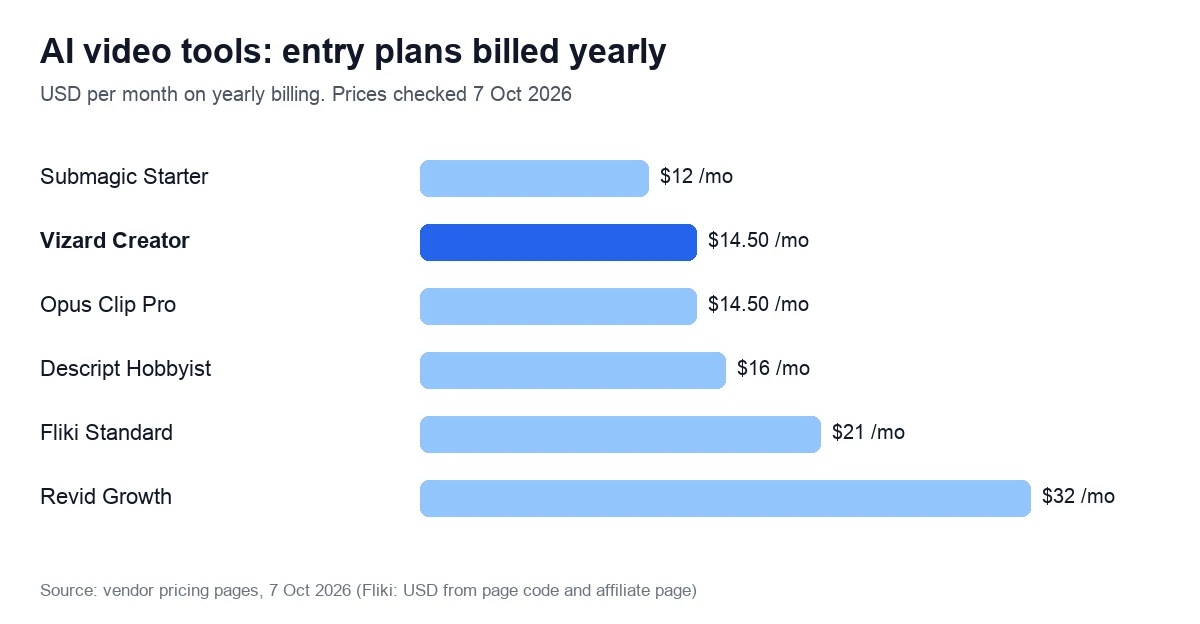
We compared 10 AI video editing tools on the jobs businesses buy them for: cutting webinars and podcasts into clips, captioning short videos and cleaning up talking-head footage. Paid plans start at $12 a month, billed yearly.
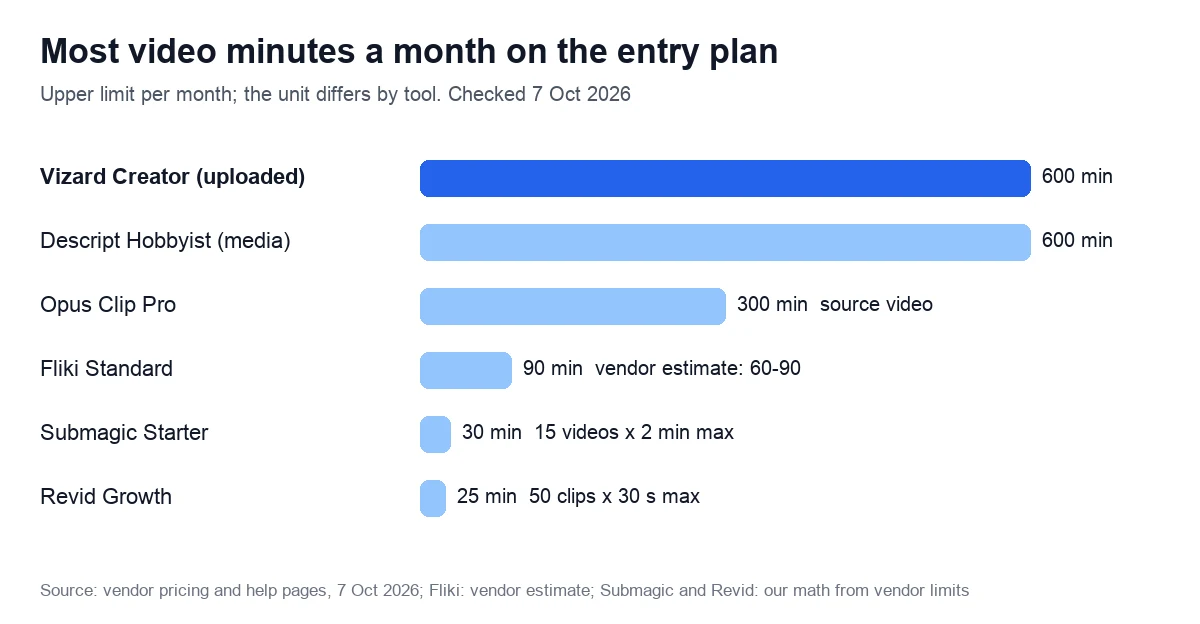
Our pick for most businesses: Vizard Creator, $29 a month or $14.50 billed yearly, for 600 minutes of uploads a month: AI clips, captions and editing by text. Opus Clip Pro costs the same for 300 minutes. Skip Vizard if you may want a refund: it gives none once you upload. Short captioned videos: Submagic. Podcasts: Descript.
Try Vizard free: 60 minutes a month
We may earn a commission if you buy through this link. It does not change the price you pay.
Quick comparison: prices, minutes and ratings
Prices checked on 7 October 2026, in US dollars, for each tool’s entry plan: monthly billing first, then the monthly rate when paid yearly. Trustpilot scores were read the same day, except Pictory’s (21 October).
| Tool and plan | Best for | $ a month: monthly / yearly | Minutes or credits a month | Trustpilot |
|---|---|---|---|---|
| Vizard Creator | Clips from webinars and podcasts | $29 / $14.50 | 600 upload minutes | 4.7 (2,521) |
| Opus Clip Pro | Clips from any footage | $29 / $14.50 | 300 minutes of source video | 4.0 (506) |
| Submagic Starter | Captions on short videos | $19 / $12 | 15 videos of up to 2 minutes (30 minutes at most, our math) | 4.5 (845) |
| Revid Growth | Shorts from a script or link | $39 / $32 | 2,000 credits: 25–50 thirty-second clips, Revid’s estimate (12.5–25 minutes, our math) | 4.0 (304) |
| Fliki Standard | Text to video with voiceover | $28 / $21 | 180 credits: 60–90 minutes of video | 4.2 (3,041) |
| Descript Hobbyist | Editing by transcript | $24 / $16 | 600 media minutes | 2.6 (290) |
| Kapwing Pro | Browser editing and subtitles | $24 / $16 | 1,000 credits; subtitles up to 1,000 minutes | Not quoted |
| Pictory Starter | Scripts and articles to video | $29 / $25 | 200 video minutes | 4.3 (674; 21 Oct) |
| CapCut Pro | All-round editing | $19.99 / about $15 | Not stated | 1.2 (1,324) |
| VEED Creator | Subtitles and dubbing | €11 yearly, per user (EU prices only) | Subtitles: 50 hours fair use | 4.2 (3,892) |
- Revid’s plan cards showed us euros, so its dollar prices come from the page’s FAQ and code. Fliki’s live page showed no prices, so its figures come from the page code and its affiliate page.
- CapCut has no public pricing page; its Pro price is from CapCut’s own article of 23 September 2026. VEED showed us euro prices only: Creator from €11 a month per user, billed yearly (7 October 2026).
- For Opus Clip and Revid we list the cheapest plan with a published yearly price: Opus Clip Starter costs $15 a month for 150 credits, monthly only, and Revid’s Hobby plan costs $39 with no credits shown on its card.
- We don’t quote Kapwing’s Trustpilot score, which we could not confirm in a browser.
What each tool automates, from vendor pricing and help pages:
| Tool | Clips from long video | Caption languages | Edit by transcript | Free plan |
|---|---|---|---|---|
| Vizard | Yes, 30+ per video; prompt search | 40 to transcribe, 100+ to translate | Yes | 60 minutes a month, watermark |
| Opus Clip | Yes, even with little speech | 20+ | Not stated | 60 credits a month, watermark |
| Submagic | Add-on, $19 a month for 10 uploads (help center, 30 Sep 2026) | 123 on site, 48+ in help | Yes | 3 trial videos, watermark |
| Revid | Yes, long video to Shorts | 100+ | Not stated | Free credits at signup |
| Fliki | Not stated | 80+ | Not stated | 3 credits a month, watermark |
| Descript | Yes, via Underlord | 25 to transcribe, 61 to translate | Yes, the core feature | 60 media minutes, 720p |
| Kapwing | Not stated | 60+ to translate | Yes | 10 credits, watermark |
| Pictory | Summaries of long videos (Professional) | Not stated | Yes | 14-day trial, 3 projects |
| CapCut | Not stated | Auto captions in Pro only | Not verified | Yes |
| VEED | Not stated | 50+ or 150+ to translate | Not stated | Yes, watermark |
AI clipping and caption tools for your own footage
Clipping tools take a recording you already have, find the moments worth posting, cut them to vertical and add captions. Vizard and Opus Clip charge 1 credit per minute of uploaded video, so a 60-minute webinar costs 60 credits whether it yields 5 clips or 30. Submagic works the other way round: you bring a short video, and it handles captions and the edit.
Vizard: the Opus Clip alternative with twice the minutes
Creator costs $29 a month, or $174 a year ($14.50 a month), for 600 credits: 600 minutes of uploads, with files of up to 30 GB. Creator also removes the watermark, exports in 4K and schedules posts to 6 social accounts.
The AI finds highlights, reframes them to vertical with the speaker centered and adds captions. You can trim a clip by deleting lines from its transcript, or type a prompt such as “the part about fundraising mistakes” to search a long recording. Transcription covers 40 languages and caption translation over 100.
The catches are in the help center. Refunds come only within 7 days and are “applicable only for unused services”, and uploading counts as use. AI Edit, a 2026 beta that adds transitions, b-roll and zooms, costs 0.5 credits per second, or 30 credits for a 1-minute clip. Vizard’s help says customer data is not used for training, yet its 2022 user agreement allows machine learning on uploaded content.
Trustpilot: 4.7 from 2,521 reviews (7 October 2026), 89% five-star. A March 2026 two-star review says unused credits “are forfeited upon cancellation”, though the help center says monthly minutes carry over.
Good fit: marketing teams that turn webinars, podcasts and sales calls into Shorts every week. Poor fit: footage with little talking, since Vizard’s AI “will not generate clips if the video lacks sufficient content”.
See Vizard’s plans and free tier
We may earn a commission if you buy through this link. It does not change the price you pay.
Opus Clip: the AI clip maker for footage with little talk
Opus Clip has strengths of its own. ClipAnything reads visual, audio and sentiment cues, so it can clip “videos with little to no dialogue”. Pro exports to Premiere Pro and DaVinci Resolve, and Opus Clip says it is SOC 2 Type II compliant and undergoes an independent audit every year.
Minutes cost more. Starter is $15 a month, monthly only, for 150 credits; Pro is $29, or $14.50 a month billed yearly, for 300. Starter already removes the watermark, filler words and silences. Posting to X costs 3 credits per clip for each X account, and we found no refund policy for subscriptions.
Trustpilot: 4.0 from 506 reviews (7 October 2026), 20% one-star, with replies to every negative review. A two-star review of 6 October 2026 calls it “a good product for turning long videos into short videos” but complains about constant pushes to buy credits.
Good fit: event and product footage without much talking, and editors who finish in Premiere Pro. Poor fit: high clip volume on a small budget. See Opus Clip pricing.
Submagic: captions and quick edits from $12 a month
Submagic edits short vertical videos you have already shot: captions, b-roll, zooms and sound effects, plus trimming by text. Starter costs $19 a month or $12 billed yearly for 45 credits, which Submagic equates to 15 videos of up to 2 minutes, in 1080p without a watermark. That cap sits below the 3 minutes YouTube has allowed for Shorts since 15 October 2024.
Pro, at $39 or $23 yearly, allows 40 videos of up to 5 minutes and adds auto zooms, removal of “bad takes & silences” and audio cleanup. Business costs $69 or $41 yearly for 100 videos of up to 30 minutes in 4K.
Clips from long recordings need the Magic Clips add-on: $19 a month for 10 uploads, per Submagic’s help page of 30 September 2026. In May 2026 the pricing page sold it as “+$19 per member/mo” with unlimited clips.
There are no refunds. “Unfortunately, we do not offer refunds for our SaaS,” says the help center, though consumers, unlike business buyers, keep a 14-day withdrawal right unless the service has been fully delivered.
Trustpilot: 4.5 from 845 reviews (7 October 2026), 7% one-star. G2 showed 4.6 from 85 reviews that day, below the “4.7/5 on G2” on Submagic’s feature pages. One-star reviews from June and July 2026 cite slow support and billing without proper notice.
Good fit: founders and marketers who post talking-head shorts and want captions, b-roll and cuts in one pass. Poor fit: anyone who wants a refund window, or clips from long webinars on the base price.
Try Submagic free: 3 videos, no card
We may earn a commission if you buy through this link. It does not change the price you pay.
Faceless videos from a script or link: Revid and Fliki
These tools mostly start from text rather than footage: a script, a blog post, a product link or an idea becomes a narrated video with stock or AI visuals. Revid draws the line itself: clipping and caption tools “cut and caption long videos you already have”.
Revid: shorts from an idea, a link or a long video
Revid turns “an idea, a script, a link, a song or a reference video” into a short with voiceover in 70+ languages, captions and music, and publishes it to TikTok, Instagram and YouTube. Growth costs $39 a month or $32 billed yearly for 2,000 credits, enough for 25 to 50 thirty-second videos by Revid’s estimate. Its 3 Auto-Mode workers create a new video every day from a prompt or a source.
Read the price carefully. The crossed-out $99 next to Growth’s $39 was already there in October 2025, so we treat $39 as the real price. Plan credits don’t roll over. Refunds are “at our discretion” within 30 days if you used under 10% of the credits, and EU consumers lose the 14-day withdrawal right once they start using Revid.
Revid’s notes for AI assistants list its weak spots: “Less suited to long-form film production, to teams that only want to edit their own footage by hand”. Trustpilot shows 4.0 from 304 reviews (7 October 2026), split between 52% five-star and 26% one-star; an August 2026 one-star review calls it a “credit-trap”.
Good fit: brands that want a daily stream of faceless shorts, published for them. Poor fit: editing your own recordings.
Try Revid with free credits, no card
We may earn a commission if you buy through this link. It does not change the price you pay.
Fliki: text to video with voiceover
Fliki turns ideas, scripts, blog posts and slide decks into narrated videos in 80+ languages. Standard costs $28 a month or $21 billed yearly for 180 credits, which Fliki estimates at 60–90 minutes of finished video. It includes 1,000 voices, 1080p videos of up to 15 minutes, one voice clone and commercial rights. Premium costs $88, or $66 yearly, for 600 credits, all AI avatars and API access.
Revisions cost extra: if you change the text, voice or pauses, Fliki “reprocesses the text to generate new audio and charges credits”. Refunds are case by case, and the terms let Fliki hold funds for 180 days if it closes your account. For custom avatars, Fliki “requires explicit consent from the person a custom avatar is modeled on”.
Trustpilot: 4.2 from 3,041 reviews (7 October 2026), 81% five-star; Fliki hasn’t replied to negative reviews. Good fit: content teams turning articles into narrated explainers. Poor fit: editing recorded footage; for narration alone, see our Murf AI review.
Try Fliki’s free plan, no card
We may earn a commission if you buy through this link. It does not change the price you pay.
Pictory: scripts and articles to video, at higher prices
Pictory makes videos from ideas, URLs, scripts, documents and slides, with editing by text. Starter costs $29 a month or $25 billed yearly for 200 video minutes, up from $25 and $19 in October 2025. There are no refunds, and cancelling deletes your projects: “you must download them from Pictory before you cancel your account”. Trustpilot: 4.3 from 674 reviews (21 October 2026). See Pictory pricing.
Editing video by editing text: Descript and Kapwing
Descript: edit a recording like a document
Descript transcribes a recording and lets you cut video by deleting words, which suits podcasts, interviews and training recordings. Its AI tools include Studio Sound for background noise, Remove Filler Words, Eye Contact for gaze correction and Underlord, an AI co-editor that makes edits from a prompt and picks clip-worthy moments. Transcription covers 25 languages and caption translation 61.
Hobbyist costs $24 a month or $16 billed yearly for 10 media hours and 400 AI credits per editor, with watermark-free 1080p export. Creator ($35, or $24 yearly) gives 30 hours and 4K.
The weak spot is billing. Plan refunds are possible only “within 48 hours of the invoice date”. Trustpilot shows 2.6 from 290 reviews (7 October 2026), 43% one-star, with replies to 4% of negative reviews, and a review of 25 September 2026 calls cancelling “extremely difficult”. Training opt-out is listed only for Enterprise.
Good fit: podcasters and teams editing talk-heavy recordings. Poor fit: buyers who want a real refund window. See Descript pricing.
Kapwing and other Descript alternatives
Kapwing runs in the browser and offers “Trim with Transcript”, subtitle translation into 60+ languages and dubbing into 40+. Pro costs $24 a month or $16 billed yearly for 1,000 credits, up from 500 AI credits in October 2025, with 4K exports and auto-subtitles for up to 1,000 minutes a month. Vizard, Pictory and Submagic also trim video by its transcript, inside their own clipping or text-to-video tools. See Kapwing pricing.
What is replacing CapCut?
Nothing has replaced CapCut outright: it is still sold, and CapCut’s own article of 23 September 2026 puts Pro at $19.99 a month or $179.99 a year. Before a business relies on it, two things are worth checking: the paywall and the license. Auto captions and motion tracking are Pro-only, and the free 1 GB of cloud storage ended in August 2024.
CapCut’s terms of service, an agreement with Bytedance Pte. Ltd. updated on 15 April 2026, say “We don’t own your User Content”, but you grant “a non-exclusive, royalty-free, transferable, sub-licensable, perpetual and worldwide license to use your User Content”. Another clause covers “your username, image and likeness”, including “for use in sponsored content”. After a similar update in June 2025, Techloy reported users “asking serious questions about ownership and control”.
Compare Submagic, whose terms say “You retain all rights to the Content you submit” while licensing it for use on the platform; you can opt out, by email, of its use in Submagic’s own marketing. Revid says users “100% own the content they create”. CapCut’s Trustpilot profile, unclaimed by the company, shows 1.2 from 1,324 reviews (7 October 2026); a September 2026 review describes a struggle to cancel a 7-day Pro trial.
Alternatives by job:
- Captions on short videos: Submagic, with captions and b-roll on its cheapest plan.
- Clips from long recordings: Vizard or Opus Clip, billed by the minute you upload.
- Editing by transcript: Descript Hobbyist or Kapwing Pro, both $24 a month.
- Subtitles and dubbing in the browser: VEED, whose paid plans include subtitles up to a 50-hour monthly fair-use limit; it also dubs into 25+ languages. Cancel at least two business days before renewal, or the plan renews. Trustpilot: 4.2 from 3,892 reviews (7 October 2026). See VEED pricing.
- Design-led social video: Canva also offers a video editor inside its design tool; we did not check its plans.
Can AI actually edit videos?
Partly. Going by the vendors’ own documents, AI handles the repetitive half of editing, and help pages and user reviews show where it stops. “While AI tools and video editors were once two very different things, the lines have blurred considerably over the last few years,” Zapier wrote on 5 October 2026.
What the tools do, by their own descriptions:
- Find the moments. Vizard’s AI “analyzes the audio in your video for speech” and works best on videos over 15 minutes; Opus Clip’s ClipAnything also reads visual and sentiment cues.
- Reframe and caption. Clips are cropped to 9:16 with the speaker in frame. Submagic claims 98.8% caption accuracy “under optimal conditions” and says results vary with audio quality, technical terms and brand names.
- Clean up. Opus Clip removes filler words and silences, Submagic Pro removes bad takes and silences, and Descript removes filler words and cuts noise with Studio Sound.
- Edit in one click. Submagic’s AI Auto Edit adds captions, b-roll, transitions and zooms to a short; Vizard’s AI Edit adds transitions, b-roll and zooms.
Where it stops:
- Vizard’s AI Edit is a beta that takes vertical clips of 15 seconds to 3 minutes, one at a time, with no API.
- A June 2026 one-star review of Vizard: “AI editing doesn’t really work…you have to use it to discover it doesn’t work.”
- A September 2026 two-star review of Fliki reports 2 to 4 generations per video before a usable result.
- A negative Descript review from early October 2026 says new AI updates “completely ruined a project I had due today”.
So an AI video editor can cut, caption, reframe and clean a talking-head recording, while a person still chooses the story and checks names and numbers in the captions.
Generators are a different job. Prompt-to-video models create new footage instead of editing yours, and they sell seconds, not minutes. Google calls Veo “Our leading video generation model”. Runway’s Standard plan, $15 a month or $12 billed yearly, buys 625 credits, about 52 seconds of its Gen-4.5 model; Runway’s Trustpilot profile, unclaimed by the company, shows 1.1 from 356 reviews (7 October 2026).
InVideo AI’s US Plus plan cost $60 a month or a promotional $30 billed yearly for 2,000 credits on an archived copy of its pricing page from 19 October 2026. From the EU, the same page shows other plans in euros. InVideo has two Trustpilot profiles: Invideo Studio (invideo.io) at 1.8 from 1,024 reviews and invideo (ai.invideo.io) at 2.9 from 910 (21 October 2026).
Free AI video editors: what you get for $0
Every AI video editor here has a free plan or trial, and most put a watermark on exports. The last column gives the monthly price first.
| Tool | Free allowance | Export limits on free | Cheapest paid plan |
|---|---|---|---|
| Vizard | 60 upload minutes a month | 720p, up to 10 minutes, watermark; files kept 3 days | Creator: $29, or $14.50 yearly |
| Opus Clip | 60 credits a month | Watermark, no editing; export within 3 days | Starter: $15, monthly only |
| Submagic | 3 trial videos, no card | Watermark until you subscribe | Starter: $19, or $12 yearly |
| Revid | Free credits at signup, no card | Regular creation needs a paid plan | Hobby or Growth: $39 |
| Fliki | 3 credits a month, no card | 720p, up to 5 minutes, watermark | Standard: $28, or $21 yearly |
| Descript | 60 media minutes; 100 AI credits once | 720p | Hobbyist: $24, or $16 yearly |
| Kapwing | 10 credits | 720p, up to 4 minutes, watermark | Pro: $24, or $16 yearly |
| Pictory | 14-day trial, 3 projects | Not stated | Starter: $29, or $25 yearly |
| VEED | Free plan | Watermark in the corner | Creator: from €11 a user, yearly (EU) |
| CapCut | Free version | No auto captions | Pro: $19.99 |
Free projects on Vizard and Opus Clip expire after 3 days, so export the clips you want before then. And free tiers count different things: Vizard counts uploaded minutes, Fliki finished audio and video, Kapwing credits for AI features such as auto-subtitling.
AI video editing for business: who should buy what
- Weekly webinars, podcasts or sales calls: Vizard Creator for the most clipping minutes per dollar; Opus Clip if your footage has little talking or you finish clips in Premiere Pro or DaVinci Resolve.
- Founder-led shorts and product ads you film yourself: Submagic Pro, which adds zooms, audio cleanup and silence removal to captions.
- Articles and product pages turned into video: Fliki for narrated explainers; Revid for a daily stream of faceless shorts that it publishes for you.
- Podcasts, interviews and internal training recordings: Descript, if a 48-hour refund window is acceptable.
Who should skip all of them: teams producing long brand films or color-graded ads, which still need a full editor such as Premiere Pro or DaVinci Resolve. Before uploading client or employee footage, read the data terms; the FAQ below compares them.
How we checked, and what we did not
We did not use these tools in our own accounts for this guide, so there are no screenshots, sample clips or scores here. On 7 October 2026 we read each vendor’s pricing page, help articles, terms and refund policy, and each Trustpilot profile. We quote G2 only where we could read the live page that day: Submagic’s.
Not checked: how well each AI picks clips, caption accuracy, rendering speed, VEED’s US-dollar prices and the credits on Revid’s Hobby plan. Submagic’s pricing page does not list the Magic Clips add-on, so its price comes from the help center. Left out: avatar platforms such as Synthesia, HeyGen and Colossyan, which generate a presenter rather than edit your footage; our avatar guide covers them.
We may earn a commission through the Vizard, Submagic, Revid and Fliki buttons; other links are not affiliate links. Our review method and editorial policy explain more.
FAQ
The best AI video editor depends on the job. For clips from webinars and podcasts, Vizard gives the most minutes for the money among clipping tools, and Opus Clip says it handles footage with little speech. For captions on short videos, Submagic starts at $19 a month. Revid and Fliki turn a script or a link into video, and Descript edits recordings through their transcript.
For professional work, AI usually sits inside a full editor. DaVinci Resolve Studio costs $295 and includes “transcriptions, auto subtitling, and text-based editing”, according to Zapier’s October 2026 review. Among AI-first tools, Descript Creator exports 4K for $35 a month, and Opus Clip Pro sends clips to Premiere Pro and DaVinci Resolve for finishing.
None edits like a person yet. Zapier describes “agentic editors that promise to edit on your behalf”. Descript’s Underlord makes edits and builds videos from a prompt, Vizard Agent offers 22 templates, and Revid’s Auto-Mode workers create a fresh video every day, 3 of them on Growth. Treat each result as a fast first draft that someone checks.
Per minute, yes. Vizard Creator and Opus Clip Pro both cost $29 a month, or $14.50 billed yearly, but Vizard includes 600 minutes of uploads and Opus Clip 300. Opus Clip says it handles footage with little speech better, and its yearly credits can be used at any point over 12 months.
Few, and the windows are short. Descript refunds a plan within 48 hours of the invoice, Vizard within 7 days if you haven’t used it, and Revid at its discretion if you used under 10% of your credits within 30 days of paying. Fliki decides case by case. Submagic and Pictory don’t refund, and VEED refunds consumers within 14 days, but only if they haven’t used it yet.
Read the documents, not the marketing. Revid’s privacy policy says no user data trains AI models. Vizard’s help center promises the same, but its 2022 user agreement allows machine learning on uploaded content. Descript lists training opt-out only for Enterprise. CapCut’s terms grant a perpetual, sub-licensable license to your content, while Submagic lets you opt out, by email, of its use of your videos in its marketing.
Clipping tools charge by the minute you upload: 1 credit per minute at Vizard and Opus Clip, however many clips come out. Generators charge by output: Runway’s 625 monthly Standard credits buy about 52 seconds of Gen-4.5 video, and Fliki charges again when you change the text or voice. Unused plan credits don’t roll over at Revid or VEED.