
Pictory AI Review 2026: Text-to-Video Pricing, Minutes and Who It Suits
We may earn a commission if you buy through links on this page, at no extra cost to you. The page also has one ElevenLabs link, in the section on voice minutes. As an independent ElevenLabs affiliate, we may earn a commission if you subscribe through this link.
Pictory turns scripts, blog posts, PDFs and slides into captioned videos built from stock footage and AI voices. Plans start at $25 a month billed yearly (2,400 video minutes upfront) or $29 monthly (200 minutes a month).
Verdict: 3.5/5 (output quality not scored). Good value for turning text into stock-footage videos: yearly Professional costs 5.8 cents per exported minute. The catches are no refunds, at most a minute of AI-generated footage a month on monthly Starter, and vendor pages that disagree on what cancelling does to projects. For avatar presenters or UGC ads, look elsewhere.
See Pictory’s plans and the 14-day trial
We may earn a commission if you buy through links on this page.
On this page: what it does, pricing, minutes and credits, free trial, refunds and cancelling, rights and YouTube, vs InVideo and HeyGen, reviews, who it suits, score, FAQ.
What Pictory does: text, links and slides to video
You give it a script, a blog URL, a PDF, a PowerPoint file or an audio recording. It splits the text into scenes, matches each scene with stock clips from Storyblocks and Getty Images, adds an AI voiceover and captions, and opens the result in a storyboard editor. Recordings such as Zoom calls can be edited through their transcript and cut into highlight clips.
Version 2.0, launched on 2 March 2026, added AI avatar presenters, an AI Studio that generates images and clips from prompts, and a script generator. Custom avatars and voice cloning now come with Professional, and Enterprise adds Pictory Central, an interactive video host with chapters, quizzes, clickable CTAs and SCORM export for an LMS.
Inputs have limits. A video built from a script or link runs up to 30 minutes on paid plans. A recording you edit can be 60 minutes and 1 GB on Starter, or 180 minutes and 5 GB on Professional and Team. Doc to Video reads PDFs only, up to 50 MB and best under 50 pages; Word files are still “coming soon”.
Premium voices read 29 languages and standard voices 7, but premium-language captions are “only available in Latin script”, and the pricing FAQ still says text-to-video supports “only English”.
Pictory pricing: minutes per year vs per month
Prices are in US dollars; yearly plans are paid upfront.
| Plan | Billed monthly | Billed yearly | Video minutes | Users |
|---|---|---|---|---|
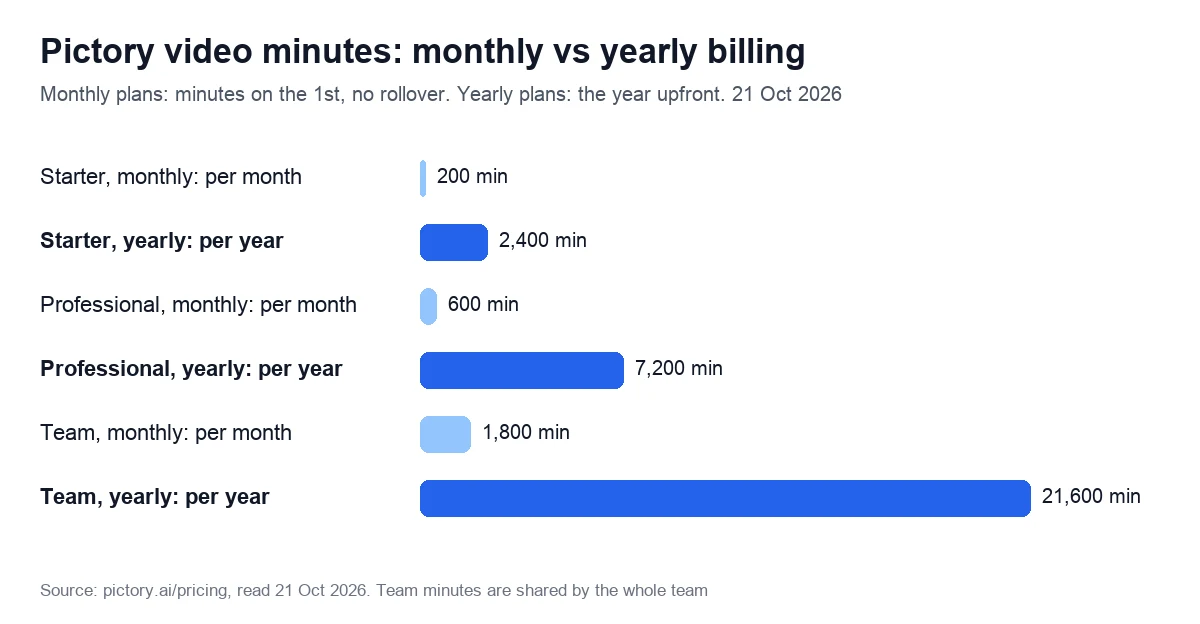
| Starter | $29 a month | $25 a month ($300 a year) | 200 a month, or 2,400 a year upfront | 1 |
| Professional | $59 a month | $35 a month ($420 a year) | 600 a month, or 7,200 a year upfront | 1 |
| Team | $199 a month | $119 a month ($1,428 a year) | 1,800 a month, or 21,600 a year, shared | 3+ |
| Enterprise | On request | On request | Custom | 10+ |
| Also included | Starter | Professional | Team |
|---|---|---|---|
| Premium AI voice minutes a month | 60 | 120 | 240 (3 users) |
| AI credits, monthly billing | 100 a month | 500 a month | 2,400 a month |
| AI credits, yearly billing | 1,200 a year | 12,000 a year | 28,800 a year |
| Stock video library | 5 million clips | 18 million clips | 18 million clips |
| Storage and brand kits | 5 GB, 1 kit | 20 GB, 5 kits | 100 GB, 10 kits |
| Custom avatars and voice clones | None | 2 of each | 2 of each per user |
| Export resolution | 1080p | 1080p | 1080p |
The Team card says “3+ Users”. A help article from January 2025 lets owners pick 2 to 5 members and 1,200 to 6,000 minutes a month, adding that “the corresponding price will also increase”; no per-seat price is published. Educators and non-profits can ask for a discount in the in-app chat.
What changes when you pay yearly
- Price. A year costs $300 instead of $348 on Starter, $420 instead of $708 on Professional and $1,428 instead of $2,388 on Team. That saves about 14%, 41% and 40%; the page says “save up to 40%”.
- Minutes upfront. “Annual plans include your full yearly allocation of video minutes upfront”, so one busy month can use all 2,400 Starter minutes. Monthly plans get 200, 600 or 1,800 minutes on the 1st, and leftovers don’t roll over.
- More AI credits, on Professional only. It gets 12,000 credits a year instead of 12 × 500 = 6,000; the partner page calls this a “Limited Offer: 40% Off Pro Annual + 2X AI Credits”. Starter and Team get the same credits either way.
- Extras. Yearly plans add a consultation with a video expert, valued by the vendor at $210, and a YouTube Mastery course.
Price per exported minute
Divide each plan’s price by its minutes, and yearly Professional comes out cheapest at 5.8 cents per exported minute, ahead of yearly Team at 6.6 and yearly Starter at 12.5.
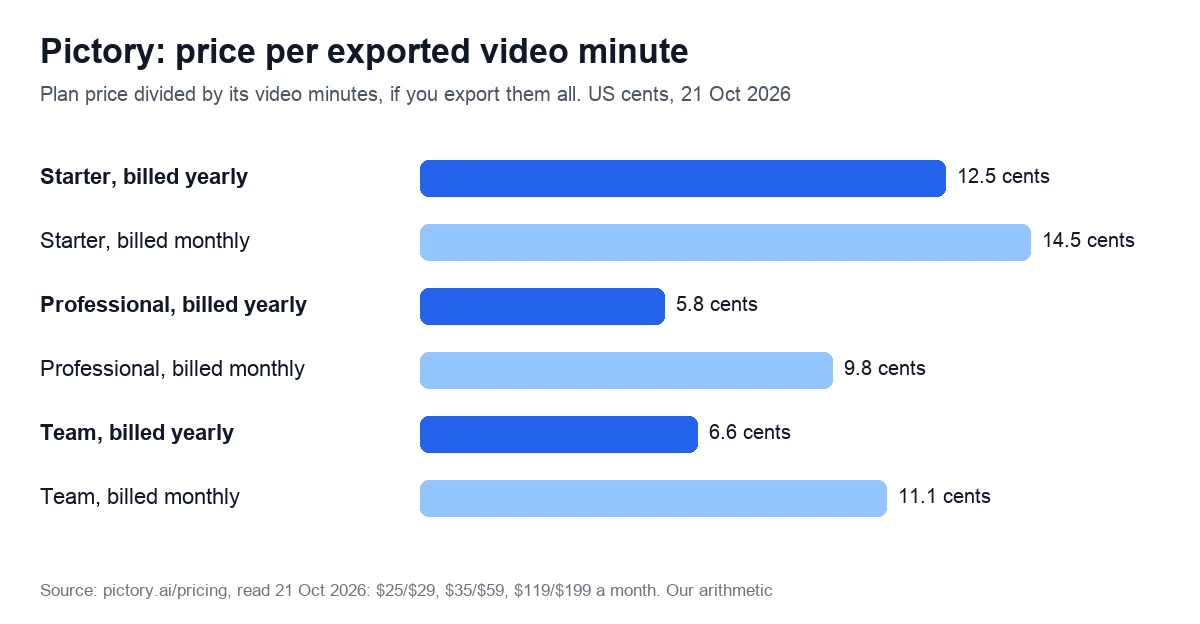
The math only works if you use the minutes. Twenty one-minute videos a month use 20 of Starter’s 200, so each costs $1.25 on yearly Starter. At that volume, voices, AI credits and avatars matter more than minutes.
Prices went up in 2026
In October 2025, Starter cost $19 a month billed yearly or $25 monthly, Professional $29 or $49, and Team $99 or $119. Archived copies show those prices on 6 January 2026 and today’s on 17 January 2026, although the page title still read “From $19 per Month” on 24 January. The biggest jump was Team’s monthly price, up two-thirds from $119 to $199.
Three meters: video minutes, voice minutes and AI credits
Each plan has three separate allowances:
- Video minutes are deducted when you download a video. Previews and edits are free, and “Subsequent downloads within the same project will not affect your quota.” Extra minutes are sold in the app; the pricing page gives no price.
- Premium voice minutes are deducted when you generate and apply a premium voice. Edit the script afterwards and the affected scenes “will need to be regenerated and deducted from the quota”; deducted minutes can’t be restored. Standard voices are unlimited.
- AI credits pay for generated images, generated clips and avatars. Unlike minutes, unused credits roll over to the next cycle while you stay subscribed.
The credit rate card shows why generated footage is scarce. A stock avatar uses 15 credits per 30 seconds and a custom avatar 35, while Veo 3.1 Fast uses 10 credits per second of video. Starter’s 100 monthly credits buy about 10 seconds of Veo footage, though the plan card says “1 minutes of video”: it depends on the model.
Extra credits cost $25 for 500, $49 for 1,000 or $199 for 5,000 a month. At 5 cents a credit, a minute of stock-avatar video costs about $1.50, and a minute of Veo 3.1 Fast footage without sound about $30.
Example: twelve 3-minute explainers a month with a premium voice use 36 of Starter’s 200 video minutes, but 36 of its 60 voice minutes. Add a one-minute stock-avatar intro to each, and you need 360 credits, over three times Starter’s monthly 100.
Narration from another voice tool
Premium voices are ElevenLabs voices, and uploaded audio doesn’t touch the voice quota: every paid plan’s card lists auto-sync for uploaded voiceovers. If 60 minutes are too few (or none, see below), or you want a cloned voice without upgrading to Professional (+$10 a month billed yearly), buy narration directly. ElevenLabs Starter costs $6 a month for about 30 minutes, with instant voice cloning; Murf Creator costs $29 a month for 2 hours.
We may earn a commission from these two links. As an independent ElevenLabs affiliate, we may earn a commission if you subscribe through this link.
Where the vendor’s own pages disagree
- Premium voices on Starter: the Starter card lists 60 minutes a month (720 a year on yearly billing), but both comparison tables on the same page mark Starter with a cross, and a help article from July 2024 says premium voices are “exclusively available to users on Professional and Teams plans”. The Starter card had no premium voices before January 2026.
- Starter’s monthly AI credits: 100 on the plan card and in one comparison table, 200 in the other.
- Team’s premium voice minutes: 240 on the card and “Up to 240 mins” in one table, “Up to 420 mins” in the other; a July 2024 help article ties the quota to team size, from 180 minutes for 2 users to 420 for 5.
- Getty Images on Starter: the card promises clips “from Getty Images and Storyblocks”, but both comparison tables list Starter with Storyblocks only, and a help article from February 2024 says Getty visuals are “unavailable to Starter plan users” unless you buy an add-on.
The 14-day trial: what you get
There is no free plan, only a 14-day trial. It covers 3 video projects and 15 video minutes in total, videos up to 5 minutes long, 720p export, 50 AI credits and 5 minutes of premium voices. A project counts once however many versions you generate, and Getty clips work during the trial.
Trial downloads carry a Pictory watermark; after you subscribe, downloading them again gives clean copies. When the trial ends you keep the account, but you “will not be able to download videos unless you have a paid subscription”.
Will it charge your card? The help center says trials are “non renewing by default and do not charge automatically”, and card details are entered when you upgrade. The pricing page doesn’t say whether sign-up asks for a card, and we didn’t create an account to check.
Test it on your own scripts and in your own language, since a wrong choice can’t be refunded.
Start the 14-day trial on Pictory’s site
We may earn a commission if you buy through links on this page.
Refunds, cancelling and what happens to your videos
Paid plans renew automatically, and the terms say “all fees are non-refundable” unless the law requires otherwise. Upgrades apply at once; downgrades and cancellations take effect at the end of the paid period, and you keep access until then.
How to cancel
- Open the profile menu, choose My account and go to the Billing tab.
- Click Cancel subscription. The next screen shows your remaining credits and offers to keep the plan; choose Cancel anyway.
- Pick a reason. You’ll be offered a pause for $1 a month; decline it if you want to stop paying.
- Confirm, and keep a screenshot of the cancellation message.
The pause needs care: on monthly plans it lasts 90 days, after which the subscription will “automatically reactivate on the same plan” unless you act. Trustpilot complaints about cancelling are listed in the reviews section below.
What happens to your projects
The vendor gives three different answers:
- The pricing FAQ says projects are “permanently deleted from the platform upon cancellation”.
- A help article dated September 2026 says that after expiry “you will no longer be able to access the projects”, unless you pause for $1 a month.
- The account guide from March 2026 says that after cancelling, “Your projects remain saved and accessible”, and they reappear if you resubscribe.
Plan for the strictest version and download every video you need before cancelling. Deleting the account goes through the support chat, “Permanently removes all projects, uploads, and brand kits” and cannot be undone.
Commercial use, stock licences and YouTube claims
Stock clips come from Storyblocks and Getty Images and music from Melodie, all licensed for your videos without royalties. The licence has limits: the terms allow stock material only “together with your Customer Content”, never on its own, in a logo or for training AI models.
YouTube uploads now take one more step. Since 1 September 2026, the help center asks you to “add the appropriate clearance code to your YouTube video description before publishing” for Melodie tracks.
On data, the terms promise that the company “will not use your Customer Content or Pictoried Content to train or fine-tune its general artificial intelligence” models without your written consent. A custom avatar or voice clone requires you to be the person recorded, or their written consent.
Pictory vs InVideo AI and HeyGen
All three make video from text, but they meter different things.
| Entry plan | Pictory Starter | InVideo AI Starter | HeyGen Creator |
|---|---|---|---|
| Price a month | $29, or $25 billed yearly | $20, or $10 billed yearly (50% off promotion) | $29, or $24 billed yearly |
| What you get | 200 video minutes, 100 AI credits | 400 credits per seat | 600 credits |
| Unused allowance | Monthly minutes expire; credits roll over | Credits reset monthly, yearly plans too | Credits roll over a month on monthly plans |
| Free option | 14-day trial, 3 projects | Free plan, no card | Free plan: 3 videos a month, watermark |
| Refunds | None | Within 7 days, if unused | None, unless the law requires |
| Trustpilot | 4.3 (674), 21 October 2026 | 1.8 (1,024) and 2.9 (910), two profiles, 21 October 2026 | 4.1 (4,195), 7 October 2026 |
InVideo AI generates scenes with AI models and charges credits for each generation; its agent is set to “Always allow” by default, so it generates without asking first. Pictory assembles stock footage and meters exported minutes, which is easier to budget. HeyGen sells avatar presenters: Creator’s 600 credits buy 12.5 to 37.5 minutes of avatar video, depending on the model.
Choose InVideo for AI-generated scenes if you can watch a credit balance (see our InVideo AI review). Choose HeyGen or Synthesia if a presenter on screen is the point: our HeyGen alternatives and Synthesia alternatives compare avatar tools by price and limits.
What Trustpilot and G2 reviewers say
On 21 October 2026, Trustpilot showed 4.3 out of 5 from 674 reviews, up from 4.2 and 659 two weeks earlier; 67% were five-star and 17% one-star. The profile notes a paid Trustpilot subscription. An archived G2 page from 8 February 2026 showed 4.6 from 79 reviews.
Recent positive reviews praise how simple script-to-video is, the B-roll it finds and the live training sessions. Some five-star reviews from October are about the training sessions rather than the editor.
The complaints are mostly about billing and stability:
- Cancelling: the cancel button sent a reviewer to a chatbot and billing continued (one star, 8 October 2026).
- Payments: premium voice minutes weren’t added after a payment (22 September 2026), and a renewal went through for a reviewer who said they weren’t using the service (18 June 2026).
- Stability: 11 of 19 projects never rendered (23 September 2026), and saved work disappeared, with no refund (9 July 2026).
Who Pictory suits, and who should skip it
A good fit:
- Bloggers and content marketers who turn posts into social videos: paste a link, keep the captions, apply a brand kit.
- Course creators and trainers with slides or PDFs who want a narrated video rather than a filmed one.
- Podcasters and webinar hosts who cut long recordings into clips by editing the transcript.
- Small teams that share brand kits and one pool of minutes.
Look elsewhere if:
- A presenter on screen is the main format: avatar tools such as Synthesia and HeyGen are built for that; see our AI avatar generators guide.
- You make UGC-style ads with actors who look like customers: that is Arcads’ niche, though it publishes no prices; see our notes on Arcads.
- You want mostly AI-generated footage: at 10 credits a second on Veo 3.1 Fast, credits go quickly.
- You script in a language other than English and need text-to-video in it: test that in the trial first.
- You need refunds or a native phone app: neither is offered.
For other text-to-video and clipping tools, see our AI video editing tools comparison.
Our score: 3.5 out of 5, and how we checked
We score every tool on six weighted criteria, explained on our How we test page. We have no Pictory account, so output quality is not scored, and the total is the weighted average of the other five.
| Criterion | Weight | Score | Why |
|---|---|---|---|
| Price for real work | 25% | 4 | 5.8 cents a minute on yearly Professional; prices up 16% to 67% in 2026 |
| Output quality | 25% | Not scored | No account yet |
| Limits and fine print | 15% | 3 | Three separate meters; vendor pages disagree on credits, voices and Getty |
| Billing and reputation | 15% | 3 | No refunds; trial doesn’t auto-charge, per the help center; Trustpilot 4.3 (674) on 21 October 2026; cancellation complaints |
| Support and learning | 10% | 4 | Live trainings, courses on yearly plans, detailed help center with some dated articles |
| Maturity of AI features | 10% | 3 | Avatars and AI Studio live since March 2026; generation limited by credits |
The math: 0.25 × 4 + 0.15 × 3 + 0.15 × 3 + 0.10 × 4 + 0.10 × 3 = 2.60. Divided by 0.75, the total weight of the scored criteria, that gives 3.5. On our scale, 3.0 to 3.9 means good for specific cases: read the limits first.
Sources: the vendor’s pricing page, terms of service, API pricing and Teams pages, and 29 help center articles, all read on 21 October 2026. We also used archived pricing pages from October 2025 to August 2026, Trustpilot and G2, and will re-check prices within 90 days.
Compare Pictory’s plans on its pricing page
We may earn a commission if you buy through links on this page.
Frequently asked questions
No. There is no free plan, only a 14-day trial with 3 video projects, 15 video minutes, 720p export and a watermark. When it ends, the account stays but downloads stop until you subscribe. Starter, the cheapest plan, costs $29 a month or $25 a month billed yearly (checked 21 October 2026).
The help center says trials are non-renewing and “do not charge automatically”: the trial simply ends, and card details are entered when you choose a paid plan. The pricing page doesn’t say whether sign-up asks for a card. Paid plans, by contrast, renew automatically until you cancel.
Generally not. The pricing FAQ says the company doesn’t offer refunds on paid subscriptions. The terms add that partial billing periods, unused services and plan changes aren’t refunded unless the law requires it. You can cancel at any time, and access continues until the paid period ends.
No official one. The help center says there is no iOS or Android app and warns that apps using the name in the App Store and Google Play are not affiliated. On a phone, a chat assistant called Pickford builds a preview in the browser; full editing and the final download happen on a desktop.
Yes. API Self-Serve costs $99 a month for 600 video minutes, including 120 premium voice minutes, or $79 a month billed yearly for 7,200 minutes a year. The vendor pitches it for automation tools such as Make.com, Zapier and n8n; Enterprise API plans add a one-time setup fee.
The stock clips and music are licensed for use in your videos, and the help center leaves monetization decisions to YouTube. Since 1 September 2026, it asks you to add a clearance code for the Melodie music tracks to each YouTube description.
Not on monthly plans: video minutes and premium voice minutes reset on the 1st of each month. Yearly plans get the whole year’s video minutes upfront, to spend at any pace until renewal. AI credits are the exception: they roll over while your subscription stays active.