
Murf AI Review 2026: Studio Plans, API Prices, Voice Cloning and Who It’s For
We may earn a commission from the Murf links on this page, at no extra cost to you. The page also has one ElevenLabs link, in the comparison section. As an independent ElevenLabs affiliate, we may earn a commission if you subscribe through this link.
Murf AI is an AI voice generator for business voiceovers: a text to speech studio, an API for developers and a dubbing tool. Paid Studio plans start at $19 a month billed yearly, for 24 hours of speech a year.
Verdict: 3.2/5 (output quality not scored). A practical pick for training, explainer and slide narration: yearly Creator works out to about $0.16 per minute of speech, with Canva built in. Skip it if you need self-serve voice cloning (Enterprise only), more than one editor on a self-serve plan, or a refund after the first 24 hours.
Try Murf AI free: 10 minutes, no card
We may earn a commission if you buy through this link. It does not change the price you pay.
On this page: overview, pricing and free plan, voice cloning, API and dubbing, security and ownership, billing traps, vs ElevenLabs, reviews, who it suits, score, FAQ.
What Murf AI is: a text to speech studio, developer tools and dubbing
Murf started in 2020 as a voiceover tool. Its homepage now pitches voice agents, a text to speech API and “customizable AI voiceovers” on a platform “trusted by 10 million+ developers, businesses, and creators”; the About page says “6M+ unique users”.
Three of its products matter for voiceovers:
- Studio, the voiceover editor: paste a script, pick a voice, adjust pitch, speed, pauses and pronunciation, then export audio, video or subtitles.
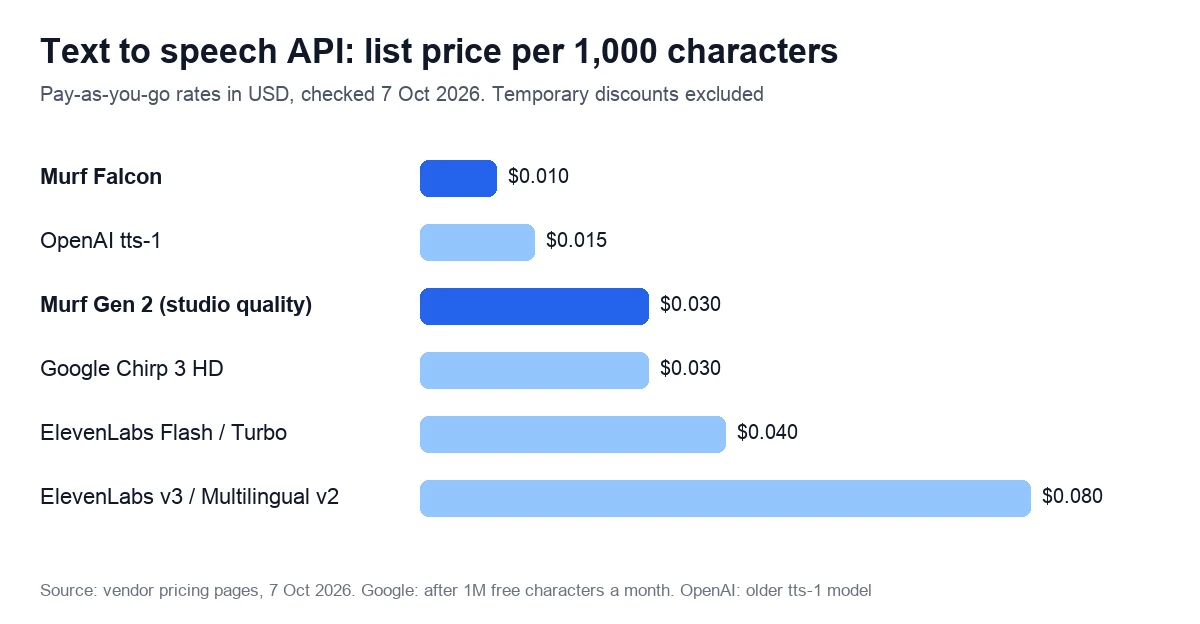
- The API: Falcon for real-time voice agents and Gen 2 for studio-quality narration, billed per 1,000 characters.
- Murf Dub, which translates the speech in a video and, per the help center, keeps the original speaker’s voice. It has its own credits.
Studio’s top model is Gen 2, which the vendor calls its “most advanced, realistic, and customizable speech model” and credits with “99.38% pronunciation accuracy”, a figure we have not measured. Business adds “Say It My Way”: you record a line, and the voice copies your intonation, pace and pitch.
Integrations follow the plans: Canva from Creator and PowerPoint from Business, plus Adobe Captivate and a Google Slides add-on. For phone systems, Studio exports a-LAW and μ-LAW audio alongside MP3, WAV, FLAC and OGG.
The stock voices, the vendor says, were “Created with permission and partnership from professional voice actors who earn royalties every time their voices are used”.
Voices and languages: the vendor’s own numbers disagree
All five pages were read on 7 October 2026:
| Page | Voices | Languages |
|---|---|---|
| Homepage | 200+ | 35+ |
| Help center, free trial | 300+ | 33 |
| Pricing page, API tab | 150+ | 35+ |
| Comparison page, table | 1,100+ | 45+ |
| About page | Not stated | 20+ |
Since the free plan opens every voice, listen for your language before you pay.
Murf AI pricing in 2026: the free plan and three paid tiers
Studio sells four plans: Free, Creator, Business and Enterprise. The pricing page shows US dollars and opens on yearly billing, which the help center calls “a flat 33% off on all subscriptions” (34% on Creator, by our arithmetic).
| Plan detail | Free | Creator | Business | Enterprise |
|---|---|---|---|---|
| Billed yearly | $0 | $19 a month ($228 a year) | $66 a month ($792 a year) | Custom, billed annually |
| Billed monthly* | $0 | $29 a month | $99 a month | Not offered |
| Voice generation | 10 minutes, once | 24 hours a year (2 a month if monthly*) | 96 hours a year (8 a month if monthly*) | Custom |
| Projects at a time | 2, 5 or 10 (sources differ) | 100 | 500 | Custom |
| Editors | 1 | 1 | 1 | Custom |
| Downloads | None | Unlimited | Unlimited | Unlimited |
| License | No commercial rights | Commercial rights | Business license | Adds broadcast rights |
| Extras | Business features to try | Canva, all 200+ voices | PowerPoint, Say It My Way, Audio to Text | SSO, voice clones (add-on), AI translation |
*Monthly prices and hours come from the data the pricing page loads; the page opens on yearly billing, and we could not display the monthly view. Enterprise is billed annually only, and a FAQ answer in the page code puts custom plans at “$5940/year”, which we could not see on screen either.
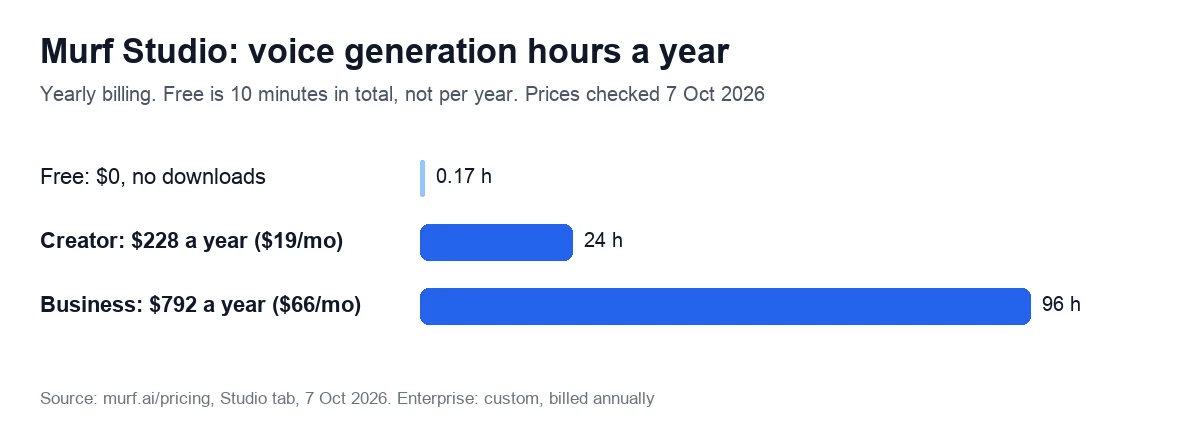
How generation hours are counted
Studio meters the length of speech you render: “Voice generation time is calculated as the sum of generated speech length of every text block”. Switching the voice, style, pitch, speed or pauses for the same text is free; editing the words renders again and uses time.
Yearly plans hand you the whole year at once, with “no monthly limits, just an overall yearly limit”. Spread evenly, Creator’s 24 hours come to about 28 minutes of speech a week, and Business’s 96 hours to about 1 hour 50 minutes.
Students, teachers, schools and non-profits can ask for 20% off (six months on monthly plans, one yearly term).
What you get without paying
The free plan is 10 minutes of voice generation with no card and, per the help center, “no validity or end date”. The pricing card sums it up as “Everything in Business Plan (No Downloads)” and “No Commercial Rights”: you can hear every voice and share a preview link, but not download audio or use it commercially. Unused free minutes carry over when you upgrade.
Why older reviews quote $299
Archived pricing data from April 2025 shows Creator at $29 a month, Growth at $99 and Business at $299. By 3 September 2025, Growth was gone and Business cost $99 a month or $792 a year, as it did on 7 October 2026.
We may earn a commission if you buy through this link. It does not change the price you pay.
Voice cloning: Enterprise only, and only with written consent
Studio has no self-serve cloning: “Currently, Voice Cloning is available only with our Enterprise plan”, says the help center. The pricing page lists “Custom Voice Clones (Add-on)” on the Enterprise card and professional voice cloning on the API’s Enterprise card, without prices.
It works like a studio project:
- The vendor sends a script written for one tone of voice.
- The speaker records “~1-2 hrs. of recordings for a given voice style” in a professional, noise-free studio, as 48 kHz, 16-bit WAV. Each extra style needs its own recording.
- Building the voice takes “1-4 weeks”, and you own the rights to it, including commercial use.
Languages depend on the page: the help center lists English, Spanish, Portuguese, French and German; the cloning page promises “20+ languages, dialects, and accents”.
Consent is written into the contract. Section 4 of the terms only accepts a “Consenting Speaker”, a person “who has given explicit written consent”, bans uploading anyone else’s voice without it and lets the vendor’s staff listen to training audio to check quality. Only you and people you share access with can use the clone.
Murf Dub keeps the original speaker’s voice when it translates a video, on pay-as-you-go credits.
API and dubbing costs: Falcon at $0.01 per 1,000 characters
On 7 October 2026, the API tab of the pricing page listed four rates:
- Falcon text to speech, built for conversation with first audio in under 100 ms: $0.01 per 1,000 characters.
- Studio-quality text to speech (Gen 2): $0.03 per 1,000 characters.
- Voice Changer: $0.10 per minute.
- Translation: $0.02 per 1,000 characters.
The free tier promises “$10 FREE, every month” with no card. Pay-as-you-go says “Purchased credit never expires”, and Enterprise adds data residency, on-premise deployment, voice cloning and an SLA. Falcon launched in November 2025.
The fine print does not match across pages:
- Free allowance: $10 a month on the card, but “100,000 characters” for the free trial in the help center. At card rates, $10 buys 1 million Falcon characters.
- Expiry: “never expires” on the card, while the Product Specific Terms say credits “expire one year after the date of purchase or issuance if not used, unless otherwise specified at the time of purchase”.
- Top-ups and concurrency: help articles give a $10 and a $2 minimum purchase, and 2, 5 or 15 concurrent requests.
Murf Dub: about $2 per minute per language
Dubbing has its own credits: 200 on the free trial, with watermarked downloads and one project, then $1 per credit on pay-as-you-go, from $5 up to 10,000 credits. The help center’s rule is that “2 credits are consumed for every minute of your file for each language selected”, rounded up to 30 seconds: about $2 per minute per target language. Enterprise quality-assured dubbing uses 62 credits a minute per language.
Example: a 10-minute training video in three languages uses 10 × 2 × 3 = 60 credits, about $60. The help center lists 44 source and 42 target languages; the dubbing page says “40+” and “28+”, and marks lip-sync “Coming Soon” below a promise of “accurate lip-syncing”.
Security, data use and the company behind Murf
The security page states: “We are ISO 42001, ISO 27001, SOC 2 Type II, CCPA and GDPR compliant, and we undergo regular third-party audits”, and says the SOC 2 Type II audit found no exceptions. The homepage adds HIPAA (“SOC 2, ISO 27001, GDPR, and HIPAA compliance”), as do the badges on the pricing page’s API tab. These are vendor statements; we have not seen the reports.
The same page describes AES-256 encryption at rest and TLS 1.2 in transit, and says the company “has experienced no security incidents or data breaches till date”.
Data use differs by plan. The Enterprise card promises “No Training on your Data” (“Murf does not train its AI models on any enterprise data”), and the Ethical AI page limits that promise to “our Enterprise customers”. We found no such commitment for Free, Creator or Business, so ask before uploading confidential scripts.
The company: Murf Inc. in San Francisco
The terms of service, dated 19 December 2024, are a contract with Murf Inc. under Delaware law, and the site gives 535 Mission Street, San Francisco, as the address. The About page says the company “began in October 2020 with three founders, ten voices”, and a comparison page on its site names them: Ankur Edkie, Divyanshu Pandey and Sneha Roy.
The latest funding round on its own blog is a $10 million Series A led by Matrix Partners India, with Elevation Capital (post updated 21 September 2022). We found no list of current shareholders.
Billing traps: auto-renewal, refunds and expiring hours
- Auto-renewal. Under section 2.3.3 of the terms, your payment method “automatically will be charged at the start of each Subscription period”. The help center advises cancelling “at least a day before it renews”.
- A 24-hour refund window. Section 2.5.3 allows a refund request only if you bought “within the last 24 hours” and used “less than 10 minutes of voice generation time”. The FAQ in the page code is stricter: “Payments already made against monthly or annual subscriptions would not be eligible for a refund”. After an unwanted renewal, you can only email support and ask.
- Hours vanish when you cancel. Unused hours roll over only once, on renewal or pause. Cancel, and “any carried-forward VGT will be lost”; projects stay in your workspace, but you can no longer render or download. Cancel during a pause, and “all projects and data will be permanently deleted” unless you resubscribe within 90 days.
- Downgrades reset your balance. Yearly to monthly, or Business to Creator, means “The loss of voice generation time and transcription time from your previous billing cycle”, fewer project slots and lost premium features.
- A pause is the softer exit: up to 30 days without charges, hours kept; then the card on file is charged automatically.
- One editor. Creator and Business list one editor each; shared projects and more editors sit on the Enterprise card.
- License fine print. Commercial rights outlive the subscription (“lifetime commercial rights and business usage rights”), but registered businesses are pointed to the Business license, and TV or radio broadcasting needs Enterprise.
Plan changes come with notice: under the terms, they “will apply only after 30 days notice to you”.
Murf AI vs ElevenLabs: cost per minute, cloning and fine print
| What you compare | Murf | ElevenLabs |
|---|---|---|
| Cheapest paid plan | Creator: $19 a month billed yearly, $29 monthly* | Starter: $6 a month |
| Speech included | 24 hours a year, or 2 hours a month* | About 30 minutes a month |
| Per minute, billed monthly | $0.24 Creator, $0.21 Business* | $0.20 Starter, $0.18 Creator, $0.17 Pro |
| Per minute, billed yearly | $0.16 Creator, $0.14 Business | $0.17 Starter, $0.15 Creator, $0.14 Pro** |
| Voice cloning | Enterprise only; 1–2 hours of studio recording, 1–4 weeks | Instant cloning from Starter; professional cloning of your own voice from Creator ($22) |
| API, per 1,000 characters | $0.01 Falcon, $0.03 Gen 2 | $0.04 Flash and Turbo, $0.08 v3 and Multilingual v2 |
| Free plan | 10 minutes once; no downloads, no commercial rights | About 10 minutes a month; no commercial license, attribution required |
| Unused allowance | Carries over once on renewal; lost on cancel or downgrade | Rolls over up to two months; lost on cancel or downgrade |
| Refunds | Request within 24 hours, under 10 minutes used | Help center: within 14 days, no credits used; terms differ by region |
| Trustpilot, 7 Oct 2026 | 4.6 (186 reviews) | 3.1 (1,175 reviews) |
*Per the pricing page data. **ElevenLabs yearly plans cost ten months’ worth: $5, $18.33 and $82.50 a month, per its pricing FAQ.
The two meter speech differently. A Studio minute is a minute of rendered speech, and re-rendering the same text in another voice or style is free. ElevenLabs charges credits per generation, and may allow some free regenerations of unchanged text. On its top models one credit buys one character, a minute takes about 1,000 characters, and the pool is shared with its music, sound effects and dubbing tools.
Cloning is the clearest split. ElevenLabs sells it on self-serve plans after you confirm you have the right and consent to clone a voice, and limits professional clones to your own voice. Murf requires an Enterprise contract and a studio session.
The comparison page on murf.ai still lists ElevenLabs at $5, $11 and $330 for Starter, Creator and Scale, against $6, $22 and $299 on 7 October 2026. Its ElevenLabs alternatives page for 2026 still recommends Play HT and Lovo, both now closed (what happened to Lovo).
Compare ElevenLabs plans and cloning options
As an independent ElevenLabs affiliate, we may earn a commission if you subscribe through this link.
What customers say on Trustpilot and G2
On 7 October 2026, Trustpilot showed 4.6 out of 5 from 186 reviews (profile claimed since October 2020), and G2 showed 4.7 from 1,411. Capterra shows 4.5 from just 4 reviews, dated 2021 to 2023.
The Trustpilot score hides a split: 75% five-star and 12% one-star, and none of the 1- and 2-star reviews we read had a company reply. An archived G2 page from 3 September 2026 tags the pros “Ease of Use” (168) and “Natural Voices” (73), and the cons “Expensive” (34) and “High Subscription Cost” (32).
Complaints worth knowing, from Trustpilot:
- Cancelling: a 1-star review (16 September 2026) says the subscription was not cancelled and requests went unanswered.
- Renewals: a 2-star review (10 March 2026) objects to automatic card charges and no refunds for unwanted renewals.
- Lost minutes: a 2-star review (8 July 2025) describes losing a year’s banked minutes on cancelling, which matches the carry-over rule above.
- Interface: a 2-star review (7 April 2026) calls the voices decent but finds Studio hard to navigate and laggy when syncing speech to video.
What reviewers like:
- Voices: a 5-star review (13 February 2026) praises natural delivery with control of tone, pacing and emotion.
- Phone audio: a 5-star review (12 March 2026) uses it for phone-tree messages and voicemail.
- Support: a 5-star review (11 January 2026) found support fast, friendly and able to help.
Who it suits, and who should skip it
A good fit:
- Training, HR and marketing teams that narrate courses, explainers and slide decks, with the voice inside Canva (Creator) or PowerPoint (Business).
- Teams that render steadily through the year: yearly plans give all the hours upfront, at about $0.14 to $0.16 per minute.
- Developers building voice agents on a low per-character rate, with data residency available on Enterprise.
Look elsewhere if:
- You want to clone your own voice on a small budget: cloning needs an Enterprise contract and a studio session.
- Several people edit the same projects and you don’t want a sales call.
- You might cancel mid-year: banked hours vanish on cancelling, and refunds close after 24 hours.
- Your audio will air on TV or radio, which needs Enterprise broadcast rights.
If you need a presenter on screen rather than a voice, compare AI avatar video generators.
Our score: 3.2 out of 5, and how we checked
We score every tool on six weighted criteria, explained on our How we test page. We have no Murf account yet, so output quality is not scored, and the total is the weighted average of the other five.
| Criterion | Weight | Score | Why |
|---|---|---|---|
| Price for real work | 25% | 3 | $0.14–0.16 a minute billed yearly, API from $0.01 per 1,000 characters; monthly prices not seen on screen, so capped |
| Output quality | 25% | Not scored | No account yet |
| Limits and fine print | 15% | 3 | Hours carry over once, vanish on cancel or downgrade; one editor; vendor figures disagree |
| Billing and reputation | 15% | 4 | Self-serve cancel, 30-day pause, notice of price changes; 24-hour refunds; Trustpilot 4.6, G2 4.7 |
| Support and learning | 10% | 3 | Detailed help center, some articles outdated; chat hours given as 24/7 and Monday to Saturday |
| Maturity of AI features | 10% | 3 | Gen 2, Falcon and dubbing live; cloning and Studio AI translation Enterprise-only; lip-sync “Coming Soon” |
The math: 0.25 × 3 + 0.15 × 3 + 0.15 × 4 + 0.10 × 3 + 0.10 × 3 = 2.40. Divided by 0.75, the total weight of the scored criteria, that gives 3.2. On our scale, 3.0 to 3.9 means good for specific cases: read the limits first.
We read the pricing page (Studio and API tabs), the terms, the Product Specific Terms, the security and Ethical AI pages and 34 help center articles on 7 October 2026, plus archived pricing data from 2025. We have generated no audio in a Murf account, so this review doesn’t judge how the voices sound. We will re-check prices within 90 days.
We may earn a commission if you buy through this link. It does not change the price you pay.
Frequently asked questions
Creator costs $19 a month billed yearly ($228) for 24 hours of speech a year, and Business $66 a month ($792) for 96 hours. Per the pricing page data, monthly billing is $29 and $99. Enterprise is quoted on request, and the API starts at $0.01 per 1,000 characters.
Yes, to try it. The free plan gives 10 minutes of voice generation with every voice, needs no card and has no end date. You can share a preview link, but you can’t download audio or use it commercially; both start with the Creator plan.
It is a commercial service run by Murf Inc., which lists a San Francisco address. Its security page claims ISO 27001, ISO 42001 and SOC 2 Type II, plus GDPR and CCPA compliance; these are vendor statements. Only Enterprise customers get a written promise that their data won’t train its models, and plans renew automatically.
Murf Inc., which contracts under Delaware law and lists 535 Mission Street, San Francisco. It began in October 2020 with three founders, named on its site as Ankur Edkie, Divyanshu Pandey and Sneha Roy. The latest funding round on its blog is a $10 million Series A (2022) led by Matrix Partners India.
Once, and only if the plan renews or is paused: leftover hours carry into the next period, then expire. Cancelling loses every remaining hour when the paid period ends, and a downgrade wipes the balance too. Yearly plans receive all their hours at the start of the year.
Only in a narrow window: the terms allow a request within 24 hours of buying, and only if you have used less than 10 minutes of voice generation. The FAQ in the pricing page’s code calls monthly and yearly payments non-refundable. After an unwanted renewal, the help center suggests emailing support.
There is no public price: cloning is an Enterprise-only add-on, priced on request, and Creator and Business don’t include it (help center and pricing page, checked on 7 October 2026). A FAQ in the pricing page’s code puts custom plans from $5,940 a year, a figure not shown on screen. A clone also needs 1–2 hours of studio recordings per voice style and takes 1–4 weeks to build. The exception is dubbing: the Dub tool keeps the original speaker’s voice for about $2 per minute per language.