
Luminar Neo Review 2026: Price, Subscription vs Lifetime, AI Tools and Who It Suits
We may earn a commission if you buy through links on this page, at no extra cost to you.
Luminar Neo is Skylum’s AI photo editor for Mac and Windows, now sold simply as Luminar. Its US price on 9 October 2026 started at $129, paid once, but the generative tools stop after a year unless you renew.
Verdict: 3.3/5 (output quality not scored). Good value for hobbyists and social media editors who want quick sky swaps, relighting and portrait fixes without paying Adobe $11.99 a month. Skip it for a professional raw workflow: Skylum’s help center documents missing Fujifilm profiles and Lightroom data that won’t migrate, and its terms tie “lifetime” to the company.
We may earn a commission if you buy through links on this page.
On this page: what it is, AI tools, price, free trial, refunds, system requirements, vs Lightroom, reviews, who it suits, score, FAQ.
What Luminar Neo is in 2026, and why the name keeps changing
Skylum released Neo in February 2022 as a new app, retiring two earlier versions instead of updating them, as PetaPixel recalled. Now the suffix is going: the pricing page title and the help center say Luminar or “Luminar for Desktop”, while the trial page still says Neo. It is the same app, and we call it Neo below.
Neo is a desktop editor for macOS and Windows that also works as a plug-in for Adobe Photoshop, Lightroom Classic and Apple’s Photos. It opens raw files from “over 1000 cameras”, including the CR2, CR3, NEF, ORF and RAF formats, and edits non-destructively, with layers, masking and batch processing.
Around the desktop app sit a phone app for iOS, Android and ChromeOS and Luminar on Web, whose status was mixed on 21 October: the plan cards listed it as “Lifetime”, the pricing FAQ still said “coming Fall 2026”, and the help center already had a getting-started guide. Sync runs one way for now: “Mobile → Desktop”. Skylum, formerly MacPhun, is “a trading name used by Shinyfields Limited, a Cyprus limited liability company”.
AI tools: Sky AI, Light Depth, Supersharp AI and GenErase
Skylum advertises “24+ AI-based tools” in Luminar. What matters for the price is how long each one lasts on a one-time license. We have no Skylum account yet, so these descriptions come from the vendor’s pages.
Core AI tools that keep working
- Sky AI replaces a dull sky, “taking into account its reflection in water”.
- Light Depth adds “natural depth and dimensional lighting”, dodge-and-burn style. The help center says it “has replaced the Relight AI tool”, which some Skylum product pages still advertise.
- Enhance AI controls “up to a dozen adjustments including shadows, highlights, contrast, and tone” with one tool.
- Portrait tools: Face AI, Skin AI, Body AI and Bokeh AI retouch faces, smooth skin, reshape the torso and blur backgrounds.
The pricing FAQ says core tools such as “Sky AI, Light Depth, Background Removal AI, and many more” are “fully usable as long as your license is active”.
Pro tools, the former Extensions
Tools that Skylum used to call Extensions now appear in its help center as “The 8 pro-level tools (ex-Extensions)”. They are Supersharp AI, Noiseless AI, Upscale AI, Focus Stacking, Background Removal AI, HDR Merge, Magic Light AI and Panorama Stitching.
The product page sums up Supersharp AI as “Restore perfect sharpness and bring out crisp, defined edges”. Upscale AI enlarges photos “2×, 4×, and up to 6×”. The license cards don’t list these eight tools by name; the cheapest license promises “instant access to all tools released up to the date of purchase”.
Generative tools that last a year
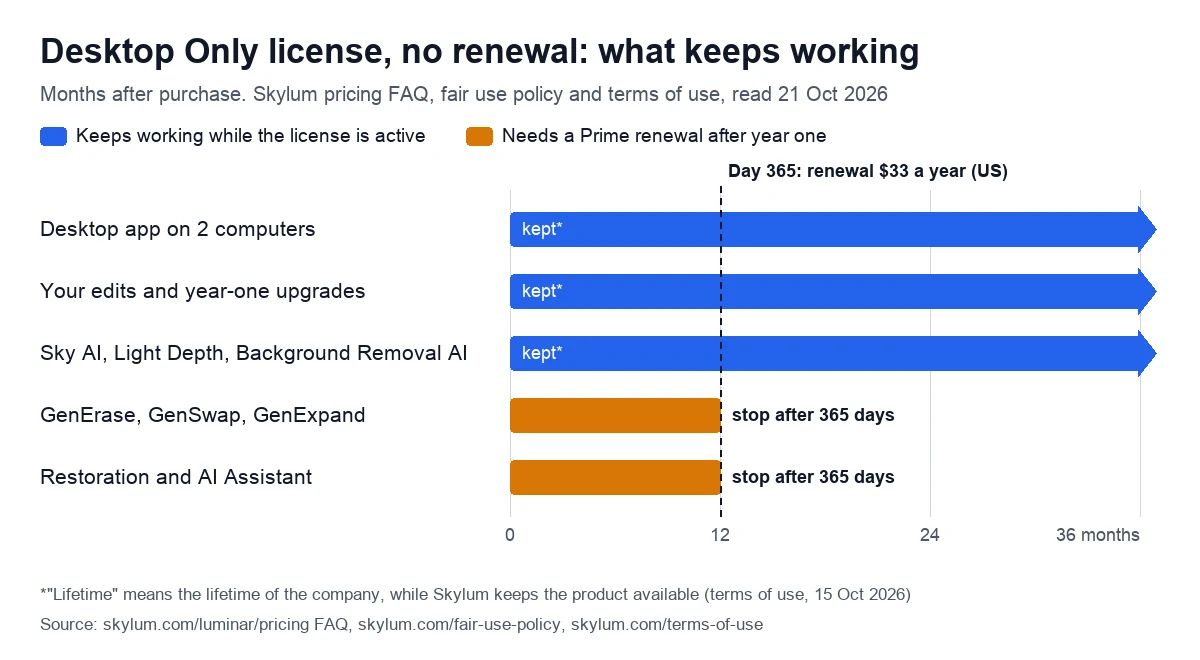
GenErase removes unwanted objects and fills the gap with matching surroundings, GenSwap replaces elements with “AI-generated visuals”, and GenExpand extends the frame. With Restoration, which revives old photos, and the AI Assistant, they are “included with your license for a period of 1 year from purchase for perpetual plans”. After that they need Luminar Prime, Skylum’s renewal add-on.
Within that year, use is generous. The fair use policy, last updated on 4 August 2026, says “There is no cap on the number of edits or generations” and allows “Editing client photos and commercial projects”. It rules out “scripts, bots, or automated pipelines”, processing “large batches to generate output at scale”, sharing a license and reselling the tools as a service.
Luminar Neo price: subscription vs lifetime license
Skylum sells Luminar as three one-time licenses. Each includes a year of the generative tools and then offers a yearly renewal.
| License | Desktop Only | All Platforms | Max |
|---|---|---|---|
| Paid once (US, 9 Oct 2026) | $129 | $159 | $199 |
| Higher price in the order summary | None | $259 | $399 |
| Renewal after year one | $33 a year | $49 a year | $59 a year |
| Desktop app | 2 computers | 2 computers | 2 computers |
| Phone and web apps | No | 3 devices each | 3 devices each |
| Generative tools, Restoration, AI Assistant | First year | First year | First year |
| Features released later | Some; big upgrades may cost extra | Some; big upgrades may cost extra | Kept for good if released during Prime |
| Library of Assets (presets, LUTs, overlays, skies, courses) | No | No | First year |
All three order summaries also list 100 Creative Add-ons and a Luminar Neo video course. All Platforms and Max also add Spaces, Skylum’s web galleries. Prices move with sales. On 21 October the same page showed visitors in the EU a “Black Friday” sale at €89, €109 and €129, against crossed-out prices of €417, €477 and €546. Skylum also lists education, military and loyalty discounts.
What stops after 365 days
The checkout summary in the US copy listed “Auto-upgrades” with every license: “Free for 1 year. Charges apply after”. The Max card adds “Renews every year, cancel anytime”. The pages we read don’t show whether the renewal is on by default, so look for it at checkout and in your Skylum account. Renewal payments are never refunded.
- You keep: the app on two computers, core AI tools such as Sky AI and, in the fair use policy’s words, “your edits, and every upgrade you unlocked during your subscription”.
- You lose: GenErase, GenSwap, GenExpand, Restoration, the AI Assistant, the creative library on Max, and new paid features released after the renewal lapses. On All Platforms and Max, Spaces web galleries may go too: the help center lists them among Prime features “available while subscribed”.
What “lifetime” means in the terms
Skylum’s terms of use, last updated on 15 October 2026, define the word: “‘Lifetime license’ means a license granted for the lifetime of the company providing the relevant Product, for as long as the company remains operational and continues to make the Product available”. It “does not mean that the license is guaranteed to remain valid for the lifetime of the user”.
The same clause grants access to the product “as it is as of the date of purchase”. Subscriptions, by contrast, renew at the price you agreed to, “regardless of the then-actual price”.
Where the subscription went
The help center still describes a desktop subscription with all upgrades and the generative tools, and the pricing FAQ explains what happens “if I cancel the subscription”. Neither the US copy nor the live pricing page showed a price for it. What is on sale is Prime, “an optional add-on subscription” for lifetime owners.
Luminar Neo free trial: 7 days, and what happens after
The Luminar Neo trial lasts 7 days and unlocks every feature, including what the page calls “pro-level premium Extensions”, on “one seat (meaning one device)”. It is desktop only: request it on a phone and the form promises the link “when you’re back on your computer”.
On payment, the trial page contradicts itself. Its FAQ says “all we need is your email” and “we won’t charge you when you sign up for a free trial”, and the form says “No credit card needed”. Another answer on the same page says that once the trial ends, “you’ll be charged for the Lifetime License” unless you cancel in your Skylum account.
We have not signed up, so we can’t say which flow applies; if it asks for a card, set a reminder for day 6. The page says nothing about watermarks or export limits. Test your own raw files on your own computer during the week: an app that won’t run there is one ground for refusing a refund.
We may earn a commission if you buy through links on this page.
Refunds and cancelling: the 30-day guarantee has exceptions
On paper the guarantee is generous. If you bought on Skylum’s website and are “not completely satisfied with software for any reason”, the company refunds the fee, “less any applicable taxes or other fees”, within 30 days. For Aperty the window is 14 days, and Topaz Labs gives 2 days.
| Situation | What Skylum’s pages say |
|---|---|
| Free trial | 7 days, all features, one device |
| Card for the trial | “No credit card needed”, yet the FAQ mentions a charge after day 7 |
| Website purchase | Refund within 30 days, minus taxes and fees |
| Subscription or Prime renewal | Never refunded; the guarantee covers the first payment only |
| Presets, LUTs, courses, extra seats | No refunds |
| App Store or Microsoft Store purchase | The store’s refund rules apply |
| Refund may be refused if | The app won’t run on your device, or for “subjective reasons” |
The fine print narrows the promise. Skylum “may decline refund claims” for “Inability to use the Product in your computing environment or on your device” and for “inconvenience, or other subjective reasons”. That sits awkwardly with “for any reason”, so check the system requirements below and run the trial before you pay.
Renewals are stricter still. The guarantee “only applies to the first time you are billed for a subscription”, and Skylum “will not refund any subscription renewal payments, whether due to your oversight of upcoming renewal charges or for any other reason whatsoever”.
How to cancel a renewal
- Log in to your Skylum account and open My software.
- Press Manage Subscription, then Cancel Subscription.
- Confirm the cancellation and choose a reason.
Cancelling stops future charges. The subscription stays active until the end of the paid term, and a one-time license keeps working afterwards.
System requirements for Mac and Windows
| Requirement | Mac | Windows |
|---|---|---|
| Processor | Intel Core i5 8th gen or Apple M1 to M4 | Intel Core i5 8th gen or AMD Ryzen 5 |
| System | macOS 13.0 or later (from version 1.28.1) | Windows 10 version 1909 or later, 64-bit only |
| Memory | 8 GB, 16 GB recommended | 8 GB, 16 GB recommended |
| Disk space | 10 GB free, SSD for best performance | 10 GB free, SSD for best performance |
| Display | 1280×768 or higher | 1280×768 or higher |
| Graphics | Not listed | OpenGL 3.3 or later |
Two details matter. The product page and a pricing-page FAQ still say macOS 12, while the help center requires macOS 13.0 from version 1.28.1, so plan for 13. And on Windows PCs with ARM processors, the installer “can only be downloaded from the Microsoft Store”.
Luminar Neo vs Lightroom: one payment or Adobe’s plan
Adobe sells Lightroom by subscription. On 21 October 2026, its US Lightroom plan cost $11.99 a month on an annual plan billed monthly, with 1TB of cloud storage and 250 generative credits a month. Adobe describes it as “The full version of Lightroom for mobile, desktop, and web, plus Lightroom Classic”. The Photography plan, at $19.99 a month, adds Photoshop and 1,000 credits. Both have a 7-day free trial.
| Option | How you pay | Two years | Generative AI |
|---|---|---|---|
| Desktop Only license | $129 once, then $33 a year if you renew | $129 to $162 | Unlimited in year one, under fair use |
| Adobe Lightroom plan | $11.99 a month, annual plan | $287.76 | 250 credits a month |
| Adobe Photography plan | $19.99 a month, annual plan | $479.76 | 1,000 credits a month |
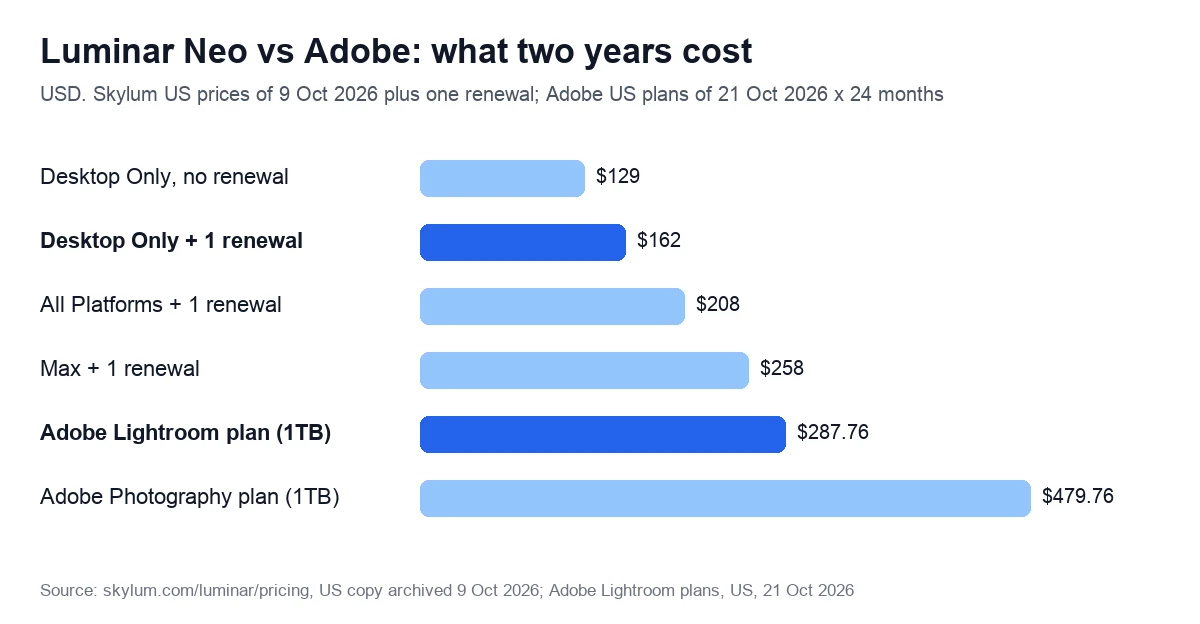
Where Luminar Neo wins: the bill over time, quick sky and light effects, and no credit counting in the first year. Where Lightroom wins: one plan covers Lightroom on phone, computer and browser plus Lightroom Classic and 1TB of cloud storage, while Neo’s sync runs only from phone to desktop for now. You can also combine them, keeping Lightroom Classic as the catalog and sending single photos to Neo as a plug-in.
Moving over is partial. Skylum’s migration tool imports “folders, collections, metadata, and many basic edits” from Lightroom Classic 15.0 or newer. Keywords, smart collections, masks, generative AI adjustments, black-and-white conversions and color profiles stay behind, and migrated photos “may appear slightly different” because the rendering engine differs.
One-time pricing is not a given among AI photo apps: Topaz Labs moved all its software to subscriptions on 3 October 2025. If sharper, larger files are all you need, see our comparison of AI upscalers.
Reviews: Trustpilot 4.6 and the “lifetime” complaints
On 21 October 2026, Skylum’s Trustpilot profile, listed as Luminar Neo, showed 4.6 out of 5 from 7,043 reviews: 84% five-star and 4% one-star, with replies to 98% of negative reviews.
Praise on 20 October 2026 was specific: one reviewer uses Neo as their main editor and credits it with reviving old, color-tainted photos; another thanked the human agent who took over after the AI support bot got confused.
Three of the four one-star reviews shown from late September and October 2026 are about licenses and old versions. One reviewer owned three lifetime licenses and says only one of those products is still alive: an earlier license did not carry over when Neo arrived as a separate product. Two more accuse Skylum of planned obsolescence, and the fourth complains about support.
The worry has history. PetaPixel reported on 5 October 2026 that Skylum will close its AI portrait editor Aperty on 4 November, after selling lifetime licenses for $250 with a promise of five years of updates. Owners can keep using Aperty, but PetaPixel expects no further updates.
Who it suits, and who should skip it
A good fit:
- Hobbyist landscape and travel photographers who want sky replacement, relighting and one-slider enhancement for a single payment.
- Families digitizing old prints: Restoration comes for the first year only, so work through the archive early or budget for the renewal.
- Social media managers and creators who edit on phone and desktop: All Platforms ($159) adds the mobile app on 3 devices and Spaces web galleries, which the help center lists among Prime features “available while subscribed”.
- Lightroom Classic users who want AI effects as a plug-in without a second subscription.
Look elsewhere if:
- You run a professional raw workflow. Fujifilm film simulations such as Classic Chrome are “not currently supported”, says the help center, which also keeps articles on raw photos that look different or show “strange colors or artifacts”.
- You run the AI tools in bulk or resell them: fair use excludes processing “large batches” at scale and a “we’ll edit your photos” operation built on your license, though editing client photos is allowed.
- Your archive must outlive the vendor: “lifetime” ends when the product does.
- You need Photoshop as well: Adobe’s Photography plan at $19.99 a month covers both.
If you mostly generate new images, Neo’s generative tools stop after a year without Prime: see our Midjourney alternatives. For one editor on phone, web and Windows today, while Neo syncs only from phone to desktop, read our Picsart review.
Our score: 3.3 out of 5, and how we checked
We score every tool on six weighted criteria, explained on our How we test page. We have no Skylum account yet, so output quality is not scored, and the total is the weighted average of the other five.
| Criterion | Weight | Score | Why |
|---|---|---|---|
| Price for real work | 25% | 4 | $162 over two years with one renewal, against $287.76 for Lightroom |
| Output quality | 25% | Not scored | No account yet |
| Limits and fine print | 15% | 3 | Unlimited AI in year one; five tools then expire; “lifetime” tied to the company |
| Billing and reputation | 15% | 3 | 30-day refund, but renewals never refunded; Trustpilot 4.6 (7,043 reviews) |
| Support and learning | 10% | 3 | Detailed help center and 24/7 chat advertised; mixed reviews of support |
| Maturity of AI features | 10% | 3 | Most AI tools live; the pricing FAQ still marks the web app and Fall Upgrade 2026 as “coming” |
The math: 0.25 × 4 + 0.15 × 3 + 0.15 × 3 + 0.10 × 3 + 0.10 × 3 = 2.50. Divided by 0.75, the total weight of the scored criteria, that gives 3.3. On our scale, 3.0 to 3.9 means good for specific cases: read the limits first.
Sources, all read on 21 October 2026: Skylum’s pricing page (live, plus a US copy archived on 9 October), trial page, refund policy, terms of use, fair use policy and help center, Adobe’s Lightroom plans and Trustpilot. We also used PetaPixel’s report of 5 October 2026 and will re-check prices within 90 days, or sooner if the plans change.
Compare the three licenses on Skylum’s site
We may earn a commission if you buy through links on this page.
Frequently asked questions
Yes. There are three perpetual licenses: $129, $159 and $199 in the US on 9 October 2026, each with the desktop app on two computers. After 365 days, a Prime renewal of $33 to $59 a year, which you can cancel, keeps the generative tools; without it, the editor and core AI tools keep working.
Skylum’s pricing page lists no free plan, only three paid licenses. The free option is a 7-day trial with every feature on one computer. Its form asks only for an email, though the trial FAQ also mentions a charge after day 7 unless you cancel. Website purchases carry a 30-day money-back guarantee.
Core tools such as Sky AI, Light Depth and Background Removal AI keep working as long as your license is active. GenErase, GenSwap, GenExpand, Restoration and the AI Assistant stop unless you renew Prime, at $33, $49 or $59 a year in the US (price list of 9 October 2026). Upgrades unlocked during a paid year stay yours.
Yes. Skylum lists Luminar as a plug-in for Lightroom Classic from version 6, Adobe Photoshop and Photos for macOS. It can also import a catalog from Lightroom Classic 15.0 or newer, with folders, collections, metadata and many basic edits, but keywords, smart collections, masks and color profiles don’t transfer.
Yes, within 30 days of buying on Skylum’s website, minus taxes and fees. Renewals of a subscription or Prime are never refunded, and App Store or Microsoft Store purchases follow the store’s rules. Skylum may also refuse a claim if the app won’t run on your computer, so test it during the trial.
It is cheaper for quick AI edits: $129 to $162 over two years for Desktop Only at US prices of 9 October 2026, against $287.76 for Adobe’s Lightroom plan on 21 October. Adobe’s plan includes Lightroom Classic and 1TB of cloud storage, while Neo syncs one way, from phone to desktop. You can also keep both and run Neo as a plug-in.