
Descript Review 2026: AI Video Editing by Text, Pricing and Limits
We may earn a commission if you buy through links on this page, at no extra cost to you. The page also has one ElevenLabs link, in the AI voices section. As an independent ElevenLabs affiliate, we may earn a commission if you subscribe through this link.
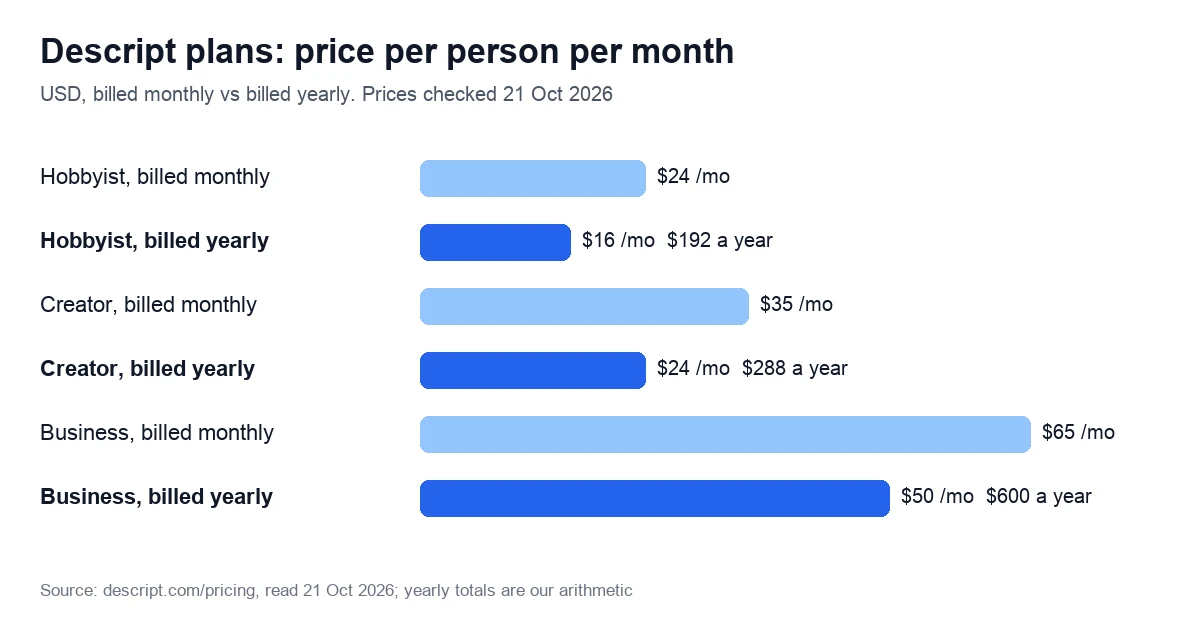
Descript edits audio and video through a transcript: delete a sentence in the text and it is cut from the recording. Plans cost $16 to $50 a month per person billed yearly, or $24 to $65 month to month.
Our verdict
Descript Hobbyist
A good fit for podcasts, interviews and course recordings you cut by editing text.
Best for: podcasters, interviewers and course creators
Try the free plan: 60 media minutes, no card
in our free account; dollar prices read 21 Oct 2026
Pros
- Cut audio and video by deleting words in the transcript
- Free plan: 60 media minutes a month, no card
- Studio Sound and filler removal: at most 30 credits a file
Cons
- Every Underlord chat message spends AI credits
- Hobbyist can’t buy top-ups when the month runs out
- Refund requests close 48 hours after the invoice
Output quality not scored: we opened a free account on 29 Oct 2026 to check limits and prices, but have not edited a project in it.
We may earn a commission if you buy through links on this page.
On this page: how it works, pricing, the 2025 change, AI credits, transcription, AI voices, reviews, who it suits, alternatives, score, FAQ.
How editing by text works, and what Underlord adds
You upload or record a file, Descript transcribes it, and the transcript becomes the main editing surface. The pricing page sums it up as “Edit video by editing a doc”: cut a sentence from the script, and the matching audio and video go with it.
The AI tools sit around that script:
- Studio Sound reduces background noise and echo in speech, for takes that sound “like it was captured on a laptop mic”. It applies to a whole file, has an intensity slider and doesn’t work on AI-generated speech.
- Remove Filler Words finds “um” and “uh”, in English transcripts only. An “Avoid harsh cuts” option skips any filler word that can’t be removed without clipping into nearby words.
- Eye Contact turns your gaze toward the camera, and Green Screen removes the background.
- Rooms records remote sessions with up to 10 participants, and the screen recorder captures up to 2 screens at once.
Underlord, the AI co-editor, takes chat requests such as “Can you split this into 5 clips that are max 1 minute long?” and makes the edit itself. You can pick the model behind it, such as GPT 6.1 Sol or Claude Opus 5.5; premium models need a paid plan. Underlord is still in beta, and Descript admits it “might overpromise, make incorrect assumptions, or follow you into workflows it’s not equipped to complete”, so check its edits before you export.
Descript’s API and MCP server can also start imports and edits from code or an AI assistant, using the same minutes and credits as the app.
Descript pricing in 2026: media minutes, AI credits and top-ups
Source: Descript pricing page (USD, per person), checked 21 Oct 2026. Per-hour figures are our arithmetic, before any AI credits are counted.
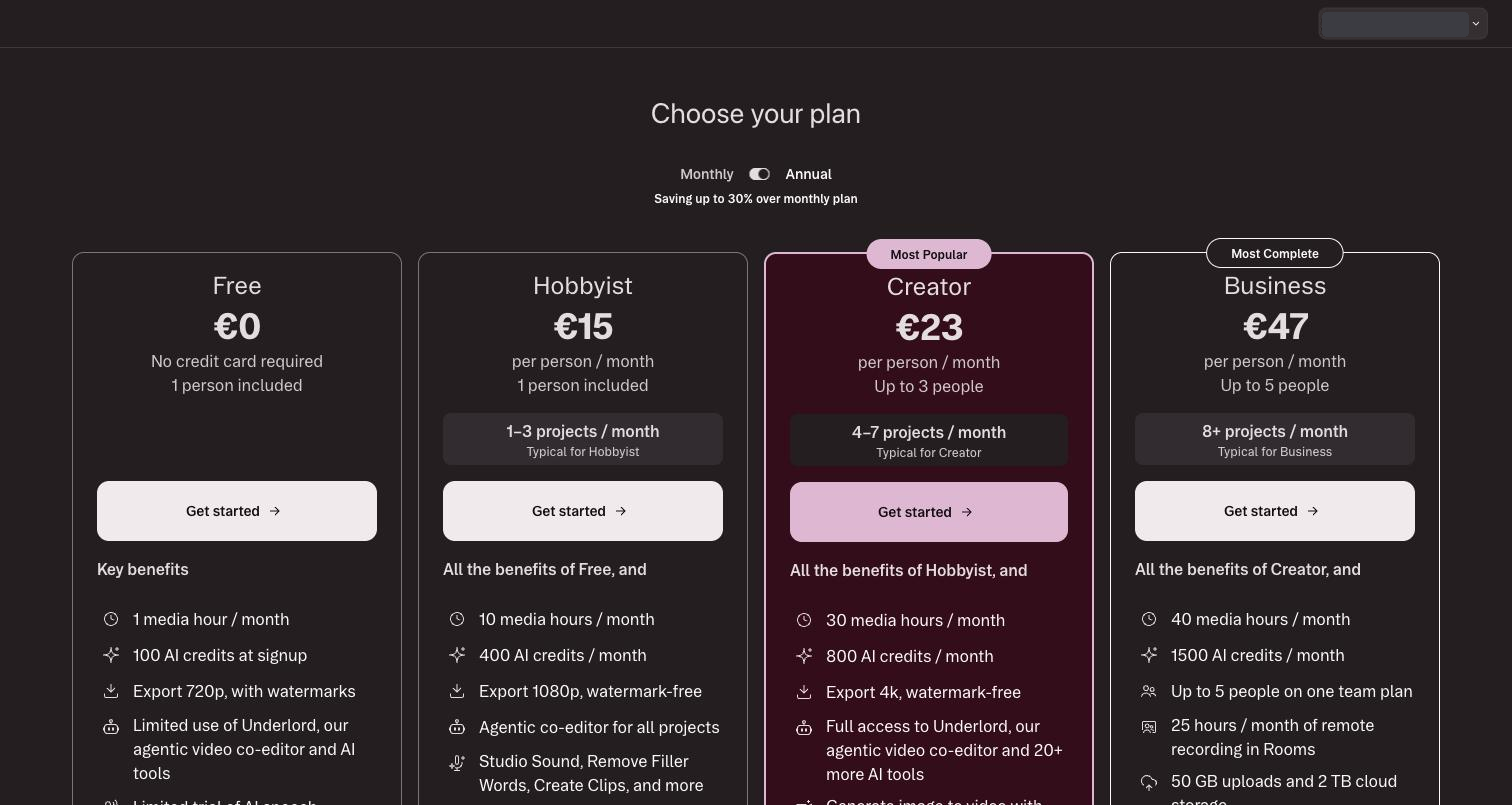
Descript sells three paid self-serve plans, a free plan and Enterprise on request. On the public page, prices are in US dollars and per person, with no country-based price list in the page code. Descript says yearly billing saves “up to 35%”; by its own prices the saving is 23% to 33%. The plan picker in the free account we opened from the EU on 29 October 2026 showed euros instead: €15, €23 and €47 per person a month billed yearly, or €23, €33 and €61 month to month, with “Saving up to 30%” on the toggle.
| Plan detail | Free | Hobbyist | Creator | Business |
|---|---|---|---|---|
| Billed monthly | $0, no card | $24 | $35 | $65 |
| Billed yearly, per month | $0 | $16 | $24 | $50 |
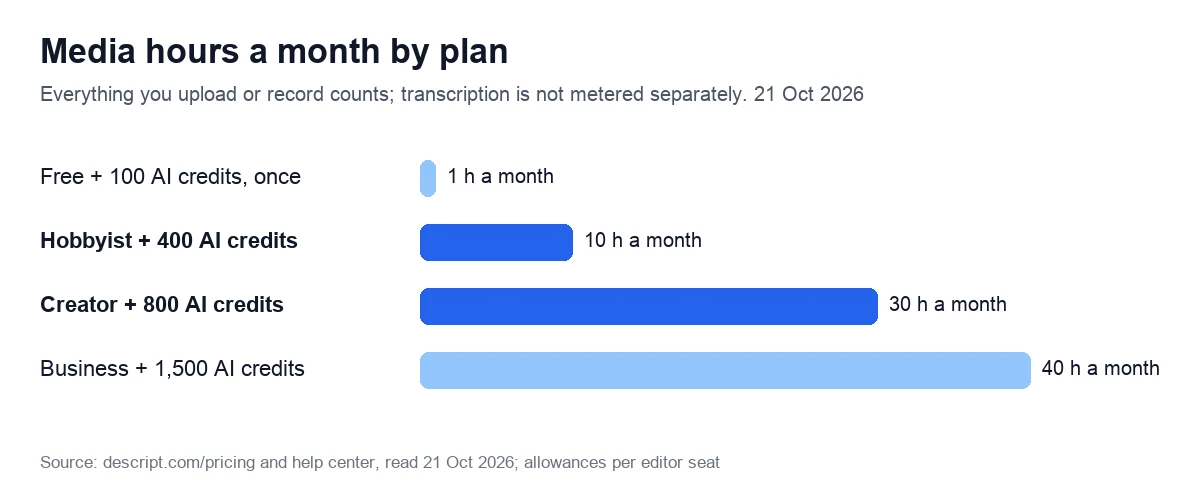
| Media hours a month | 1 | 10 | 30 | 40 |
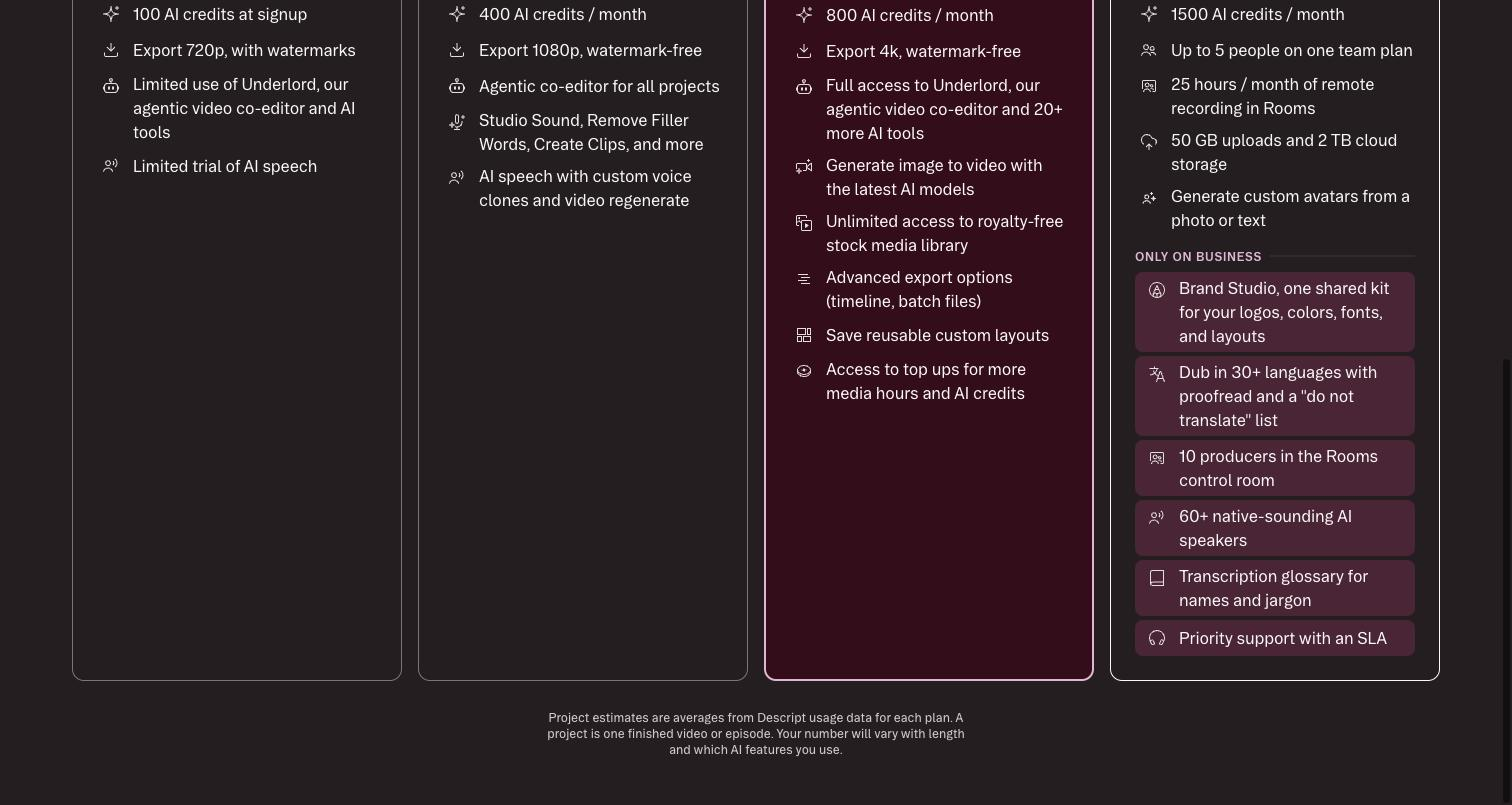
| AI credits | 100, once | 400 a month | 800 a month | 1,500 a month |
| Top-ups | No | No | Yes | Yes |
| Video export | 720p; watermark-free export not included | 1080p | 4K | 4K |
| People | 1 | 1 | Up to 3 | Up to 5 |
| Rooms recording | 2 hours | 5 hours a month | 15 hours a month | 25 hours a month |
| Cloud storage | 5 GB | 100 GB | 1 TB | 2 TB |
Seats on Creator and Business are billed separately, and each one adds its own minutes and credits to a pool the whole drive shares. Enterprise is priced on request and adds SSO, SCIM and an opt-out of AI training.
The free plan: 60 minutes, 720p, no watermark-free export
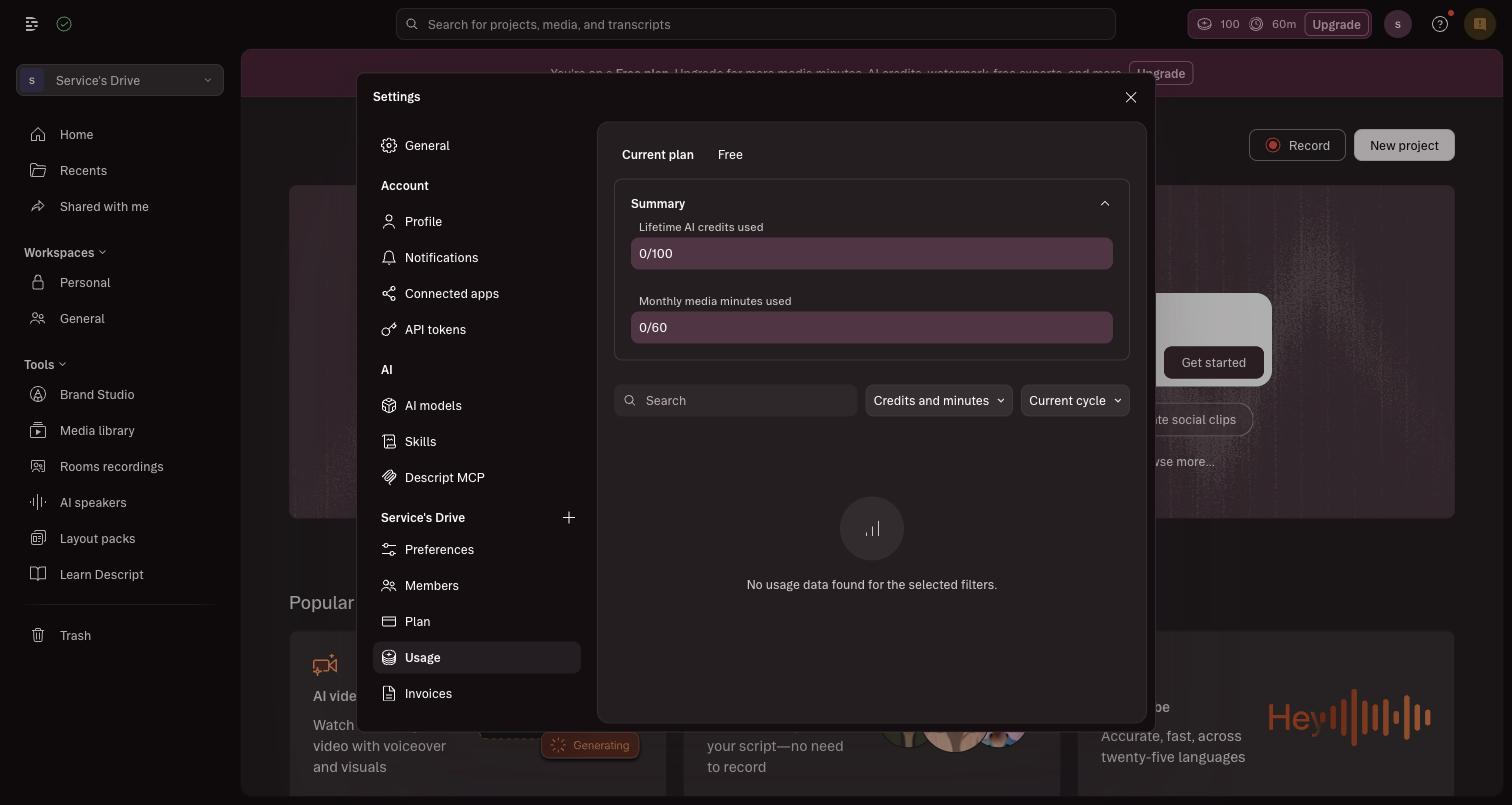
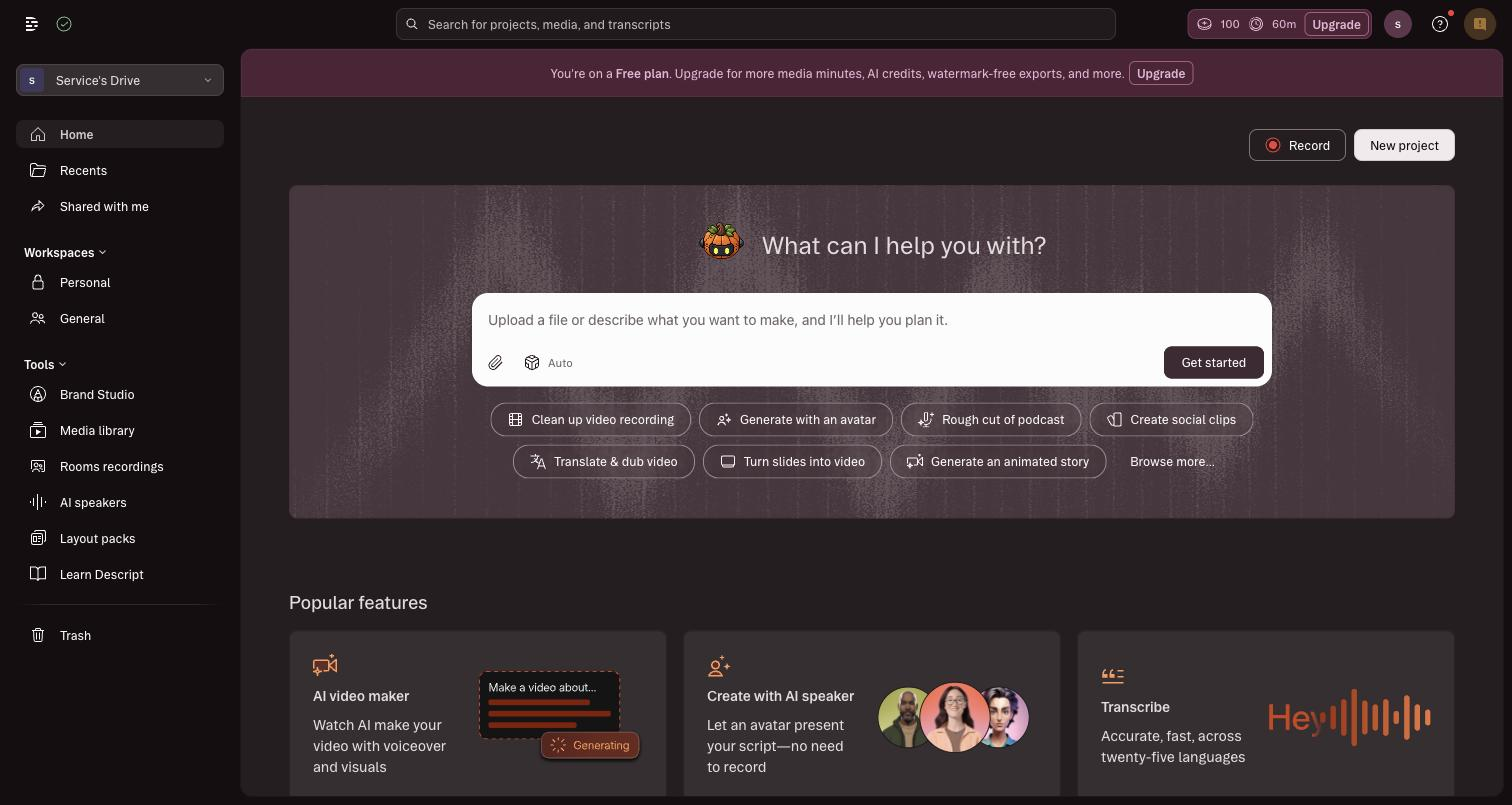
Free needs no credit card. It gives 60 media minutes a month plus 100 AI credits once, not monthly. Exports stop at 720p, and the pricing table marks watermark-free export as “Not included” on Free, so expect a watermark; watermark-free export starts on Hobbyist. Files are capped at 1 GB and storage at 5 GB. The free account we opened on 29 October 2026 matched the page: no payment method on file, 60 media minutes a month and 100 AI credits shown as “Lifetime AI credits” in its settings, and a plan picker that spells out “Export 720p with watermarks” for Free.
Top-ups: only on Creator and Business
When a month’s allowance runs out, Creator and Business can buy more. Top-ups are shared across the drive, are spent only after the monthly allowance and expire 12 months after purchase. Hobbyist can’t buy them, so you wait for the renewal or upgrade.
- AI credits: 350 for $35, 1,000 for $80 or 4,000 for $200, from $0.10 down to $0.05 a credit.
- Media hours: 5 for $25, 20 for $80 or 50 for $150, from $5 down to $3 an hour.
Education and nonprofit discount
Schools and nonprofits can apply for $12 per editor a month, or $8 billed yearly, with Hobbyist features and up to 3 editor seats. The help center calls it the only plan sold at a discount.
Refunds and cancellation
The refund window is short: 48 hours from the invoice date for a plan and 7 days for an extra editor seat. Top-ups are non-refundable, and there are no prorated refunds for unused time. Canceling moves you to Free at the end of the paid period. Projects stay, and a top-up balance is kept but can’t be used on Free. If you leave a Legacy plan, you can’t go back to it.
Compare the four plans on the vendor’s site
We may earn a commission if you buy through links on this page.
What changed in September 2025
Prices didn’t move. An archived copy of Descript’s pricing page from 12 September 2025 shows the same $16, $24 and $50 a month billed yearly as the live page on 21 October 2026. What changed is what the money buys. By 27 September 2025, transcription hours and per-feature quotas had given way to media hours and one budget of AI credits.
| What you get | Hobbyist | Creator | Business |
|---|---|---|---|
| 12 Sep 2025 snapshot: hours | 10 transcription hours | 30 transcription hours | 40 transcription hours |
| 12 Sep 2025 snapshot: AI tools | 20 basic AI actions a month | Unlimited basic and advanced AI actions | Unlimited professional AI actions |
| 12 Sep 2025 snapshot: speech and avatars | 30 min of AI speech, 5 min of avatars | 2 h of speech, 30 min of dubbing, 10 min of avatars | 5 h of speech, 2 h of dubbing, 30 min of avatars |
| 27 Sep 2025 snapshot: hours | 10 media hours | 30 media hours | 40 media hours |
| 27 Sep 2025 snapshot: AI | 400 AI credits | 800 AI credits | 1,500 AI credits |
The switch hit Creator and Business most: their unlimited AI actions became 800 and 1,500 credits a month, and Underlord chat now draws on the same balance. Hobbyist gained flexibility, since 400 credits can go to whichever tool you use most instead of a separate cap per feature. The help center describes the new plans as “a budget of credits instead of 17 different feature-specific limits”.
Older subscriptions followed. According to the help center, “Starting November 17, 2025, all Legacy and Sunset plan subscribers will be automatically migrated”, and some of those prices “could increase to match our current pricing”. Extra hours also cost more on the new plans: Legacy plans sell add-on transcription hours at $2 an hour per month, while media-hour top-ups cost $3 to $5 an hour and last up to 12 months.
How far 400, 800 or 1,500 AI credits go
Media minutes are easy to plan. Uploads and recordings count by their length, a still image counts as 1 second, and a 1-hour Rooms session with 5 participants uses 60 minutes, not 300. AI credits are harder, because two kinds of spending share one balance.
- Manual tools cost in proportion to the job. Studio Sound and Remove Filler Words are capped at 30 credits per file, so Hobbyist’s 400 credits cover at least 13 full-file passes a month (800 and 1,500 credits cover at least 26 and 50).
- Underlord has “no fixed price per action”. Each message costs a few credits even without a tool, a tool run charges both the agent and the tool, and the same prompt “can cost different amounts on different runs”.
- Nothing rolls over. Unused minutes and credits are gone when the plan renews.
The Usage tab shows what each run cost, but only afterwards, and exporting usage to CSV isn’t available on Free. The risk shows in reviews. A one-star Trustpilot review from 3 October 2026 says 800 credits went on cleaning up filler pauses in a short reel, while the tool kept deleting real words. A zero-star G2 review from 15 June 2026 says “AI credits were charged for Avatar generations that never completed”.
Our reading: if you cut by text and run Studio Sound and filler removal yourself, Hobbyist’s credits go a long way. If you want Underlord to drive the edit, Creator is the safer start because it can buy top-ups.
Descript as a transcription tool: languages, accuracy and limits
On current Descript plans, transcription isn’t metered on its own. You pay in media minutes when you upload or record, whether or not you transcribe, so Hobbyist’s 10 media hours double as up to 10 hours of transcription a month.
- Languages: 25 on the pricing page and 26 in the help center. The help center calls them Latin-alphabet languages, yet its list includes Greek and Hindi (both in beta, like Welsh). Chinese, Japanese and Russian aren’t supported, and each file can have only one spoken language.
- English-only tools: filler-word detection, transcript import and replacement, and the transcription glossary, which is itself a Business feature.
- Accuracy: the vendor says “With clear audio, accuracy can reach up to 95%”. Results depend on recording quality, accents, background noise, mic placement and overlapping speakers, and the models come from third parties.
- Hard limits: files over 15 hours fail to transcribe automatically, and music and song lyrics aren’t transcribed.
- Speakers: every plan detects 8+ speakers and transcribes multitrack recordings with each speaker on a separate track.
On G2, a review from September 2026 calls the transcripts accurate “not all the time, but most of the time”, and another, from April 2026, corrects medical and diet terms by hand. On Trustpilot, a one-star review from 2 October 2026 calls the free-transcription advertising misleading; on paper, the free plan includes an hour of media a month.
AI voices, voice clones and Regenerate (formerly Overdub)
Descript’s AI Speech turns typed text into a voiceover, using a stock voice or a clone of your own, and clones come with every paid plan. Hobbyist and Creator list 25+ stock voices and Business 60+. The catalog draws on the ElevenLabs Voice Library, where community voices can disappear at the owner’s discretion, so the help center suggests its Recommended list for a voice you’ll reuse across projects.
Cloning requires recorded consent: the person reads a consent statement in English, even for speech in another language. Cloning a deceased person, someone who hasn’t agreed or an AI-generated voice is not allowed.
Regenerate, the tool once called Overdub, smooths jump cuts and awkward pacing. With an authorized clone, it can change what a speaker said without a re-record. It works with English audio and video only and asks for consent the first time you regenerate video. Dubbing covers 30 languages, but native-sounding voices in 14 languages are Business-only, and the plan picker in our account listed “Dub in 30+ languages with proofread” among the features found only on Business (29 October 2026). The pricing page adds a warning for Regenerate: past the limit, you will hear “jibber” and “jabber” in generated speech.
If narration is the whole job, a dedicated voice tool may be simpler. ElevenLabs, which runs that voice library, started at $6 a month on 21 October 2026. Murf Creator cost $19 a month billed yearly on 7 October 2026, for 24 hours of voice generation a year. Our Murf AI review covers its limits, or you can see Murf’s plans directly.
Compare ElevenLabs voice plans
As an independent ElevenLabs affiliate, we may earn a commission if you subscribe through this link.
What reviewers say on Trustpilot and G2
On 21 October 2026, Descript’s Trustpilot profile showed 2.6 out of 5 (“Poor”) from 290 reviews, 43% of them one-star, and carried Trustpilot’s notice that the company hasn’t invited customers to review it recently, so the reviews may not be representative. An archived G2 page from 12 October 2026 showed 4.6 from 927 reviews, 82% of them five-star, with 806 reviewers from small businesses.
Complaints worth knowing:
- Credits: besides the 800-credit reel above, a two-star review from 6 September 2026 says the AI bot spends credits on edits the reviewer didn’t ask for.
- Cancellation: a one-star review from 25 September 2026 says that once you are a customer, canceling the subscription is extremely difficult.
- Refunds: a reviewer who canceled about an hour after buying and asked for a refund (11 September 2026) calls the customer service terrible.
What reviewers like:
- Editing by script: a 4.5-star G2 review from 3 August 2026 is titled “Easy to edit script and audio at the same time”.
- Ease of use: G2’s most-cited pros are Easy Editing (278) and Ease of Use (268), and the top cons are the learning curve (81), learning difficulty (71), complexity (69) and slow performance (66).
Who it suits, and who should look elsewhere
Good fit
- Podcasters and interviewers recording with guests
- Course creators and trainers who record their screen
- Small teams: up to 3 people on Creator, 5 on Business
Skip it if
- You mostly cut long videos into many short clips
- You work in Chinese, Japanese or Russian, or mix languages
- You want the AI to edit for you on a tight budget
Rooms counts a session’s minutes once, not per guest, and Studio Sound is built for noisy, echoey takes; Descript pitches Creator at people making content “about once a week”. Trainers get Eye Contact for scripted takes and captions translated into 61 languages, and teams share one pool of minutes and credits. Editors who finish elsewhere get timeline export to Premiere, Final Cut and Pro Tools from Creator. For clips, Opus Clip and Vizard charge 1 credit per minute of source video and post to social networks for you (compared below). Underlord’s cost varies by prompt, Hobbyist can’t top up, and a plan refund must be requested within 48 hours.
Descript alternatives: CapCut, Opus Clip, Vizard and Riverside
| What we compared | CapCut Pro | Opus Clip | Vizard | Riverside |
|---|---|---|---|---|
| Price a month | $19.99, or $179.99 a year | Starter $15, monthly only; Pro $29, or $14.50 billed yearly | Creator $29, or $14.50 billed yearly | Pro $29, or $24 billed yearly |
| Best for | Phone, desktop and web editing | Clips from long videos | Clips, plus trimming by transcript | Remote podcast recording |
| Free plan | Yes; auto captions need Pro | 60 credits a month, watermark | 60 minutes a month, 720p, watermark | 2 hours of multi-track recording once, 720p, watermark |
- CapCut is the low-cost all-rounder, but its terms, updated on 15 April 2026, give ByteDance a perpetual, sublicensable license to your content, plus a sublicensable license to use your username, image and likeness to identify you as the source of that content, “including for use in sponsored content”. Its unclaimed Trustpilot profile showed 1.2 from 1,324 reviews on 7 October 2026.
- Opus Clip suits daily short-form posting: it finds clips even in footage with little speech and posts to YouTube Shorts, TikTok and Instagram Reels. Free clips carry a watermark, can’t be edited and stop being exportable after 3 days. See Opus Clip’s plans.
- Vizard gives twice the minutes for the same $174 a year: 600 a month on Creator (7 October 2026), against 300 credits on Opus Clip Pro. Like Descript, it trims video when you delete transcript lines, and Trustpilot showed 4.7 from 2,521 reviews on 7 October 2026. See Vizard’s plans.
- Riverside is the closest rival for podcasts. Pro includes unlimited recording, transcriptions and text-based editing, but caps downloads of separate tracks at 15 hours a month. At $24 a month billed yearly it costs $8 more than Descript Hobbyist, and Descript’s G2 page, archived on 12 October 2026, showed it at 4.8 from 1,754 reviews. See Riverside’s plans.
Kapwing also trims video by editing its transcript, with Pro at $16 a month billed yearly. Our comparison of AI video editing tools covers more options, and our HeyGen alternatives guide covers AI presenters.
Our score: 3.3 out of 5, and how we checked
We score every tool on six weighted criteria, explained on our How we test page. We opened a free Descript account on 29 October 2026 to check its limits and plan prices, but have not edited a project in it, so output quality is not scored, and the total is the weighted average of the other five.
| Criterion | Weight | Score | Why |
|---|---|---|---|
| Price for real work | 25% | 3 | $16 a month billed yearly for 10 media hours; AI use is hard to budget |
| Output quality | 25% | Not scored | Free account opened 29 October 2026; no project edited |
| Limits and fine print | 15% | 3 | Credits reset monthly; no fixed Underlord price; no top-ups on Hobbyist |
| Billing and reputation | 15% | 3 | Public prices, self-serve cancellation, 48-hour refunds; Trustpilot 2.6, G2 4.6 |
| Support and learning | 10% | 4 | Detailed help center; live chat on weekdays on paid plans; SLA on Business |
| Maturity of AI features | 10% | 4 | Studio Sound, filler removal and voice clones live on Hobbyist; Underlord in beta |
The math: 0.25 × 3 + 0.15 × 3 + 0.15 × 3 + 0.10 × 4 + 0.10 × 4 = 2.45. Divided by 0.75, the total weight of the scored criteria, that gives 3.3. On our scale, 3.0 to 3.9 means good for specific cases: read the limits first.
Sources: Descript’s pricing page and help center articles on credits, top-ups, refunds, transcription, voices and Underlord, read on 21 October 2026, plus archived pricing pages from 12 and 27 September 2025. A Reddit thread about the new pricing ranks in Google’s top ten for “descript pricing” (21 October 2026), but Reddit blocked our requests, so we don’t quote it. We will re-check prices within 90 days.
Start on the free plan before you pay
We may earn a commission if you buy through links on this page.
Frequently asked questions
Descript Hobbyist costs $24 a month, or $16 a month billed yearly. Creator costs $35 or $24, and Business $65 or $50. Prices are per person in US dollars, checked on 21 October 2026; from the EU, our account showed €23, €33 and €61, or €15, €23 and €47 billed yearly (29 October). The free plan needs no card, and Enterprise is quoted on request.
Yes. The plan picker in the free account we opened on 29 October 2026 lists 720p export with watermarks on Free, and watermark-free 1080p starts on Hobbyist. The free plan gives an hour of media a month plus 100 AI credits that are not renewed; its settings call them lifetime credits.
Select the clip, open the Properties panel and, in the Duration section, drag the speed control or type a new value. Speeding a clip up shortens it, and the change carries into your export. The playback speed button at the top of the timeline is different: it plays the project at up to 3x while you edit, without changing the file.
No. The allowance resets when your subscription renews, and anything unused is lost. Top-ups work differently: on Creator and Business, extra minutes or credits are spent only after the monthly allowance and expire 12 months after purchase. Hobbyist can’t buy top-ups, so you wait for the renewal or upgrade.
Only if you ask quickly. A plan refund must be requested within 48 hours of the invoice date, and an editor seat within 7 days. Top-ups are non-refundable, and unused time isn’t refunded pro rata. Canceling moves the account to the free plan at the end of the paid period, and your projects stay.
The vendor says accuracy “can reach up to 95%” with clear audio, and that poor recordings, accents, background noise and overlapping speakers lower it. It covers 25 to 26 languages, one per file, but not Chinese, Japanese or Russian. Files over 15 hours won’t transcribe automatically.