
Best AI Image Upscalers 2026: Topaz, Magnific, Upscayl and Free Options Compared
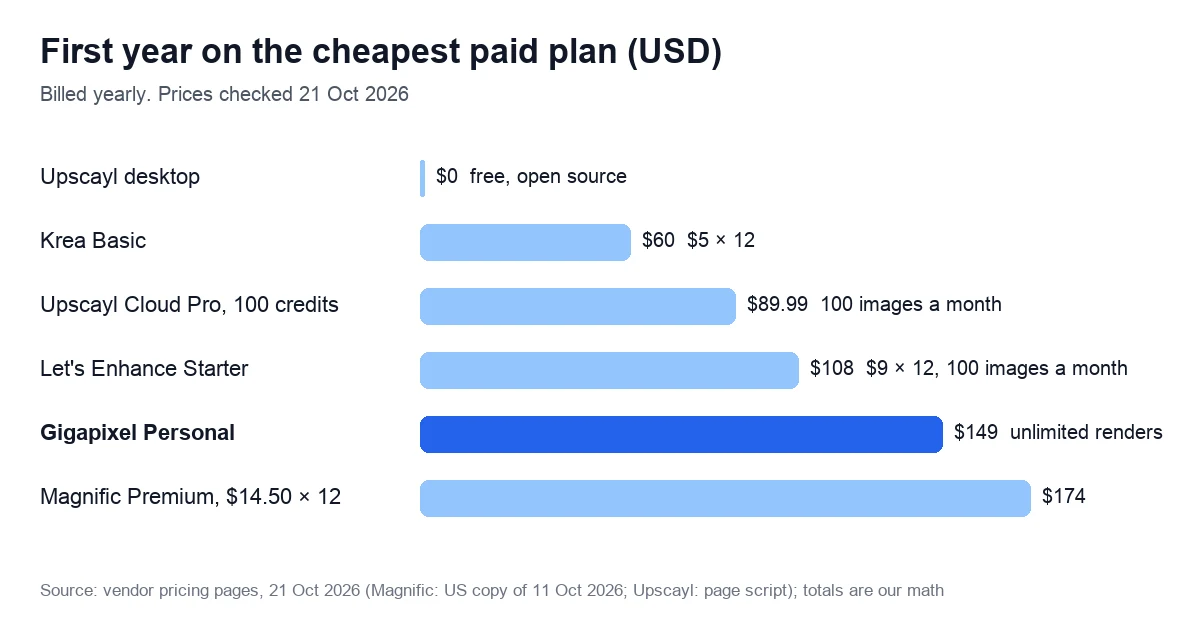
We compared eight AI image upscalers on price, free limits, maximum size, batch work and refunds. Paid plans start at $9 a month, or $5 billed yearly; Upscayl’s desktop app is free and open source.
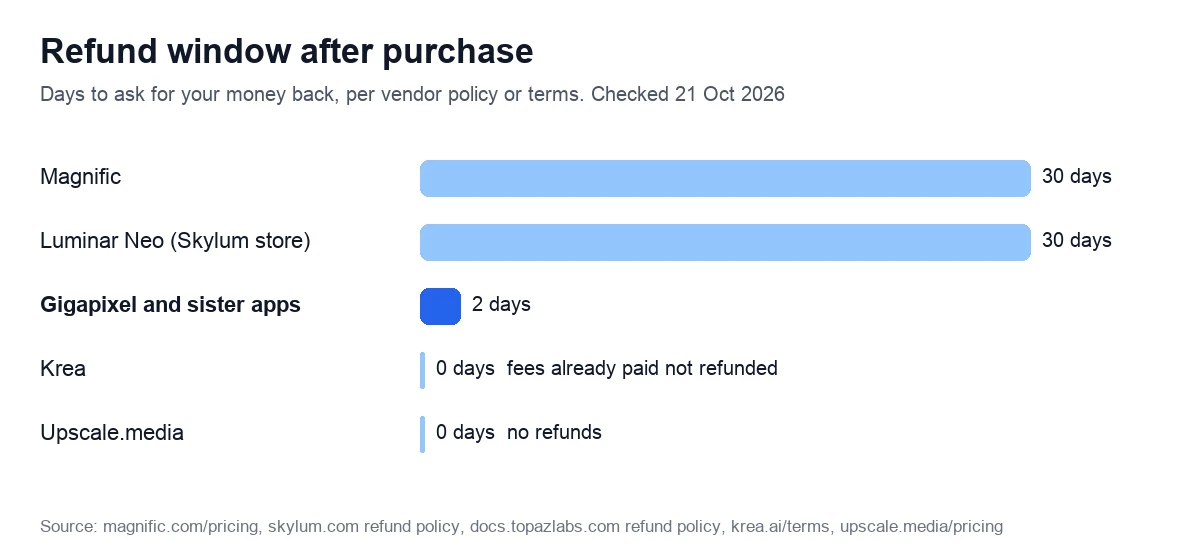
Quick verdict: Topaz Gigapixel suits regular photo work: $149 a year for unlimited local and cloud renders, up to 16×. Not for buyers who want a long test: we found no desktop trial, the browser tool allows up to 10 images according to the FAQ data in the page code, and refunds close after 2 days. Free pick: Upscayl.
See Gigapixel plans: $29 a month or $149 a year
We may earn a commission if you buy through links on this page.
8 AI image upscalers compared: price, free use and limits
Prices checked on 21 October 2026, in US dollars unless marked, for each tool’s cheapest paid plan. Where two prices appear, the first is for monthly billing.
| Tool | Runs on | Cheapest paid plan | Free use | Largest output |
|---|---|---|---|---|
| Gigapixel (Topaz Labs) | Windows, macOS | $29 a month, or $149 a year | Web tool: up to 10 images, according to the FAQ data in the page code | 16× |
| Magnific Premium | Browser | $20 a month, or $14.50 billed yearly | No free AI plan listed | 16× (Precision v2), up to 10K |
| Upscayl | Windows, macOS, Linux | Desktop free; Cloud from $9.99 a month (100 credits) or $89.99 a year | Unlimited, on your PC | 16× |
| Let’s Enhance Starter | Browser | $12 a month, or $9 billed yearly | 10 credits, watermarked | 256 MP (512 MP on Max) |
| Krea Basic | Browser | $9 a month, or $5 billed yearly | 100 units a day, up to 2K | 22K |
| Upscale.media | Browser, Android app | €7.11 for 60 credits, one-time (EU view) | 3 credits a month | Not stated |
| Remini | iPhone, iPad, Android | Lite from $4.99 a week; Pro $9.99 a week (US App Store) | Free app with ads | Not stated |
| Luminar Neo | Windows, macOS | From $129, one-time (US) | 7-day trial | 6× |
What each tool handles beyond a single photo, from vendor pages and terms:
| Tool | Batch | Video | Commercial use | Refunds |
|---|---|---|---|---|
| Gigapixel | Yes | Separate video app | Personal plan: firms under $1M revenue | 2 days |
| Magnific | Not stated | Yes, in Premium | Commercial AI license | 30 days |
| Upscayl | Yes (Batch Upscayl) | Images only | Only 3 built-in models (General Photo, its Fast version, Digital Art); others personal use only | Free app |
| Let’s Enhance | Yes, “in bulk” | Separate video tool | Not stated on pricing page | No window in its terms |
| Krea | Not stated | Video tool listed | Paid plans only | Paid fees not refunded |
| Upscale.media | Yes, after sign-up | Not checked | Not stated | None |
| Remini | Not stated | Not checked | Not stated | Current period not refunded |
| Luminar Neo | Yes | Photos only | Client and commercial work allowed | 30 days (Skylum store) |
- Gigapixel’s $149 is paid up front; $19 a month also works but locks you in for 12 months.
- Magnific’s dollar prices come from a US copy of its pricing page saved on 11 October 2026; from the EU it showed €16 a month, or €12 billed yearly.
- Upscale.media showed us euros only, and Krea counts compute units, not images.
- Luminar’s US price comes from a copy saved on 9 October 2026.
Topaz Photo AI / Gigapixel: trial terms, price and license
Topaz Labs sells three desktop apps: Gigapixel enlarges images up to 16×, Photo sharpens, denoises and fixes lighting, and Video works on footage. Adobe agreed to buy the company on 25 June 2026 and had completed it by 23 September, Newsshooter reported; the brand and the standalone apps stay, and the technology already runs in Adobe Firefly and Photoshop.
The company’s FAQ calls Gigapixel “the more focused tool” for “high-volume or high-magnification upscaling”. Photo, called Photo AI until 2025, suits people who want enlargement plus everyday fixes in one app.
Topaz Labs free trial: what it offers in October 2026
The free route for still images is now a browser tool. The FAQ data in its page code, though not the FAQ shown on the page, says it is “free to try on up to 10 images with no watermarks”; the page itself offers enlargement up to 8× on a phone or a computer. The downloads page mentioned no trial when we read it on 21 October 2026.
The desktop trial has changed. The trials help page, archived on 6 September 2025, promised “no time limit”, but images tested in Photo AI and Gigapixel “cannot be saved”; it now returns a 404 error.
On 19 October 2025, a reply on the company’s community forum said: “Neither Topaz Photo or Topaz Gigapixel offer trial versions at this present time”. For the Video app, the FAQ data on its product page still describes a free trial with every AI model and watermarked exports; the visible page and the downloads page don’t mention one.
Prices: Gigapixel, Photo, Video and Studio
Prices checked on 21 October 2026 on the vendor’s pricing and product pages, for personal plans and Gigapixel Pro in US dollars.
| Plan | Monthly | 12-month commitment, per month | Paid yearly |
|---|---|---|---|
| Gigapixel Personal | $29 | $19 | $149 |
| Gigapixel Pro | Not listed | $54 | $499 |
| Photo Personal | $39 | $25 | $199 |
| Video Personal | $59 | $39 | $299 |
| Studio, all apps | $69 | $45 | $399 |
On 21 October, Photo was on sale at $19.50 a month for the first 3 months or $99.50 for the first year, and Studio at $199.50 for the first year, then $399.
License, refunds and cancelling
Personal plans include “personal and commercial use for organizations under $1M USD annual revenue”; Pro removes the revenue cap and adds seat management. A desktop license runs on one computer at a time.
Refunds are tight: “Refund requests must be submitted within 2 days of purchase”. A plan with a 12-month commitment “cannot be canceled or refunded during the 12-month term without paying an additional fee”. Cancel at least 24 hours before renewal, or the charge may still go through.
On Trustpilot, Topaz Labs scores 3.6 from about 56,600 reviews (21 October 2026). One October review praises a trade-show print blown up from 16 inches to 16 feet; another calls problems with a Photo subscription on macOS 27 and an M6 chip a major issue.
Good fit: photographers and print shops that enlarge images every week on their own computer. Poor fit: anyone who wants to try the desktop app first, or needs more than 2 days to claim a refund. Luminar Neo has a 7-day trial and a 30-day refund on Skylum’s store; see our Luminar Neo review.
Compare Gigapixel, Photo and Studio plans
We may earn a commission if you buy through links on this page.
Magnific: what enlargements cost in credits
Magnific began at magnific.ai, which now serves only existing accounts: “New registrations are only available on magnific.com”. That is the suite formerly called Freepik.
Premium costs $20 a month, or $14.50 a month billed yearly (US copy of its pricing page, 11 October 2026); the yearly plan gives 240,000 credits, a commercial AI license and Magnific’s image and video enlargers. Premium+ costs $45, or $33.75 billed yearly, for 600,000 credits a year and adds a Topaz enlarger for video up to 4K, per the plan’s tooltip.
Magnific Precision, one of its enlargement models, costs 90 credits per 2K image in the plan table, which Magnific converts into 2,666 images a year on Premium. Bigger jobs cost more: the page’s examples run from 90 to 1,620 credits for a 600×600 image, depending on the scale factor. At 1,620 credits, Premium covers about 148 such jobs a year, roughly $1.17 each on yearly billing (our math).
Magnific also reserves the right to “update credit costs at any time, without prior notice”. On the plus side, the pricing page promises a “30-day refund guarantee” and “No model training on your data”. Its pricing page shows no free plan for AI tools.
Good fit: designers who also generate images and video and want enlargement in the same subscription. Poor fit: large batches of photo enlargements, where Gigapixel’s flat $149 a year is easier to budget.
See Magnific’s plans and credit table
We may earn a commission if you buy through links on this page.
Upscayl: free and open source, with a graphics card catch
Upscayl is a free desktop app for Windows 10 and later, macOS 12 and later, and Linux. Its code is open source under the AGPL-3.0 license and built on Real-ESRGAN. It enlarges images up to 16×, processes several images in one go with Batch Upscayl and can run an image twice with Double Upscayl.
The catch is hardware. You need “a Vulkan compatible GPU”, and the developers warn that Upscayl “won’t work with most iGPUs or CPUs”. It also “cannot de-blur or do focus adjustment”, so an out-of-focus photo stays soft. The latest desktop release on GitHub, v2.15.0, dates from 25 December 2024, though the code was updated on 5 October 2026.
The team now sells Upscayl Cloud as well: 10 trial credits after you fill in an application, then Pro from $9.99 a month for 100 credits ($24.99 for 300), with output up to 256 megapixels. One credit covers one image, per its pricing FAQ. After you cancel, unused credits expire at the end of the billing cycle with no refund, and your history goes after a month.
Good fit: a computer with a capable graphics card and occasional jobs; the download is on upscayl.org. Poor fit: laptops with integrated graphics. For those, Topaz’s browser tool needs no install and adds no watermark; it allows up to 10 images, says the FAQ data in its page code.
Free AI upscaler options and what each limits
A free AI upscaler is enough for a few files. Here is where each free tier stops, per vendor pages on 21 October 2026.
| Tool | Free allowance | Catch | Paid from |
|---|---|---|---|
| Upscayl desktop | Unlimited, on your PC | Needs a Vulkan GPU | Cloud Pro: from $9.99 a month (100 credits) |
| Topaz browser tool | Up to 10 images, according to the FAQ data in the page code | Up to 8×; then a subscription | Web Image: $19 a month ($12 on sale) |
| Krea | 100 units a day, up to 2K | No commercial license | Basic: $9, or $5 billed yearly |
| Let’s Enhance | 10 credits, no card | Watermark; output up to 8 MP | Starter: $12, or $9 billed yearly |
| Upscale.media | 3 credits a month; 1 image a day without an account | Paid credits non-refundable | 60 credits: €7.11, one-time (EU view) |
| Upscayl Cloud | 10 trial credits | Trial application first | Cloud Pro: from $9.99 a month (100 credits) |
| Remini | Free app | Ads | Lite from $4.99 a week; Pro $9.99 |
Let’s Enhance removes the watermark from earlier free results once you pay, so a test batch isn’t wasted. Upscale.media doesn’t charge you when free credits run out, but paid credits are “non-refundable”, and subscriptions get no refunds “due to the high cost of AI”.
Canva has an Upscale button under Magic Studio, per a how-to archived on 15 September 2026. That page names no plans or size limits, and canva.com blocked our requests on 21 October, so Canva stays out of our tables.
Let’s Enhance, Krea, Remini and Luminar Neo
Let’s Enhance: print sizes, priced per image
Let’s Enhance is built around print: it enlarges up to 16× so photos can “hit 300 DPI at any size”. Starter costs $12 a month, or $9 billed yearly, for 100 credits, and one image uses one credit, so each costs $0.09–0.12. Output tops out at 256 megapixels on Starter and 512 on Max, from files of up to 64 megapixels.
Unused credits roll over, up to six months’ worth, while you stay subscribed; we found no refund window in its terms, last updated on 1 March 2024.
Good fit: print shops and online stores with steady monthly volume. Poor fit: testing on big files, since free results stop at 8 MP.
Try Let’s Enhance: 10 free credits, no card
We may earn a commission if you buy through links on this page.
Krea: a Topaz model from $5 a month
Krea is a generator suite with enlargement built in. The free plan gives 100 compute units a day and basic models up to 2K, without a commercial license. Basic, at $9 a month or $5 billed yearly, adds paid models “including Topaz Standard” with output up to 22K, and Krea’s menu also lists video upscaling.
Plans are measured in units, not images, and the pricing page doesn’t say how many units an enlargement uses. Its terms rule out refunds of fees already paid. Plans and units are on Krea’s pricing page.
Remini: one-tap fixes on the phone
Remini, from Bending Spoons, promises to “Turn your old, blurry photos into gorgeous, clear HD in just ONE TAP”, according to its App Store listing, where it scores 4.6 from 357,000 ratings. The app is free with ads. Pro costs $9.99 a week in the US App Store and Lite from $4.99; the store also lists a “1 Month” purchase at $9.99 without saying what it includes.
Kept on Pro weekly for a year, that comes to about $519 (our math). For a few prints, Topaz’s browser tool also runs on phones.
Inside a photo editor: Luminar Neo
If you already edit in Luminar Neo, its Upscale AI tool enlarges photos 2×, 4× or up to 6×. Licenses start at $129, one-time, in the US (9 October 2026), and Skylum’s pricing FAQ says even the cheapest gives “instant access to all tools released up to the date of purchase”. The 7-day trial includes every Pro tool. Our Luminar Neo review covers licenses and renewals.
AI upscaler for video: Topaz Video and the alternatives
Video needs its own models. Topaz Video uses “temporally aware AI models” to take footage to 4K and 8K, and also reduces noise, stabilizes shaky clips and interpolates frames. It renders locally on NVIDIA, AMD and Apple Silicon graphics.
Personal costs $59 a month, $39 a month on a 12-month commitment or $299 a year, with unlimited local rendering and 25 cloud credits a month. Its FAQ data mentions a trial with all models and watermarked exports. In the browser, Topaz for Web – Video costs $29 a month ($19 on sale) for 200 cloud credits, around 16 renders.
See Topaz Video plans: $59 a month or $299 a year
We may earn a commission if you buy through links on this page.
The alternatives bill differently. Magnific’s Premium includes a video enlarger whose credit use “depends on input and output resolution, video duration, and selected settings”. Let’s Enhance and Krea list video tools without per-clip prices. To cut or caption footage instead, see our AI video editing tools guide.
Who should buy what
There is no single best AI upscaler; the job decides.
- Photographers and print shops with weekly volume: Gigapixel Personal at $149 a year if your organization earns under $1M a year; Pro at $499 above that.
- About 100 images a month: Let’s Enhance Starter, $0.09–0.12 an image if you use all 100 credits.
- A few images a month: the free tiers above.
- A gaming PC and no budget: Upscayl, free and local.
- AI art and design work: Krea Basic for $60 a year, or Magnific Premium if you also want stock, generators and video in one plan.
- Phone snapshots: Remini, if weekly billing doesn’t bother you.
- Video: Topaz Video, at $299 a year or $59 a month.
A badly blurred photo needs a different fix. Upscayl’s developers say their app can’t de-blur, and Topaz’s browser tool FAQ warns that “images with extreme compression or excessive blur may not recover every lost detail”.
The same company sells separate fixes: Unblur in its Web – Image plan and Super Focus in Topaz Photo, $39 a month or $199 a year.
How we checked, and what we did not
We did not run these tools in our own accounts for this guide, so there are no before-and-after samples or quality scores here. On 21 October 2026 we read each vendor’s pricing page, FAQ, help articles, terms and refund policy, plus Trustpilot and GitHub pages.
Not checked: output quality, speed, how many units an enlargement uses on Krea, Upscale.media’s dollar prices and Canva’s plan limits. Left out: Fotor and Adobe Photoshop, which bundle enlargement into bigger editors, and image generators, which our Midjourney alternatives guide compares.
We may earn a commission through links to Topaz, Magnific, Let’s Enhance and Krea; links to Upscayl and to our own guides are not affiliate links. Our review method and editorial policy explain more.
FAQ
Partly. Its browser tool allows up to 10 images without a watermark, per FAQ data in the page code, and Topaz Video’s FAQ data mentions a trial with watermarked exports. For the desktop Photo and Gigapixel apps we found no current trial: the trial help page returns a 404 error, and a forum reply of October 2025 said neither offered one. Refunds are possible within 2 days.
For unlimited use on your own computer, Upscayl: free, open source and up to 16×, but it needs a Vulkan graphics card. Without one, free tiers run out fast: up to 10 images in the Topaz browser tool, per its page-code FAQ data, 10 watermarked credits at Let’s Enhance, 3 credits a month at Upscale.media, or Krea’s 100 daily units at up to 2K.
They are priced differently, and we did not compare output quality ourselves. Magnific sells enlargement inside a credit-based suite from $20 a month, where one job costs 90 to 1,620 credits in its own examples. Gigapixel is a flat $149 a year with unlimited renders on your computer or in the cloud. Magnific refunds within 30 days; Gigapixel within 2.
Yes, with tools built for video. Topaz Video takes footage to 4K and 8K for $59 a month or $299 a year, and its FAQ data mentions a watermarked trial. Its browser version gives 200 cloud credits, about 16 renders, for $29 a month. Magnific’s Premium plan also includes a video enlarger, billed in credits that vary with resolution and length.
It depends on the plan. Gigapixel’s Personal plan allows commercial use for organizations under $1M in yearly revenue, and Pro removes the cap. Krea grants a commercial license from Basic, not on Free. Magnific’s Premium includes a commercial AI license, but its FAQ says that making sure an image doesn’t infringe third-party rights is “your responsibility”.
No. Since 3 October 2025 Topaz sells its apps only by subscription; perpetual licenses last cost $99 for Gigapixel, $199 for Photo AI and $299 for Video AI, according to CG Channel. If you want to pay once, Luminar Neo still sells one-time licenses from $129 in the US (9 October 2026), and Upscayl’s desktop app costs nothing at all.
It depends on the plan. On the two we priced per job, our math gives roughly 6.5 cents to $1.17. Let’s Enhance charges one credit per image: $0.09 billed yearly or $0.12 monthly on Starter. Magnific’s Precision model uses 90 credits for a 2K image, about 6.5 cents on Premium billed yearly, and up to 1,620 credits, about $1.17.