
Synthesia Review 2026: Pricing per Minute, Avatars, Limits and Who It Suits
We may earn a commission if you buy through links on this page, at no extra cost to you. The page also has one ElevenLabs link, in the section on voice-only tools. As an independent ElevenLabs affiliate, we may earn a commission if you subscribe through this link.
Synthesia turns a script into a video presented by an AI avatar, in 140+ languages. Paid plans start at $19 a month in the US, or $14 billed yearly, with about 22.5 minutes of video a month.
Verdict: 3.1/5 (output quality not scored). Good value per minute for one editor making training or explainer videos: from about $0.62 a minute billed yearly at US prices. The catches: SCORM, quizzes and brand kits need Enterprise, nothing is refunded even if unused, and cancelling ends access to your videos.
See Synthesia’s free and paid plans
We may earn a commission if you buy through links on this page.
On this page: pricing, cost per minute, free plan and trial, extra costs, avatars and features, vs HeyGen, refunds, reviews, who it suits, score, FAQ.
Synthesia pricing in 2026: what a minute of video costs on each plan
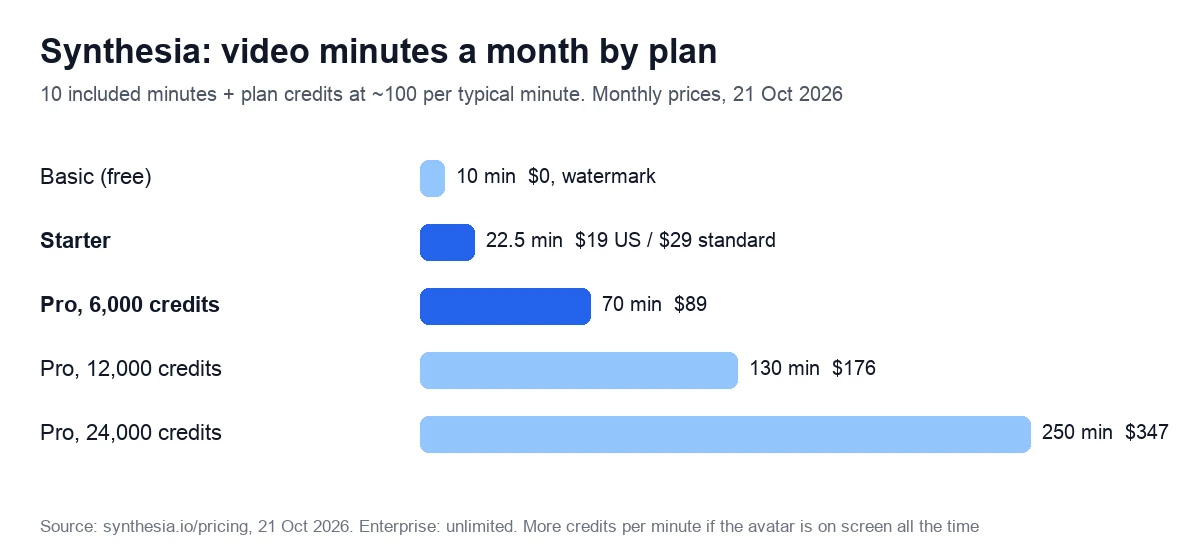
Synthesia has four plans: the free Basic, Starter, Pro and Enterprise. Every plan, free or paid, includes 10 minutes of video or dubbing a month. Beyond that you pay in credits, one pool for video, dubbing and surveys, and a typical finished minute takes about 100 of them.
Pro was called Creator until the plans switched to credits, between 27 September and 4 October 2026. Older guides quoting about $2.90 a minute describe the old Starter: 10 minutes for $29.
| Plan | US price, monthly / yearly | Standard price, monthly / yearly | Video a month | What the plan adds |
|---|---|---|---|---|
| Basic | $0 | $0 | 10 min | Watermark, sharing by link only, 9 stock avatars |
| Starter | $19 / $14 | $29 / $18 | About 22.5 min | MP4 downloads without the logo, 3 personal avatars, 125+ stock avatars |
| Pro, 6,000 credits | $89 / $59 | $89 / $64 | About 70 min | 5 personal avatars, interactive videos, API access, 180+ stock avatars |
| Enterprise | Custom | Custom | Unlimited | SCORM, brand kits, SSO, 240+ avatars, one-click translation |
Yearly prices are per month and paid upfront: $168 or $216 a year for Starter, $708 or $768 for Pro, with the year’s credits available on day one. Plan credits don’t carry over: the allowance and the plan’s credits “reset each billing period”.
Why US visitors see lower prices
Synthesia’s pricing page picks a price list by country. Its code holds a cheaper list, labeled T1, and archived replies of the page’s location script put visitors from the US, Canada, Germany and the Netherlands on it. That list appeared between 16 April and 5 May 2026. The UK always gets it, in pounds, Japan never does, and visitors outside the group see the standard list.
From the EU, the page shows euros: Starter at €26 (€16 billed yearly) and Pro at €79 (€58) on the standard list. The code also supports price experiments, so the checkout page has the final word.
What a minute costs, billed monthly or yearly
Synthesia pricing is easiest to compare per minute. We divide each price by the video it buys, once counting the 10 included minutes and once counting only the plan’s credits. We leave out the 500 credits every plan gets “to spend on anything”, as the vendor does in its estimate of “about ~22 minutes a month” on Starter.
| Plan and billing | Price | Video included | Per minute, all video | Per minute from credits |
|---|---|---|---|---|
| Starter, US, monthly | $19 a month | About 22.5 min a month | $0.84 | $1.52 |
| Starter, US, yearly | $168 a year | About 270 min a year | $0.62 | $1.12 |
| Starter, standard, monthly | $29 a month | About 22.5 min a month | $1.29 | $2.32 |
| Starter, standard, yearly | $216 a year | About 270 min a year | $0.80 | $1.44 |
| Pro, either list, monthly | $89 a month | About 70 min a month | $1.27 | $1.48 |
| Pro, US, yearly | $708 a year | About 840 min a year | $0.84 | $0.98 |
| Pro, standard, yearly | $768 a year | About 840 min a year | $0.91 | $1.07 |
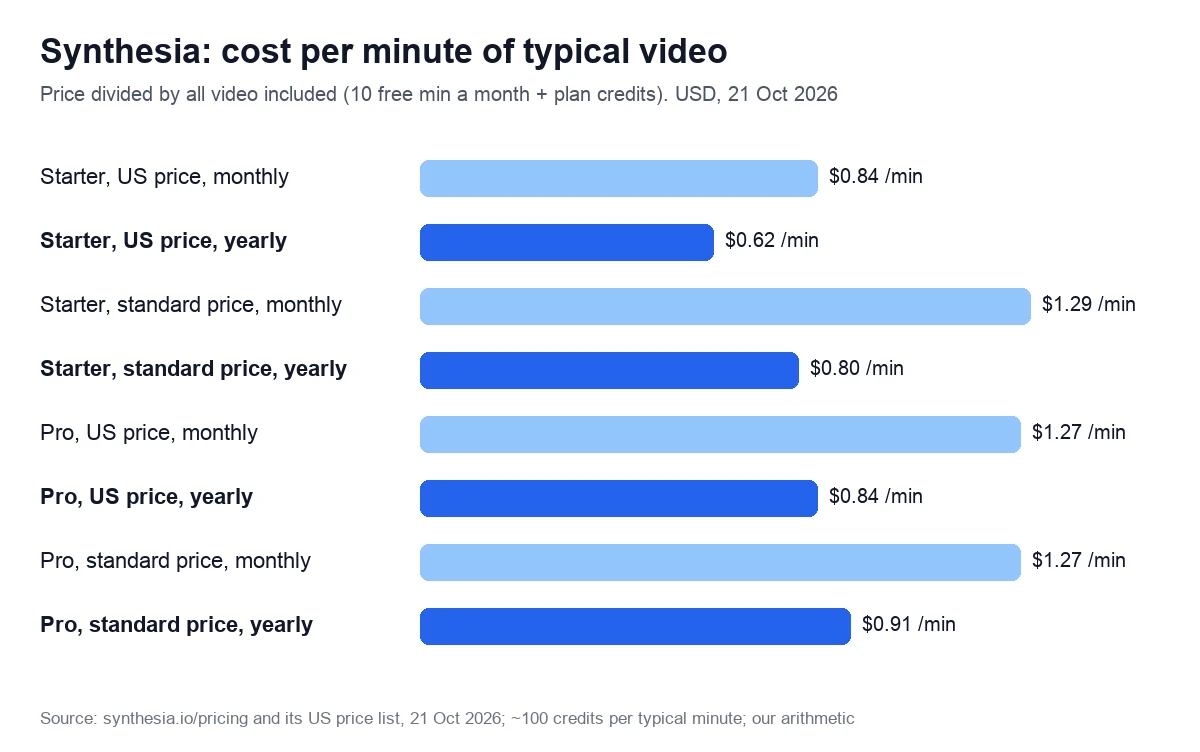
Treat these as best cases. The pricing page says “A typical finished minute uses about 100 credits, more if the avatar is on screen throughout.” It also calls each card’s minutes “the most extra video those credits can make”. Edits are cheap, though: “edit three seconds of an existing video and regenerate, and you’re charged for three seconds”.
Bigger Pro tiers go up to 48,000 credits for $676 a month and cut the price per credit by up to 5%. Counting the 10 included minutes, a minute on them costs a little more than on the base tier: about $1.35 to $1.39 against $1.27.
Check the price for your country
We may earn a commission if you buy through links on this page.
Is Synthesia free? The Basic plan and the US-only trial
Yes, within limits. Basic needs no credit card and renews monthly with 10 minutes of video or dubbing, 3 survey responses and 500 credits. Videos carry a watermark and can only be shared by link, since MP4 downloads start on Starter, and the stock library shrinks to 9 avatars.
For a quick test, the FAQ points to a free AI video generator page. The editor itself runs on desktop only.
The free trial of paid plans is narrower. The page’s code shows a “Try for FREE” button on yearly Starter and Pro only to US visitors; everyone else sees “Purchase now”. Its length and terms aren’t described, so read them at sign-up.
Two one-star Trustpilot reviews show the friction: on 7 September 2026 the advertised trial was unavailable, and on 30 September a reviewer learned only after entering personal details that it works only in Edge and Chrome.
What the plan price leaves out: credits, add-ons and Enterprise-only features
These costs and limits sit outside Synthesia’s monthly fee.
- Running out. When credits are gone, “Video creation and survey response collection pause until your plan renews.” Extra credits, with automatic top-ups since 9 September 2026, cost an unpublished amount and last 12 months.
- Lip-sync. Dubbing takes about 80 credits a minute with lip-sync and 40 without, because lip-sync “Uses 2× credits when enabled”.
- Syren. The AI video agent, in beta since 9 October 2026, typically uses 1,000 to 2,000 credits per minute, 10 to 20 times an editor minute: about $15 to $30 a minute at Pro’s monthly price. Each user gets 2,000 promo credits for one month, and Syren videos stop at 3 minutes.
- Extra avatars. A Studio Express-1 avatar costs $1,000 a year on yearly plans only and takes up to 10 days to make. An extra personal avatar was $240 a year on yearly plans on 7 October 2026.
- Surveys and roleplays. Survey answers cost 350 credits after 3 free a month; Roleplay learner seats are $29 a month ($25 billed yearly).
- Enterprise-only features. SCORM export, brand kits, SAML/SSO, live collaboration, quizzes, one-click translation and all 240+ avatars. Self-serve plans dub into 70+ languages, Enterprise into 140+.
- Seats and output. Self-serve plans have one editor, plus 3 guests on Starter or 5 on Pro. Downloads are Full HD MP4s; the pricing page lists no 4K export, though AI b-roll can be made in 4K since 25 September 2026.
On 7 October 2026, a G2 reviewer at a large company wrote that “Pricing can feel a bit high if you’re using Synthesia sparingly or want to access some of the higher tier features”, such as quizzes. Another, in April, found it “unclear which features I actually have access to on the Creator plan”.
Avatars, languages and the API: what each plan includes
London-based Synthesia Ltd, founded in 2017, raised $200 million at a $4 billion valuation in January 2026 and says over 90% of the Fortune 100 use its product.
The Synthesia AI avatar generator: stock, prompt-built and personal avatars
To make a Synthesia AI video, you write or import a script, choose an avatar and a voice, and generate. Avatars come three ways. You can pick one of 240+ ready-made avatars, build a character from a text prompt with Avatar Builder, or make your own digital twin “from a single photo”, with an optional voice clone.
Plans cap the stock library at 9 avatars on Basic, 125+ on Starter and 180+ on Pro; only Enterprise gets all 240+. Starter allows 3 personal avatars and Pro 5. Consent is recorded live on camera and “cannot be uploaded or bypassed”, and the person must be 18 or older.
Avatars can also change outfits and act in AI scenes generated with Veo 3, at 230 credits per clip with an action. Full-body Express-2 avatars with gestures arrived in September 2025.
Languages, dubbing and voices
Every plan narrates in 140+ languages and voices. Dubbing existing videos covers 70+ languages on self-serve plans and 140+ on Enterprise, the only plan that translates a whole video in one click. You can clone your own voice for your avatar or upload a recorded voiceover instead of a script.
| Feature | Basic | Starter | Pro | Enterprise |
|---|---|---|---|---|
| Stock avatars | 9 | 125+ | 180+ | 240+ |
| Personal avatars | None | 3 | 5 | Unlimited |
| Dubbing languages | 70+ | 70+ | 70+ | 140+ |
| MP4 download without logo | No | Yes | Yes | Yes |
| Editors and guests | 1 editor | 1 editor, 3 guests | 1 editor, 5 guests | Custom |
| CTAs, branching, bulk personalization | No | No | Yes | Yes |
| Quizzes, SCORM, brand kits, SSO | No | No | No | Yes |
| Video API | No | No | Up to 360 min a year, from the plan’s credits | 360 min a year included |
| Support | AI chat | Regular | Priority | Priority, plus a success manager |
Through the API, real-time interactive avatars cost $0.10 a minute on every paid plan (avatar layer only), and dubbing $0.40 a minute, or $0.80 with lip-sync, all from the same credit balance.
PowerPoint import, automatic captions and a Chrome screen recorder come with every plan. The vendor lists ISO 42001, ISO 27001 and SOC 2 Type II audits and stores customer data in Ireland.
HeyGen vs Synthesia: cost per minute, free plans and training features
Both sell avatar video by subscription and credits, and both entry plans cost $29 a month at standard prices; they differ in what the credits buy and where training features sit.
| Point | Synthesia | HeyGen |
|---|---|---|
| Entry plan | Starter: $19, or $14 billed yearly (US); $29 or $18 (standard) | Creator: $29, or $24 billed yearly |
| Video on the entry plan | About 22.5 min a month of typical video | 600 credits: 12.5 min (Avatar V) to 150 min (older Avatar III) |
| Per minute, entry plan billed yearly | $0.62 (US) or $0.80 (standard) | $0.16–0.28 (Avatar III) to $1.92 (Avatar V); $0.64 on an Avatar IV photo avatar |
| Next plan up | Pro: $89, or $59 to $64 billed yearly; about 70 min | Pro: from $49 for 1,000 credits, with 4K export |
| Free plan | 10 min a month, watermark, share link only | 3 videos a month up to 1 min, watermark |
| Export | Full HD MP4 | 1080p on Creator, 4K from Pro |
| Stock avatars | 125+ on Starter, 240+ on Enterprise | 500+ free, 700+ on paid plans |
| Languages | 140+; dubbing in 70+ on self-serve plans | 175+ languages and dialects on paid plans |
| SCORM export | Enterprise only | From Business: $149 a month, $20 a month per extra seat |
| Unused credits | Reset every billing period | Roll over a month; yearly plans keep them until renewal |
| Refunds | None, even if unused | None, unless the law requires one |
| Customer data stored in | The EU (Ireland) | The US (AWS) |
| Trustpilot / G2 | 3.8 (1,829) / 4.6 (2,841) | 4.2 (4,693; 21 Oct) / 4.8 (1,973) |
Synthesia suits buyers who want EU data storage, ISO audits, the cheaper yearly entry at US prices or cheap edits, as only regenerated seconds use credits. HeyGen suits those who need 4K, more languages, SCORM without an Enterprise contract, credits that roll over or the most minutes per dollar, on its older Avatar III model.
HeyGen’s free plan includes Avatar IV and a custom video avatar, but its terms, read on 7 October 2026, license free-plan output only “for personal, non-commercial, and internal evaluation purposes”. Both comparison pages favor their owners. Synthesia’s page cites a blind test it commissioned, in which people preferred its avatars 7 times out of 10. HeyGen’s says its rival “has no free tier”, which the Basic plan disproves.
More options: our HeyGen alternatives and the Colossyan review, which compares all three on SCORM.
Refunds, renewals and cancelling: what to know before you pay
- No refunds. The help center is blunt: “purchases are non-cancelable and non-refundable, even if the subscription wasn’t used.” Studio avatars can’t be refunded once made, and there are no student or non-profit discounts.
- Automatic renewal. Plans renew at the same per-unit price. Cancel in Billing before the renewal date, because “a reminder email isn’t guaranteed for every plan.”
- Plan changes. Upgrades apply at once with a prorated charge; downgrades start with the next billing period.
- Cancelling. Starter and Pro cancel in account settings. Access lasts until the paid period ends, and then “you lose access to Synthesia and all videos in your account”, so export your MP4s first. Support may reverse a mistaken cancellation within 48 hours.
- Your content. The customer terms let the vendor use your data “to provide, maintain and improve the Services”, which include its AI models. We found no explicit promise not to train on customer content.
What customers say on Trustpilot and G2
On 21 October 2026, Trustpilot rated Synthesia 3.8 out of 5 from 1,829 reviews: 71% five stars, 14% one star. It notes that the company hasn’t replied to negative reviews or invited reviews recently. G2 is kinder: 4.6 from 2,841 reviews on an archived page of 9 October, 1,870 of them from small businesses and 355 from large enterprises.
G2’s tags lead with ease of use (990 mentions), quality (809) and realistic avatars (788); the top cons are avatar limitations (443) and AI limitations (372). Four of the five newest reviews on that page, from 5 to 8 October, are marked “Incentivized” and came through seller invitations.
Complaints worth knowing:
- Moderation: a one-star Trustpilot review of 18 October 2026 likes the interface but calls the moderation extreme. The vendor wants scripts “professional and business related” and checks every video before delivery.
- Reliability: a two-star review of 1 October calls it good enough for training but says working features break, so everything needs double-checking.
- AI footage: an instructional designer on G2 (6 October, invited review) notes that “The maximum footage length is typically limited to around 8 seconds”, so narration can outrun the visuals.
What reviewers like:
- No filming: a talent management director at a university (G2, 7 October, invited review) can “create presenter-led training without coordinating a live recording for every topic”.
- Speed: an enterprise consultant on G2 (7 October) goes from concept to finished video “in sometimes less than an hour”.
Capterra showed 4.6 from 314 reviews on 7 October 2026. Two of the eight newest Trustpilot reviews, both five stars, mostly praise the vendor’s training sessions.
Who Synthesia suits, and who should look elsewhere
A good fit:
- L&D, HR and internal communications teams turning slides and documents into presenter-led training and process videos in many languages.
- Companies that want customer data in the EU and a vendor with ISO 42001 and 27001 audits.
- One editor making about 20 to 70 minutes of typical video a month on a yearly plan, without SCORM.
Look elsewhere if:
- You make UGC-style social ads. Synthesia’s avatar page lists video ads as a use, yet the acceptable use policy (23 February 2024) bars stock avatars from “promoted”, “boosted” or “paid” social ads without written consent. Creatify and Arcads are built for ads; see our alternatives for ads.
- You need SCORM on a budget. Colossyan’s Professional plan exports 5 SCORM packages a month for $59 a month billed yearly with one editor; each extra editor, up to three, adds $30 a month (prices of 7 October 2026).
- You want short clips for free. HeyGen’s free plan makes 3 watermarked videos a month, up to a minute each, licensed for non-commercial use only; Colossyan’s free Starter gave 20 minutes a month with a watermark on 7 October 2026.
- You need 4K. HeyGen exports 4K from its Pro plan, which starts at $49 a month; see AI avatar generators compared.
Only need a voiceover or dubbing?
If a training video needs no face on screen, narration over slides costs far less. Murf Creator gives 24 hours of voiceover a year for $228 billed yearly, about 16 cents a minute by our arithmetic, and works inside Canva; our Murf AI review has the limits.
Try Murf free: 10 minutes, no card
We may earn a commission if you buy through this link. It does not change the price you pay.
To dub videos you already have, ElevenLabs Starter costs $6 a month with dubbing and instant voice cloning. Its help center said on 7 October 2026 that dubbing keeps the original speaker’s voice but offers no lip-sync; see our ElevenLabs review.
Compare ElevenLabs plans with dubbing
As an independent ElevenLabs affiliate, we may earn a commission if you subscribe through this link.
Our score: 3.1 out of 5, and how we checked
This Synthesia review scores six weighted criteria, explained on our How we test page. We have no account with the vendor, so output quality is not scored, and the total is the weighted average of the other five.
| Criterion | Weight | Score | Why |
|---|---|---|---|
| Price for real work | 25% | 3 | $0.62 to $0.91 a minute billed yearly; teams and SCORM need custom Enterprise pricing |
| Output quality | 25% | Not scored | No account yet |
| Limits and fine print | 15% | 3 | Credits reset every period; minutes are estimates; edits charge only new footage; one editor |
| Billing and reputation | 15% | 3 | No refunds even if unused; videos gone after cancelling; Trustpilot 3.8, G2 4.6 |
| Support and learning | 10% | 3 | Detailed help center, academy and live sessions; priority support from Pro |
| Maturity of AI features | 10% | 4 | Express-2 avatars, lip-sync dubbing and interactive avatar API live; Syren in beta |
The math: 0.25 × 3 + 0.15 × 3 + 0.15 × 3 + 0.10 × 3 + 0.10 × 4 = 2.35. Divided by 0.75, the total weight of the scored criteria, that gives 3.1. On our scale, 3.0 to 3.9 means good for specific cases: read the limits first.
Sources: the vendor’s pricing page with its price lists by country, the refund policy and billing help, all read on 21 October 2026. We read the acceptable use policy, terms and security page on 7 October and used archived pricing pages since October 2025. We re-check prices within 90 days.
We may earn a commission if you buy through links on this page.
Frequently asked questions
Basic is free. Starter costs $19 a month for US visitors, or $14 a month billed yearly, according to the pricing page’s code; the standard list charges $29, or $18 billed yearly. Pro costs $89 a month, or $59 billed yearly in the US ($64 on the standard list), with bigger tiers up to $676 a month. Enterprise is priced on request.
About 22.5 minutes a month: the 10 minutes every plan includes, plus 1,250 credits, about 12.5 more minutes of typical video. Yearly Starter adds 15,000 credits upfront, about 150 minutes over the year. Videos with the avatar on screen throughout use more credits, and dubbing and surveys share the same pool.
No. The help center says purchases are non-cancelable and non-refundable, even if the subscription wasn’t used, and studio avatars can’t be refunded once produced. Cancel from Billing before the renewal date, since a reminder email isn’t guaranteed. If you cancel by mistake, support may reverse it within 48 hours.
You keep access until the paid period ends. After that, the help center says you lose access to the product and all videos in your account and can no longer download them. Export every MP4 you want to keep first; downloads need Starter or a higher plan.
Stock avatars only with written permission: the acceptable use policy, updated in February 2024, bars them from promoted, boosted or paid social ads unless the vendor consents in writing. Your own avatar needs consent from the person it shows. TV, news and political uses of stock avatars also need written consent.
Only on Enterprise, along with brand kits, SSO, quizzes and one-click translation. Self-serve plans give you MP4 downloads from Starter up, and Pro adds interactive CTAs and branching. For SCORM packages without an Enterprise contract, Colossyan’s Professional plan includes 5 SCORM exports a month (checked on 7 October 2026).