
InVideo AI Review 2026: Credits, Plan Prices, the Free Plan and Refunds
We may earn a commission if you buy through links on this page, at no extra cost to you. The page also has one ElevenLabs link, in the alternatives section. As an independent ElevenLabs affiliate, we may earn a commission if you subscribe through this link.
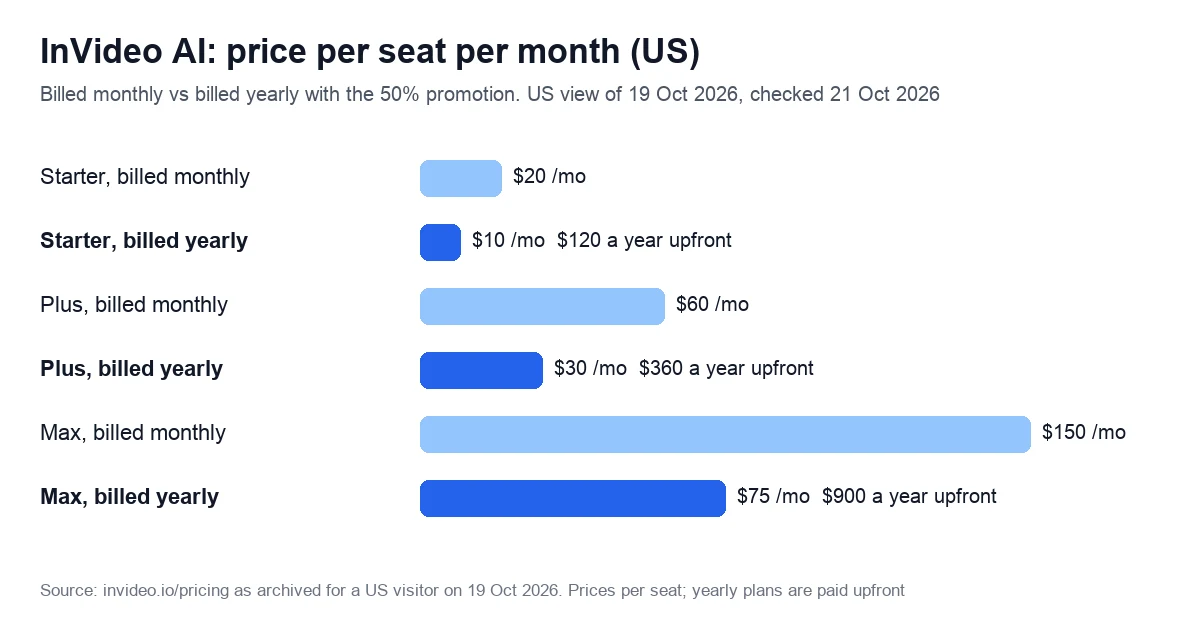
InVideo AI is a browser video editor whose AI agents write, generate and cut video for credits. In the US, Starter costs $20 a month, or $10 a month on a promotional yearly plan, for 400 credits that expire monthly.
Verdict: 2.4/5 (output quality not scored). We don’t recommend a paid plan for regular video work: Plus’s 2,000 monthly credits buy about 1 min 40 s of Seedance 2.5 footage at 1080p, unused credits vanish monthly, and refunds end once you generate or download anything. For a few short social clips, start on the free plan, which needs no card.
Try InVideo AI free, no card needed
We may earn a commission if you buy through links on this page.
On this page: overview, pricing, credits, free plan, stock and exports, refunds, reviews, who it suits, alternatives, score, FAQ.
What InVideo AI is, and how it differs from InVideo Studio
In October 2026 the homepage sells the product as “The agentic video editor for serious creatives”. You upload footage, describe the edit to an agent called Agent Two, review the cut and export. The help center compares its multitrack timeline to Premiere Pro and DaVinci Resolve.
The older prompt-to-video mode remains: in April 2026 the pricing page promised an agent that “can create up to 30 mins of video from a single prompt”. The editor can also generate shots, voiceovers or music inside your own project.
InVideo Studio is a separate, older editor with its own pricing. This review covers InVideo AI.
InVideo AI pricing: credits, plans and what resets
Prices depend on your country and change often. US visitors on 19 October 2026 saw Starter, Plus and Max for individuals, larger Max tiers, team plans and Enterprise, all priced per seat.
| Plan | Billed monthly | Billed yearly | Credits a month | Notable limits |
|---|---|---|---|---|
| Free | $0 | — | Weekly quota, size not published | Watermark on exports |
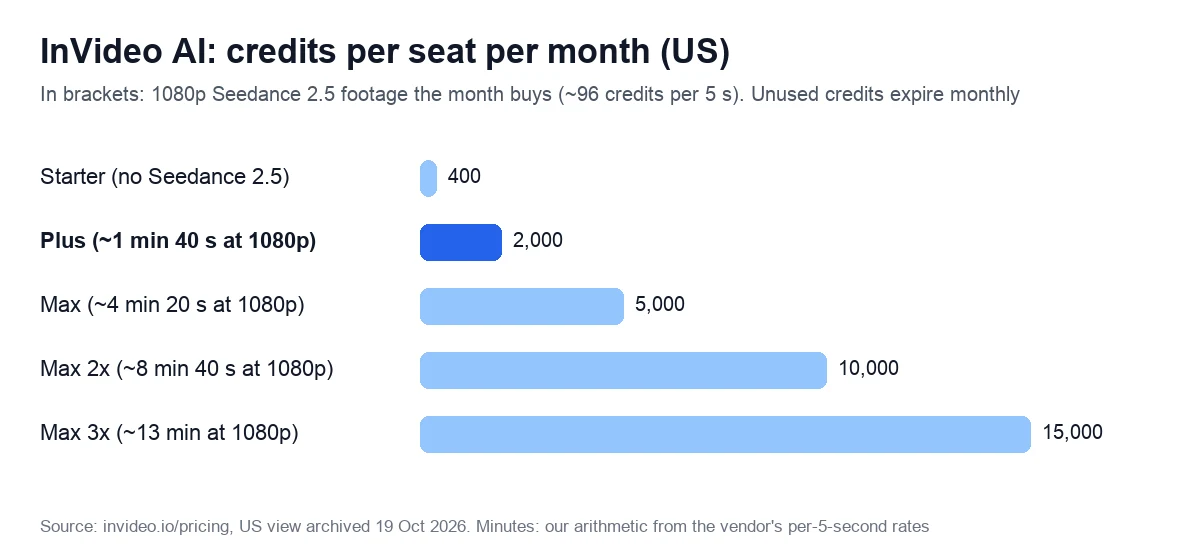
| Starter | $20 | $10 ($120 a year) | 400 | Lite agent only, no Seedance 2.5, Full HD* |
| Plus | $60 | $30 ($360 a year) | 2,000 | All agents and models, Full HD* |
| Max | $150 | $75 ($900 a year) | 5,000 | 4K, 20 free guest seats |
| Max 2x / Max 3x | $300 / $450 | $150 / $225 | 10,000 / 15,000 | Same features as Max |
| Team (5+ seats) | $79 a seat | $47.40 a seat | 1,600 a seat | 4K |
| Scale (5+ seats) | $215 a seat | $107.50 a seat | 4,000 a seat | 4K |
| Enterprise | Custom | Custom | Custom | SOC 2, single sign-on, indemnification |
*The plan data limits Starter and Plus to Full HD, but the page’s calculator promises 4K export of your own footage from Starter; see stock and exports. Yearly plans are charged upfront. Yearly prices for Max 2x, Max 3x, Team and Scale are our arithmetic from the plan data.
The yearly price is a promotion, and it keeps moving
The plan data lists full yearly prices of $240, $720 and $1,800 per seat, then applies 50% coupons with no end date; the one on Starter and Plus is labelled “50% off forever”. Monthly prices held at $20, $60 and $150 in all 14 archived copies from 29 September to 19 October, while the yearly discounts changed twice.
- 29 September: no discount on Starter, 17% off Plus and 33% off Max.
- 1 October: 40% off Plus ($36 a month) and 50% off Max ($75).
- 9 October: 50% off all three, so $10, $30 and $75 a month, still in place on 19 October.
Under the terms of service, price changes apply “from the next renewal period” after notice. Moving from yearly to monthly billing gives up the discount, the help center warns.
What resets, and what expires
- Monthly reset. Credits renew on the day you subscribed, “on annual plans too, since credits are allocated per month”, and don’t roll over.
- Upgrade versus cancel. Upgrading carries unused credits over; after cancelling or downgrading, “any unused paid credits will expire” at the end of the period.
- Top-ups. $50 buys 2,000 credits, valid up to 12 months or until your subscription ends.
- Moving prices. The vendor may “update credit costs at any time, without prior notice”.
By our arithmetic, a credit costs the same on Plus and Max: 1.5 cents billed yearly, 3 cents monthly. Starter pays 2.5 and 5 cents. So, apart from a one-off 10% discount on the first month of monthly Max, the Max card’s “Lowest cost per credit” badge beats Starter, not Plus.
Outside the US, and older plan names
For visitors in the EU on 21 October, the page showed euro plans instead: Basic at €9 a month for 190 credits, Pro at €30 for 1,000 and Ultra at €80 for 3,000, with yearly prices halved.
Reviews quoting Plus at $20, Max at $100 or a Generative plan describe the earlier lineup. The vendor’s G2 listing, archived on 8 August 2026, still showed Generative at $200 for 800 AI credits.
Check today’s InVideo AI prices
We may earn a commission if you buy through links on this page.
What a credit buys: the cost of a minute of video
Credits pay for AI work: the agent’s processing and the images, video, voice and music it generates. Video models are priced per second. Manual timeline editing, exporting and downloading cost nothing.
The vendor publishes rates for generated clips, not a price per finished video. Its table for Seedance 2.5, the video model it promotes on the pricing page, gives these rates for 5-second clips.
| Seedance 2.5 quality | Credits per 5 s | Credits per minute | Plus month (2,000) | Max month (5,000) |
|---|---|---|---|---|
| Draft | 24.5 | 294 | 6 min 45 s | 17 min |
| 720p | 56 | 672 | 2 min 55 s | 7 min 25 s |
| 1080p | 96 | 1,152 | 1 min 40 s | 4 min 20 s |
At 1.5 cents a credit on yearly Plus, a minute of 1080p footage costs about $17, or about $35 billed monthly. A 30-second ad made only of generated 1080p shots would use 576 credits, over a quarter of Plus’s month, before retries.
Why the balance drops faster than expected
- The agent bills for thinking, too: credit usage “is not limited to finished video clips”.
- It doesn’t ask first. By default the agent generates “directly without asking for permission”. Switch it to “Ask before generating videos” and set a credit limit per project.
- Agent costs show afterwards: per message in the three-dot menu, per project under Project Usage. When you pick a model yourself, a two-line icon shows the cost before you generate.
- Running out mid-video brings up a paywall; the alternative is to “create the video using stock media instead”.
The free plan: limits and watermark
The free plan needs no card: the help center says you can use the product “for free without entering your card details”. You get “limited credits”, and the quota “is reset weekly on Monday at 12 a.m. UTC”. Neither the help center nor the US pricing page says how many credits that is.
Free users can run AI models within those credits, generate images and share videos on social media. The terms grant a licence to “commercialise Outputs you generate through the Services” without tying it to a paid plan.
Expect a watermark on free exports: the plan data lists its removal under every paid plan, and projects exported before you subscribe “will still contain watermarks” until exported again on a paid plan.
A year earlier the free plan was spelled out: 10 video minutes and 1 AI credit a week, 4 watermarked exports a week and “No access to generative features”, per a pricing page archived on 1 October 2025.
Stock footage, iStock quota, exports and 4K
Paid plans include “unlimited access to standard stock media from Storyblocks, Shutterstock, Pexels, and Pixabay”. Premium iStock clips are rationed: 100 a month per seat on Starter, 200 on Plus and 500 on Max. Go over the quota and you’re asked to pay when downloading; it resets monthly and doesn’t roll over.
- Storage: 200 GB per seat on Starter, 600 GB on Plus, 2,000 GB on Max.
- Seats: multiplayer editing for up to 5, 10 or 20 seats; Plus and Max add 10 or 20 free guest seats with 190 credits each.
- Exports: MP4 video, WAV, AAC or Opus audio and PNG stills, plus editable projects for Premiere Pro, Final Cut Pro and DaVinci Resolve.
Resolution is where the page contradicts itself. Its plan data limits Starter and Plus to Full HD, while its calculator lists “Your own footage, 4K export” from Starter. If you need 4K, confirm it at checkout.
Cancelling and refunds: what the terms say
- Automatic renewal. Under the terms in force since 8 July 2026, your plan “will automatically renew at the end of each billing period” unless you cancel first.
- A 7-day window that closes at first use. You may request a refund within seven days of a purchase or renewal, or longer where local law requires, “provided you have not used any credits or premium features”. Generating or downloading any video or asset counts as use.
- No partial refunds, none for credits: “Credits, whether free or paid, are non-refundable, non-redeemable and non-transferable.”
- Discretion. Requests go to [email protected] and are decided “on a case-by-case basis”; approved refunds should arrive within 5 to 10 business days. Apple refunds App Store purchases.
- Yearly by mistake. Moving to monthly billing takes effect only when the yearly term ends.
- Cancelling. Profile, Subscription, Cancel. The plan runs to the end of the period, then drops to Free and the card is removed. App store subscriptions are cancelled in the store.
On data, the terms are plain: “Invideo will not use your User Data to train or fine-tune its artificial intelligence or machine-learning models”.
InVideo AI reviews on Trustpilot and G2
On 21 October 2026, Trustpilot listed two profiles. The older one, still named Invideo Studio, scored 1.8 out of 5 from 1,024 reviews, yet its October reviews are about AI credits and plans. The newer one, for the AI app, scored 2.9 from 910. On both, about a third of reviews give one star and most of the rest give five.
G2 showed 4.3 from 179 reviews on a page archived on 8 August 2026, with “Plan Limitations” as the most-tagged complaint.
- Credits that don’t stretch. On Trustpilot on 8 October 2026, a Plus subscriber wrote that 2,000 credits did not cover two short stock-footage videos; on 10 October another reported 2,500 credits spent with nothing to show.
- Older plans, same story. From G2, February 2026: “I paid $60 for the Max Plan, expecting the advertised minutes, but real AI generation consumes credits so fast that I only got 2 minutes of video.”
- Refunds. A G2 reviewer in June 2026 says “my same-day refund request was denied after a brief evaluation because some credits had been consumed during testing”.
- Charges and support. G2, July 2026: “I was charged on my credit card without any clear warning, and the default settings appear to allow this to happen.” A Trustpilot reviewer on 12 October calls support mostly an AI-agent loop.
- Volume. A 2-star Trustpilot review from 3 October 2026 likes the results but finds the credit model unworkable for 3 to 5 videos a week.
On the plus side, a G2 reviewer (June 2026) says “Entering a script or idea and getting a first draft in a few minutes is the feature I use the most”. On Trustpilot, 57% and 60% of reviews on the two profiles give five stars.
Who it suits, and who should skip it
A good fit:
- Creators who need a few short social clips a month within the free weekly quota or Starter’s 400 credits.
- Editors who want a browser timeline with an AI assistant: manual editing costs no credits, and the cut can move to Premiere Pro or DaVinci Resolve.
- Small teams that edit together: multiplayer editing is on every plan.
Look elsewhere if:
- You publish several videos a week from generated footage: at about $17 per 1080p minute on yearly Plus, before agent processing and retries, costs climb fast. Compare other AI video editing tools.
- You make training courses: the export guide lists MP4, audio, PNG stills and editable projects, with no SCORM package. Our Colossyan review covers a tool that exports SCORM.
- You need a talking presenter, which avatar platforms such as Synthesia, HeyGen and Colossyan specialise in: compare Synthesia alternatives.
- You make long narrated pieces: a G2 reviewer found the workflow “optimized for social media production rather than long-form editorial projects”.
Alternatives by job: training, avatars, clips and voiceovers
For training videos with SCORM export, start with our Colossyan review. For avatar presenters, read our Synthesia review, then compare HeyGen alternatives and our list of AI avatar generators.
For faceless videos from a script or link, our Pictory review compares this tool with a rival that sells exported video by the minute. For clips cut from your own recordings, our guide to AI video editing tools compares Revid, Fliki, Opus Clip, Vizard and Descript by price and minutes.
Only need a voiceover?
InVideo lists ElevenLabs and MiniMax among its audio models, voice generation costs credits, and a G2 reviewer found the Italian voice “not sufficiently natural for high-quality narration”. You can make the narration in a voice tool and upload it: the editor accepts your own “video, images, and audio files”.
- Murf: 10 free minutes with no card, but no downloads or commercial rights; Creator is $19 a month billed yearly for 24 hours of voice a year, checked on 21 October 2026. More in our Murf AI review.
- ElevenLabs: Starter is $6 a month with a commercial licence and instant voice cloning, checked on 21 October 2026. More in our ElevenLabs review.
Try Murf free: 10 minutes, no card
We may earn a commission if you buy through this link. It does not change the price you pay.
See ElevenLabs plans from $6 a month
As an independent ElevenLabs affiliate, we may earn a commission if you subscribe through this link.
Our score: 2.4 out of 5, and how we checked
We score every tool on six weighted criteria, explained on our How we test page. We hold no account with this vendor, so output quality is not scored.
| Criterion | Weight | Score | Why |
|---|---|---|---|
| Price for real work | 25% | 2 | About $17 per 1080p minute on yearly Plus; yearly prices are a moving promotion |
| Output quality | 25% | Not scored | No account yet |
| Limits and fine print | 15% | 2 | Credits expire monthly even on yearly plans; agent generates without asking by default |
| Billing and reputation | 15% | 2 | Trustpilot 1.8 and 2.9; refunds end at first use; self-serve cancelling |
| Support and learning | 10% | 3 | Dated help articles on credits and agents; some still use old plan names |
| Maturity of AI features | 10% | 4 | Seedance 2.5, three agent modes and a full timeline on Plus |
The math: 0.25 × 2 + 0.15 × 2 + 0.15 × 2 + 0.10 × 3 + 0.10 × 4 = 1.80. Divided by 0.75, the weight of the scored criteria, that gives 2.4. Below 3.0, our scale says we don’t recommend the tool.
Sources: the vendor’s pricing page as archived for a US visitor on 19 October 2026, and the live page as shown to visitors in the EU. We also read the terms of service dated 8 July 2026 and help center articles on plans and credits, refunds and the free plan on 21 October 2026. Price history comes from pricing pages archived between October 2025 and October 2026. We re-check prices every 90 days.
Start on the free plan before you pay
We may earn a commission if you buy through links on this page.
Frequently asked questions
Yes. The free plan needs no card and gives limited credits that reset every Monday at 00:00 UTC; the vendor doesn’t publish how many. Exports carry a watermark, which paid plans remove. US paid plans start with Starter at $20 a month, or $10 a month billed yearly in the October 2026 promotion.
No. Credits reset every month on the day you subscribed, yearly plans included, and unused ones are lost. Upgrading carries the balance over, but after cancelling or downgrading, paid credits expire at the end of the period. Top-ups, $50 for 2,000 credits, last up to 12 months or until the subscription ends.
Only within 7 days of a purchase or renewal (longer where local law requires), and only if you haven’t generated or downloaded anything in that period. There are no partial refunds, credits are never refunded, and each request is decided case by case. Write to [email protected]; Apple handles App Store refunds.
Yes. The terms of service give you a perpetual licence to use, modify, distribute and commercialise your outputs, and it survives cancellation. Stock footage inside a video stays under its owner’s licence, with no exclusivity. Where the law requires AI content to be labelled, that disclosure is your job.
Generated video is priced by the second. Seedance 2.5 at 1080p takes about 96 credits per 5 seconds, or 1,152 a minute, over half of Plus’s monthly 2,000. Agent replies also bill for processing, and by default the agent doesn’t ask before generating. Turn on approvals and set a project credit limit.
The plan data labels the Starter and Plus coupon “50% off forever”, and Max carries an equal 50% discount with no end date. The discounts changed twice between 29 September and 19 October 2026, and the terms allow price changes from your next renewal after notice. Switching to monthly billing gives up the discount.