
Picsart Review 2026: Free Tier, Pro Pricing, AI Tools and How to Cancel
We may earn a commission if you buy through links on this page, at no extra cost to you.
Picsart is a photo and video editor with built-in AI generation for web, iPhone, Android and Windows. Free accounts get 5 AI credits a week; Pro costs $15 a month, or $126 a year, with 500 credits a month.
Verdict: 3.1/5 (output quality not scored). A practical pick for social posts, product cutouts and quick ad visuals; Pro billed yearly works out to $10.50 a month. Check the billing rules: the web plans showed no free trial, the terms call payments nonrefundable, and app-store subscriptions are canceled in the store. Professional retouchers should look elsewhere.
See Picsart’s current plans and prices
We may earn a commission if you buy through links on this page.
On this page: what you get, free tier, pricing, AI credits, free trial, how to cancel, commercial use, reviews, who it suits, apps like it, score, FAQ.
What you get: an editor, outside AI models and stock in one account
Picsart was founded in Armenia in 2011 by Hovhannes Avoyan, still its CEO, and is based in Miami. By its own count, reviewed in September 2026, the app has 2.5B+ downloads and runs on web, iOS, Android and Windows. One subscription covers three things:
- An editor for photos and short videos, with templates, stickers, collages and batch editing of 50 images on Pro, 100 on Ultra.
- AI editing tools named in the App Store listing: Background Remover, Object Remover, AI Expand, AI Enhance, AI Replace, AI Try-On, and AI Writer for captions and marketing copy.
- Generation with outside models. The pricing page sells Seedance, Nano Banana Pro, MiniMax H3 and Kling 3.0, and Ultra lists “200+ leading AI video, image, and audio models”. Pro includes unlimited images from one model, Flex.2 Klein.
The pricing page lists as new 15+ AI agents, a command-line tool and access through MCP from Claude Code, Cursor and ChatGPT. The GenAI terms are plain about it: “Many of the tools in the Picsart AI Platform utilize third-party AI models to generate the Output”. Quality depends on the model you pick, and so does the cost in credits.
Is Picsart free? What the free tier includes
Yes, with limits. Both app stores list Picsart as free with in-app purchases, and its terms call the no-cost tier “Picsart Free”. Standard photo and video tools, custom sizes and a selection of templates, fonts and stickers come with every plan. For AI work, a free account gets 5 credits a week, per the pricing page’s plan data.
A paid plan adds:
- No ads in the mobile app. Google Play marks the app “Contains ads”, and the FAQ lists “an ad-free experience on the mobile app” as a subscription benefit.
- Exports without the watermark, a paid benefit in an older FAQ entry for the Gold plan.
- Premium templates, fonts and stickers, stock photos and Getty video clips, brand kits and batch editing.
- Monthly instead of weekly credits: 500 on Pro and from 1,500 on Ultra.
Long-time users feel the squeeze. A Google Play review from 12 August 2026 reads: “All of the sudden, I can do literally nothing without it prompting me to buy a subscription”.
Picsart pricing: Plus, Pro and Ultra, monthly vs yearly
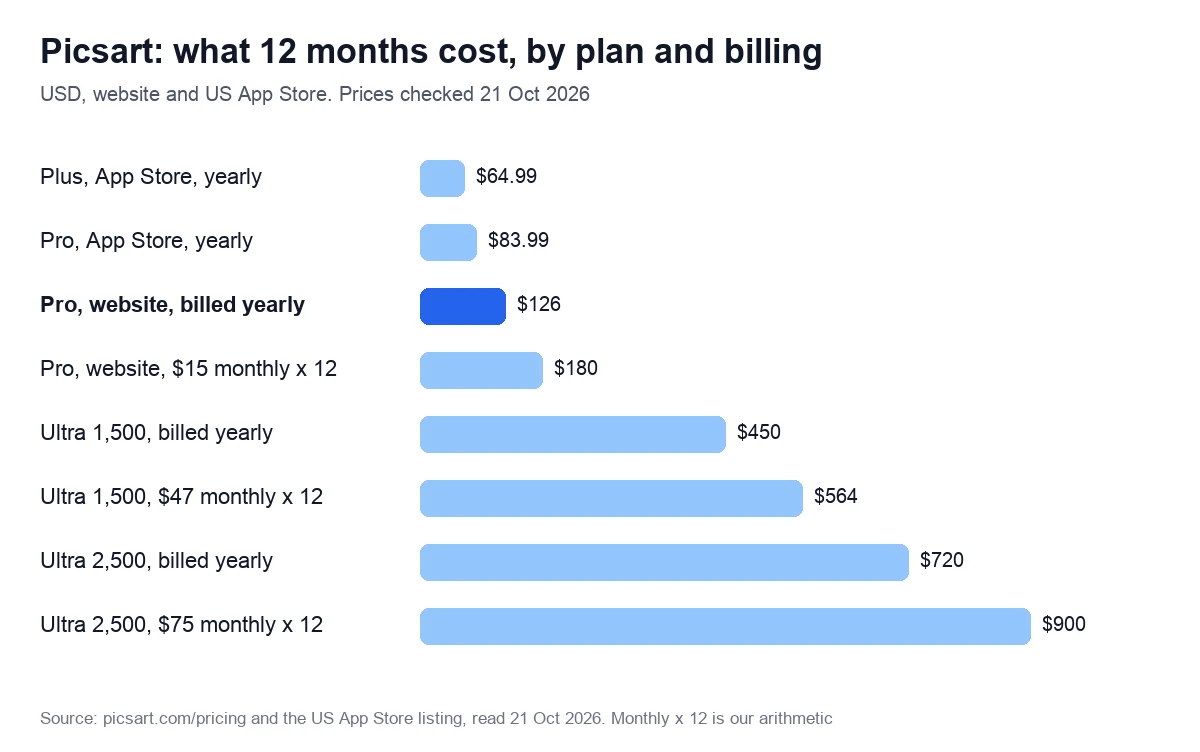
Picsart’s web pricing page shows two paid cards, Pro and Ultra, with a monthly and yearly switch labeled “SAVE UP TO 30%”. Plus, the cheaper tier, is gone from the web, but the iPhone app still sells it. Enterprise has its own page and no published price.
| Plan | Billed monthly | Billed yearly | AI credits |
|---|---|---|---|
| Free | $0 | $0 | 5 a week |
| Plus (iPhone app) | $11.99 | $64.99 a year | 200 a month (web plan data) |
| Pro | $15 | $126 a year ($10.50 a month) | 500 a month |
| Ultra 1,500 | $47 | $450 a year | 1,500 a month |
| Ultra 2,500 (default) | $75 | $720 a year ($60 a month) | 2,500 a month |
| Ultra 5,000 | $145 | $1,390 a year | 5,000 a month |
| Ultra 10,000 | $250 | $2,400 a year | 10,000 a month |
Yearly billing saves $54 on Pro (30%) and $180 on the default Ultra tier (20%). Ultra is priced per seat, and larger teams are sent to sales.
What Pro and Ultra include
| Feature | Pro | Ultra |
|---|---|---|
| AI models | Trending models: Seedance 2.0, Nano Banana Pro, MiniMax H3, Kling 3.0 | 200+ video, image and audio models, early access to new features |
| Unlimited generations | Flex.2 Klein images; Wan 3.0 until 31 October | Same |
| Stock | Millions of photos and Getty video clips | Up to 6.5 million Getty stock videos |
| Batch editing | 50 images at once | 100 images at once |
| Brand kits | 3+ | 10+ |
| Ad tools | Not listed | Ad variations, localization, performance tracking |
| Seats and storage | 100 GB; seats not listed | Team seats, 300 GB per seat |
| Extra credits | Upgrade to Ultra; FAQ text also mentions add-ons | Add-on credits that never expire |
The FAQ sums up the split: “Choose Pro for standard photo and video editing, or Ultra if you require heavy AI generation, premium AI models, and team collaboration features”.
App store prices are different
The US App Store sells Pro at $13.99 a month, $83.99 a year or $11.99 a week, Plus at $11.99 a month or $64.99 a year, and legacy Gold plans from $4.99 a week. Yearly Pro in the app costs $42 less than on picsart.com.
Two catches. We could not confirm that app Pro carries the same 500 monthly credits. And the vendor’s FAQ text for the older Gold plan warns: “If you subscribe via the app, you’ll only have access via that specific platform (iOS or Android)”. A website subscription, by the same text, covers web, iOS and Android.
AI credits: how they are counted and when they expire
Picsart credits are “virtual tokens used for generative AI tools”, and the FAQ warns: “Different AI features use different credit amounts. Credit allocation & costs are subject to change”. Four rules matter:
- No rollover. “Monthly subscription credits expire at the end of each billing cycle and do not roll over”. Add-on credits stay until used.
- Failed generations are refunded in credits, “automatically rolled back to your account within 24-48 hours”.
- Trials get a fraction: 50 credits on a Pro trial instead of 500, and 500 on an Ultra trial instead of 2,500.
- Some generations are free. Flex.2 Klein images are unlimited on both paid plans, and Wan 3.0 is unlimited until 31 October 2026, except through the API, CLI and MCP.
We could not pin down the exchange rate. Each card animates how many Nano Banana Pro images and seconds of Seedance 2.5 video a plan buys, but a script fills in those numbers and they are not in the page code. Check that counter before paying.
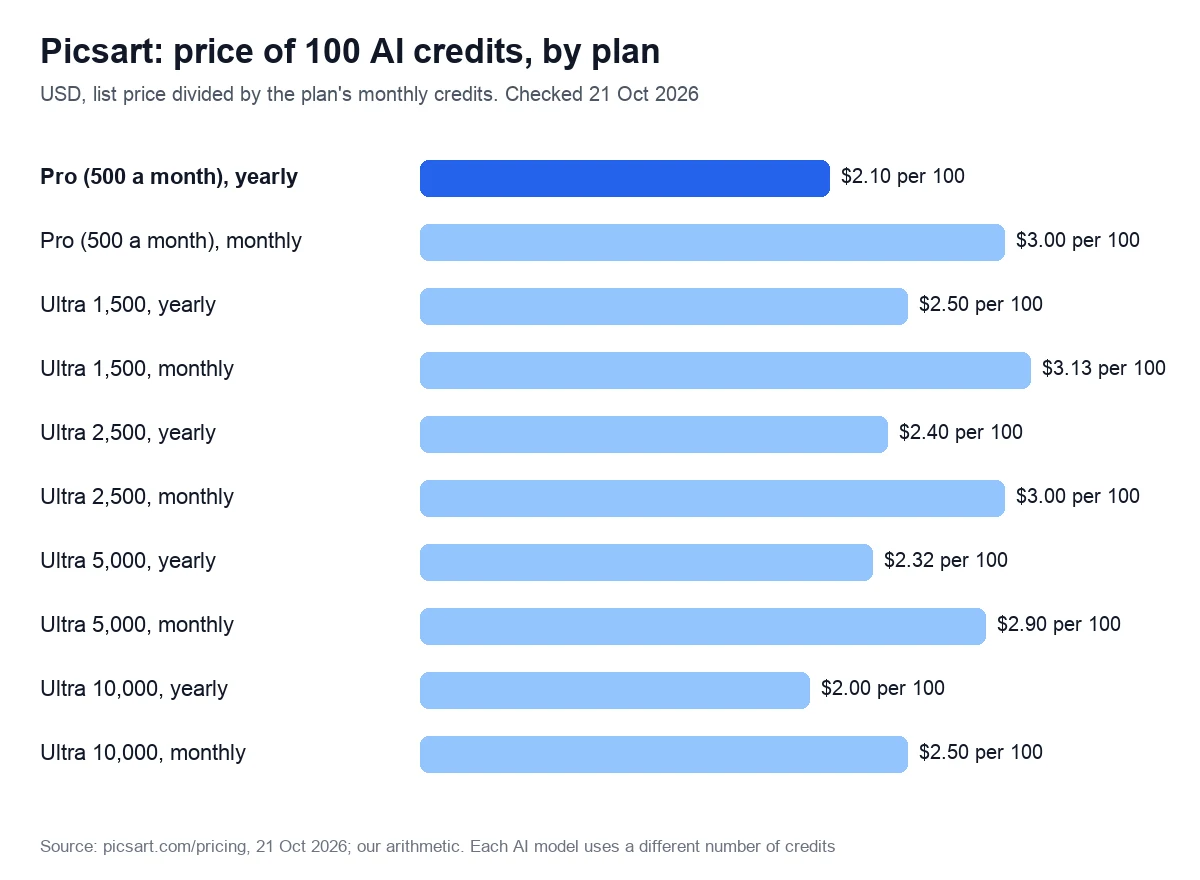
Ultra is barely a bulk discount: billed yearly, Pro credits cost less than Ultra credits at every tier except 10,000 a month. Buy Ultra for its models, seats and ad tools; if you only need more credits, check whether add-on packs are offered in your account first.
Compare Pro and Ultra on the pricing page
We may earn a commission if you buy through links on this page.
Picsart free trial: who gets one and when billing starts
On 21 October 2026, Picsart’s web plans showed no free trial. In the plan data the pricing page served us (logged out, from the EU), all 10 web plans had zero trial days and no trial switch available. We checked twice that day.
Yet FAQ text in the same page’s code says: “Most plans include a free trial, though eligibility depends on your account history and the specific plan chosen”. So a trial may appear in the app, in another region or for some accounts, and its length is not published. If you get one:
- A card may be required: “For some Trials, we’ll require you to provide your payment details to start the Trial”.
- Billing starts right after. The terms allow a charge “on the first day following the end of the Trial”, for the monthly or yearly plan picked at checkout.
- Canceling early keeps the trial: “you’ll retain access to all the premium features until your free trial period is over”.
- Trial credits are capped, so a trial shows you the tools rather than a month of output.
How to cancel Picsart
Cancel where you paid. The help center’s cancellation article (we read an archived copy from 21 May 2026, as the live page blocked our requests) starts with a warning: “Deleting the Picsart app or your Picsart account won’t automatically cancel your subscription”.
On the website
- Go to picsart.com and log in.
- Click your profile photo and select Settings.
- Open Billing & Subscriptions and click Cancel subscription.
- Choose “Downgrade to free plan”, which, the article says, “means the same as Cancel Subscription”.
In the iPhone or Android app, or on Windows
- Open the app and enter Settings through the icons in the navigation bar.
- Scroll down and tap Subscription; the app sends you to the App Store or Google Play.
- Find the subscription among your active ones and cancel it there.
Log in to the store account you paid with, or the subscription won’t show. On Windows, follow the Microsoft Store’s steps for managing subscriptions. Forgot which account paid? The article points to your purchase receipt.
Timing, and canceling a free trial
The help center recommends canceling “24-48 hours before your subscription renewal date”. Paid features last until the period ends, then the account drops to the free plan. For a trial, use the same steps before its last day. No cancel button may mean you aren’t subscribed there; check whether you paid through Apple, Google or Microsoft.
Refunds: the terms say no, the help center says ask
The terms of use, last updated on 30 June 2023, are blunt: “All payments are nonrefundable”, partial periods included. Yet the help center’s Refund Policy, archived on 21 May 2026, says website subscribers “can submit a request”, while app purchases go to Apple or Google. If you were charged by mistake, ask, but treat a refund as a favor rather than a right.
Commercial use: AI images, templates, stock photos and music
Each kind of content in Picsart has its own license:
- AI output. Under the GenAI terms of 30 April 2026, you own input and output “to the extent allowable by law” and may use output for any legal purpose, with no warranty that it is copyrightable or non-infringing.
- Your uploads. The same terms grant the company a “perpetual, worldwide, royalty-free, sub-licensable, irrevocable” license to your input, including to improve its third-party AI providers’ services, and to display and distribute your output. Think twice before uploading a client’s unreleased product shots.
- Public by default. Text-to-image results and prompts “may be publicly viewable and remixable”.
- Templates and stickers are licensed “only for your personal and non-commercial use” unless marked as available for commercial use.
- Shutterstock photos are “for digital use within Picsart only and may not be used for printing”, and can’t serve as a business trademark.
- Faces. Biometric features such as AI Avatar are for users aged 18 and over; the app itself is 13+.
Music needs the most care. Tracks that Epidemic Sound supplies to the mobile video editor come under a narrower license: small businesses may use them for self-promotion, but not in “paid media space”, which explicitly includes online pre-, mid- and post-roll ads. Boosting an organic post is allowed; monetizing the video, for example with YouTube ads, is not.
For narration in a paid ad, use a voice tool whose license covers it. Murf, for example, grants commercial rights on all paid plans that survive cancellation, with TV and radio broadcast reserved for Enterprise; for registered businesses Murf recommends its Business license. Creator is $19 a month billed yearly. See our Murf AI review.
We may earn a commission if you buy through this link. It does not change the price you pay.
Ratings and complaints: Trustpilot, App Store and Google Play
On 21 October 2026, the US App Store showed 4.7 out of 5 from 1.2M ratings, with an Editors’ Choice badge. Google Play showed 3.9 from 12.1M reviews. Trustpilot showed 4.4 from 1,715 reviews, with 71% five-star and 17% one-star ratings.
- Billing and access. A Trustpilot reviewer (18 October 2026) paid but could not get into the account and feared further charges. A paying Google Play user wrote on 6 September 2026: “lately it’s been giving me issues about payment and I think this is the final straw”.
- Credits spent on weak results. A UK Trustpilot reviewer (16 October 2026) paid £22 for credits and got a product video with odd sounds.
- Enhancements that change nothing. A Trustpilot review on 19 October 2026 found the before and after images identical.
With the paywall review quoted above, four of these five complaints are about money. Fans exist too: on 7 and 10 October 2026, Trustpilot reviewers described years of use and a very positive experience. Picsart replies to 96% of negative Trustpilot reviews, typically within two weeks, and answered both Google Play complaints within a day.
Who it suits, and who should skip it
Picsart is a good fit for:
- Social media managers and small shops making posts, stories and product cutouts on a phone and the web.
- Creators who want several video and image models, from Kling to Nano Banana Pro, under one bill.
- Small marketing teams that need brand kits, batch edits, ad variations and seats: that is Ultra, from $47 a month.
Look elsewhere if:
- You retouch photos for clients and want a desktop editor: Luminar sells a one-time license (see our Luminar Neo review), and Adobe Lightroom is another option.
- You print designs with the app’s Shutterstock photos, or run paid video ads with its built-in music; both licenses rule that out.
- You need a warranty that AI output is free of third-party claims, or a refund safety net. The terms give neither.
Apps like Picsart
Most Picsart rivals sell the same mix of editor, templates and AI credits. Prices are in US dollars, checked on 21 October 2026 unless a date is shown. If you only need an AI image generator, see our Midjourney alternatives, compared on price and commercial rights.
| App | Entry paid plan | Free version | Strongest at |
|---|---|---|---|
| Canva | Pro from $14.99 a month or from $119.99 a year (App Store) | Yes | Templates and team design |
| Adobe Firefly with Express | Standard $9.99 a month, 2,000 credits | Daily free generations | Models Adobe calls safe for commercial use |
| Fotor | Pro $8.99 a month or $39.99 a year, 100 credits | Basic, free forever | Low yearly price |
| Pixlr | Plus $2.49 a month, or $1.99 a month billed yearly (US list, 10 Oct 2026) | Yes | Browser editing on a budget |
| Luminar | $129 one-time, Desktop Only (US list, 9 Oct 2026) | 7-day trial | Desktop photo retouching |
- Canva is the template-first choice for teams. Its web pricing page blocked our requests, so these prices come from the US App Store.
- Adobe Express comes with every paid Firefly plan, together with Photoshop on web and mobile. Results from partner models, unlike Adobe’s own, are your responsibility.
- Fotor Pro costs $39.99 a year for 100 credits a month, and unused credits roll over for up to 5 months while you subscribe. See Fotor’s plans.
- Pixlr gives 80 AI credits a month on Plus and 1,000 on Premium, and refunds nothing once a payment is processed.
- Luminar suits photographers who want desktop tools without a subscription: $129 one-time in the US price list of 9 October 2026, a 7-day trial and a 30-day money-back guarantee. Its generative AI tools are included for the first year. Check Luminar’s current price.
Our score: 3.1 out of 5, and how we checked
We score every tool on six weighted criteria, explained on our How we test page. We have no Picsart account, so output quality is not scored, and the total is the weighted average of the other five.
| Criterion | Weight | Score | Why |
|---|---|---|---|
| Price for real work | 25% | 3 | Pro $10.50 a month billed yearly; credit cost per image not confirmed |
| Output quality | 25% | Not scored | No account yet |
| Limits and fine print | 15% | 3 | Credits expire monthly; narrow stock and music licenses; AI output usable commercially |
| Billing and reputation | 15% | 3 | No web trial, no refunds in the terms; App Store 4.7, Google Play 3.9 |
| Support and learning | 10% | 3 | Clear cancellation guide; refund rules differ between the terms and the help center |
| Maturity of AI features | 10% | 4 | 200+ models, agents, CLI and MCP live; collaboration “coming soon” |
The math: 0.25 × 3 + 0.15 × 3 + 0.15 × 3 + 0.10 × 3 + 0.10 × 4 = 2.35. Divided by 0.75, the total weight of the scored criteria, that gives 3.13, rounded to 3.1. On our scale, 3.0 to 3.9 means good for specific cases: read the limits first.
This Picsart review rests on public pages, all read on 21 October 2026: the pricing page, terms of use, GenAI terms, archived help center articles and both app store listings. Trustpilot figures come from a page-fetching tool, not a browser. Picsart FAQ quotes come from text in the pricing page’s code, not a visible FAQ. We will re-check prices within 90 days, or sooner if plans change.
See Picsart’s prices before you subscribe
We may earn a commission if you buy through links on this page.
Frequently asked questions
On the website, Pro costs $15 a month, or $10.50 a month billed yearly at $126. Ultra starts at $47 a month for 1,500 credits; the default 2,500-credit tier is $75, or $60 billed yearly. The US App Store charges $13.99 a month for Pro.
Not on the website, which shows only Pro and Ultra. The US App Store still sells Plus at $11.99 a month or $64.99 a year, for premium content, templates and extra retouch tools. The pricing page’s plan data gives Plus 200 AI credits a month.
Only on request, not as a right. The terms of use call all payments nonrefundable, including partial periods. The help center’s Refund Policy, archived in May 2026, still lets website subscribers submit a request, and Apple or Google handle app purchases under their own rules. Canceling stops the next charge, not the current one.
No. The help center warns that deleting the app or your account won’t cancel a subscription, and a notice in the pricing page’s code agrees. Cancel first, on the website or in the store where you paid, then delete the account; deletion removes your edits, collections and likes.
AI output, yes: the GenAI terms allow any legal purpose, with no guarantee that it is copyrightable or non-infringing. Templates and stickers need a commercial-use label, Shutterstock photos stay digital and inside the app, and the in-app music can’t go into paid ads.
No. Monthly subscription credits expire at the end of each billing cycle. Add-on credits you buy separately stay until used, and credits spent on a failed generation come back within 24 to 48 hours. A trial gives fewer credits: 50 on Pro instead of 500.