
Colossyan Review 2026: Pricing, Minutes, SCORM and Who It’s For
Some links on this page may earn us a commission, at no extra cost to you.
Colossyan is an AI video platform for training teams: it turns documents and slides into avatar videos and SCORM packages. Since summer 2026, its paid self-serve plan costs $59 a month billed yearly: 30 NEO and 10 NEO2 minutes.
Verdict: 3.2/5 (output quality not scored). A sensible pick for L&D teams that need SCORM on a budget: Professional includes 5 SCORM exports a month, which Synthesia keeps for Enterprise and HeyGen for its $149 Business plan. Skip it for UGC-style ads, clip editing or heavy monthly volume without an Enterprise budget.
Try Colossyan free, no credit card needed
We may earn a commission if you buy through this link. It does not change the price you pay.
On this page: overview, pricing, free plan, minutes, SCORM, voice cloning, vs Synthesia and HeyGen, billing traps, reviews, who it suits, score, FAQ.
What Colossyan is, and why it’s also called Colossyan Creator
The company calls itself “an AI platform for training and enablement”. You start from a script, a PDF, a slide deck or a topic, pick one of 300+ stock avatars and 700+ voices, and generate an MP4 in which the avatar presents your material. A finished video can’t be edited: you change the draft and generate it again.
Colossyan Creator is not a separate plan but another name for the same product. G2 and Capterra list it under that name, and the homepage title on 7 October 2026 still read “Colossyan Creator – AI Video Generator”.
Today the vendor splits the product into Colossyan Video, the editor, and Colossyan Learn, which builds courses with several lessons and knowledge checks; course creation is unlimited on every plan.
The company was founded in London in 2020, is based in Budapest and has raised $27M, including a $22M Series A led by Lakestar. Recent additions include full-body NEO 2 avatars, Cora’s AI Video Generator (generally available since 10 September 2026) and an optional “AI-generated” label for the EU AI Act.
Colossyan pricing in 2026: plans, minutes and seats
Starter is free, Professional is the only plan you can buy without talking to sales, and Enterprise is quoted individually and billed annually only. Prices show in US dollars even from the EU, with yearly billing preselected at “-34%”.
| Plan detail | Starter | Professional | Enterprise |
|---|---|---|---|
| Billed monthly | Free, no card | $89 a month | Not offered |
| Billed yearly | Free | $59 a month | On request |
| Editors | 1 | Up to 3; each extra one +$45 a month, or +$30 a month billed yearly | Custom |
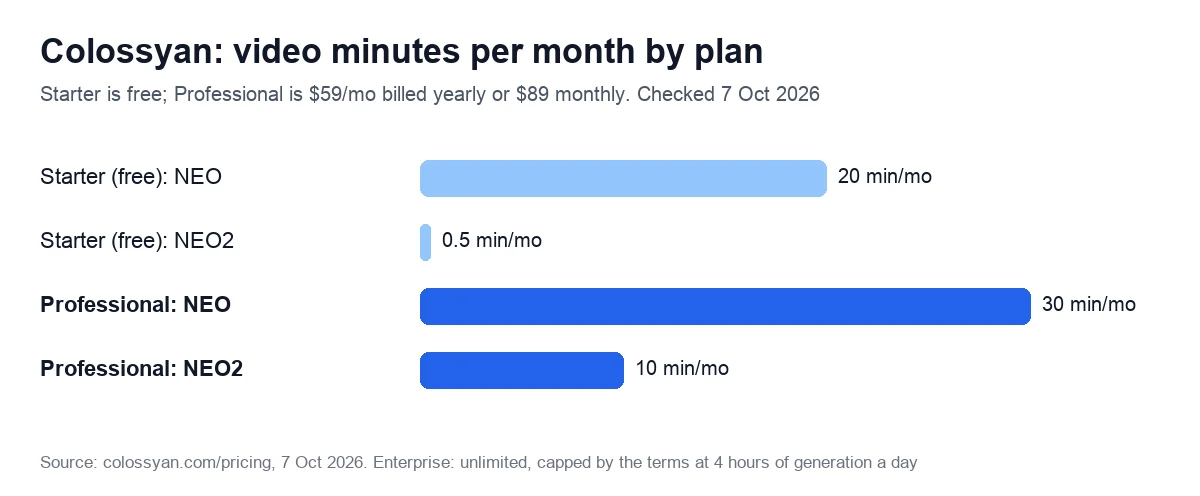
| NEO minutes a month | 20 | 30 | Unlimited* |
| NEO2 minutes a month | 0.5 | 10 | Unlimited* |
| Longest video | 20 min | 30 min monthly, 50 min yearly | Custom |
| Scenes per video | 40 | 40 | Custom |
| Instant avatars / voice clones | 15 / 3 | 20 / 5 | Unlimited |
| Interactive videos a month | 10 | 15 | Unlimited |
| Auto-translations a month | 15 | 20 | Unlimited |
| SCORM exports a month | None | 5 video + 5 course (streaming) | Unlimited, also self-contained |
| Watermark removal | No | Yes | Yes |
| API | No | 360 minutes a year | Custom |
| Resolution | Up to 1080p | Up to 1080p | Up to 4K |
*The terms cap “unlimited” plans at “a maximum of four hours of video generation per day”. Professional also lists “Unlimited MP4 video downloads”. The “$27/mo” printed next to Starter’s “Free” is not a charge: the FAQ calls it “$27/month worth of value”.
What the summer 2026 plan change did
Until mid-June 2026, Starter cost $27 a month ($19 billed yearly) and Business $88 ($70 billed yearly), with unlimited NEO minutes plus 10 NEO2 minutes a month. Between 12 June and 20 July, Starter became free and Business gave way to Professional: about the same monthly price ($89), a lower yearly one ($59), but NEO minutes capped at 30 a month.
What only Enterprise unlocks
- Unlimited minutes, custom video length and 4K export.
- Viewer analytics, which the help center says “are only available on Enterprise plans”.
- SSO/SAML and a choice of EU or US data residency, although the vendor’s Synthesia comparison page calls SAML SSO “part of the core product”.
- Branded avatars, one studio avatar and 1,000 minutes of conversational avatars.
- Self-contained SCORM packages, 24/7 priority support and a dedicated success manager.
Is Colossyan free? Starter and the 14-day trial
Yes. Starter needs no credit card and gives one editor 20 NEO minutes and half a minute of NEO2 a month, plus 15 instant avatars, 3 voice clones, 10 interactive videos and 15 auto-translations. It has no SCORM, API or AI image generation, and the help center says “All videos on a free account (Free and any Trial) contain a Colossyan watermark”.
Two things are unclear: how many MP4 downloads Starter allows, and whether the help center’s commercial license “with all paid plans” covers it, since that article predates the free Starter.
The 14-day trial needs no card either. It “opens up our full Enterprise feature set”, but your videos can total only 5 minutes and carry the watermark. Afterwards the account drops to Starter; nothing is deleted or charged.
See current Colossyan plans and prices
We may earn a commission if you buy through this link. It does not change the price you pay.
NEO and NEO2 minutes: how fast the allowance goes
NEO, short for “Neural Expressive Output”, is the avatar engine. NEO2 is the newer generation with hand gestures and body movement, and only some avatars support it. The two pools don’t mix: “Videos with a NEO2 avatar use your NEO2 minutes”, while NEO avatars and videos without an avatar use NEO minutes.
- No rollover. Unused minutes expire every month. Yearly plans get the whole year upfront (360 NEO and 120 NEO2 minutes on Professional), and those expire at the end of the year.
- Every render costs the full length: “Each time you click Generate we deduct the full length of the video from your allowance, whether or not you have generated that video before.”
- So does every language. A 60-second video in 10 languages uses 10 minutes, and deleting a video gives nothing back.
- Drafts and previews are free, and you can never be billed for overage.
- Top-ups are narrow. Only yearly Professional plans can buy more: 600 NEO2 minutes for $1,500 a year, or $2.50 a minute.
Example: a 5-minute onboarding module in English plus three translations uses 20 of Professional’s 30 monthly NEO minutes. Regenerate the English version twice after script fixes, and the month’s NEO minutes are gone. Yearly billing helps, since a busy month can draw on the rest of the year’s pool.
Training features: SCORM export, quizzes and LMS
SCORM is the main reason an L&D team pays. Professional allows 5 video SCORM exports a month, shared across the account, plus 5 course exports from Colossyan Learn; Enterprise is unlimited. Videos export to SCORM 1.2 and 2004 and Learn courses to 1.2 for now. The SCORM page marks xAPI “Roadmap”, though the document-to-video and PowerPoint-to-video pages promise “export to SCORM or xAPI”.
- Plan availability. The SCORM feature page still says “Enterprise plans”, while the pricing page and a help article updated on 18 September 2026 give Professional 5 exports a month. Ask the vendor to confirm in writing: the trial unlocks Enterprise features, so it won’t show this.
- Streaming packages. The pricing page labels Professional’s exports “Streaming” and offers “Self-contained” packages only on Enterprise, although the SCORM page says plain videos are embedded in the package. We found nothing on whether streamed packages keep playing after you cancel.
Interactive videos add buttons, quizzes and branching, 15 a month on Professional. Through SCORM your LMS receives completion and, for interactive videos, a pass mark, while the vendor’s own viewer analytics are Enterprise-only. The vendor lists Moodle, Cornerstone, Docebo, 360Learning, TalentLMS, Litmos, Workday and Absorb among the LMSs its packages work with.
Every plan imports PowerPoint and PDF files up to 50 MB and includes a screen recorder, subtitles with SRT or VTT export and auto-translation of voiceover, subtitles and on-screen text. Cora also accepts a recording as a source, but “Video import uses the audio transcript only.”
Colossyan voice cloning and custom avatars: limits and consent
Voice clones are free within plan limits: 3 on Starter, 5 on Professional and unlimited on Enterprise. The feature page promises a clone from a one-minute clip, usable in 30+ languages. The help center asks for about 5 minutes of audio and says the clone is ready in 5 to 10 minutes.
The vendor is frank about the limits: a clone can’t control intonation, accent or speed, and quality “may start to degrade after about 30 seconds/500 characters”. Test it on a full script during the trial.
- Voices: “You cannot clone anyone’s voice except your own, unless you have explicit permission.”
- Avatars: “Anyone can be a custom avatar as long as they have given their explicit consent.” “You need to be at least 18 years of age to request an AI avatar, and we do not allow avatars of minors or animals.” Instant avatars of others are “strictly prohibited”.
- Public figures: “Colossyan cannot be used to create AI avatars of politicians, public figures, or any individuals who have not consented to have their likeness used.” “Flagged content is reviewed by our team of human moderators.”
Instant avatars come from a photo or a short phone or webcam video and cost nothing within the plan limit (15, 20 or unlimited). A green-screen studio avatar costs $1,000 a year and is included once with Enterprise. The vendor’s pages disagree on whether yearly Professional customers can buy one, and quote five, about 15, or 10 to 15 working days to make it.
The acceptable use policy bars stock avatars and voices from expressing “any personal preferences or experiences as their own” and from use “for television broadcasting or advertising”, which rules out testimonial-style UGC ads with a stock presenter. Medical, pharmaceutical and political ads are banned for all content.
If you need a narrator rather than an on-screen presenter, a voice tool can cost less: see our Murf AI review.
Colossyan vs Synthesia and HeyGen: cost per minute and SCORM
All three sell avatar video to businesses, but they meter it differently and put SCORM on very different plans.
| Plan | Colossyan Professional | Synthesia Starter | Synthesia Pro | HeyGen Creator |
|---|---|---|---|---|
| Price a month | $89, or $59 billed yearly | $29, or $18 billed yearly | $89, or $64 billed yearly | $29, or $24 billed yearly |
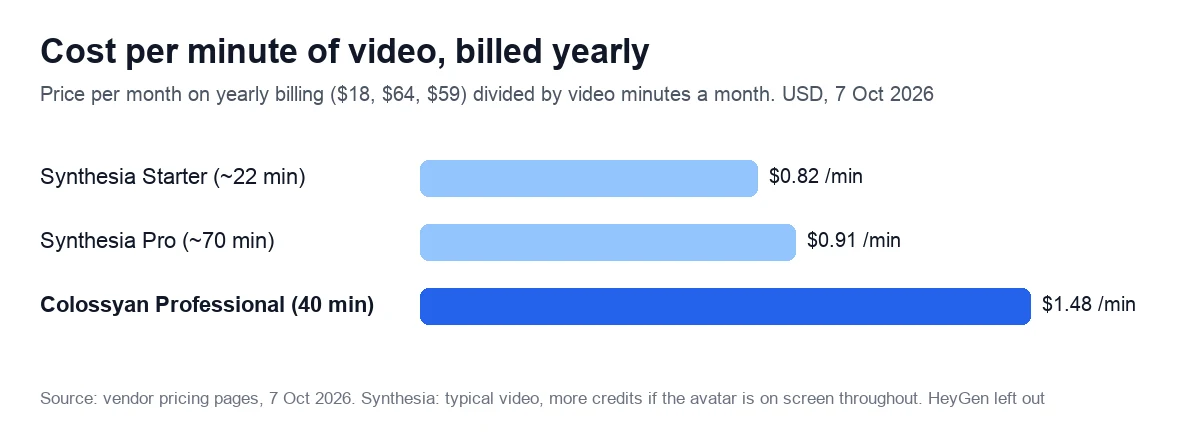
| Video included | 40 min a month (30 NEO + 10 NEO2) | About 22 min of typical video a month | Up to about 70 min of typical video a month | 600 credits: about 12.5 to 37.5 min on Avatar IV and V |
| Per minute, billed yearly | $1.48 | $0.82 | $0.91 | $0.64 to $1.92 |
| Editors | Up to 3 | 1, plus 3 guests | 1, plus 5 guests | 1 |
| Quizzes and SCORM | 15 interactive videos, 5 SCORM exports a month | Enterprise only | Enterprise only | Business plan: $149, or $119 billed yearly |
| Refunds | Full refund within 14 days if under 10 min generated | No | No | No, unless required by law |
| Trustpilot, 7 Oct 2026 | 4.0 (9 reviews) | 3.8 (1,828) | 3.8 (1,828) | 4.1 (4,195) |
- Synthesia includes 10 minutes of video a month on every plan and sells the rest as credits; by its own estimate Starter adds about 12 minutes and Pro up to about 60, though a “typical finished minute uses about 100 credits, more if the avatar is on screen throughout.” Edits only charge re-generated footage. From the EU it shows euros: Starter €26 or €16 billed yearly, Pro €79 or €58.
- HeyGen sells credits: 600 a month on Creator. At its published rates that is about 37.5 minutes with an Avatar IV photo avatar, 19 with an Avatar IV video avatar and 12.5 with Avatar V; older Avatar III looks use fewer credits. Unused credits roll over for a month on monthly plans.
- Colossyan’s 40 minutes count in full only if 10 of them go to NEO2 avatars; without them, Professional costs $1.97 per NEO minute.
Where Colossyan wins: quizzes and SCORM on a $59 plan with up to three editors (+$30 each, billed yearly), a larger free plan (20.5 minutes a month against Synthesia’s 10), a refund window and a softer exit. Canceled accounts drop to the free plan with drafts and videos kept. Synthesia’s help center, by contrast, says that once the billing period ends “you lose access to Synthesia and all videos in your account.”
Where it loses: price per minute, review volume and, by its own admission, breadth. Its comparison pages recommend Synthesia for standalone videos, the broadest language coverage and “the deepest compliance certification stack in the category”, and HeyGen for marketing video, lip-sync translation and real-time avatars.
We may earn a commission if you buy through this link. It does not change the price you pay.
Billing traps: renewals, refunds and data terms
- Auto-renewal. Plans renew for the same period unless you cancel in advance.
- Yearly is paid upfront, and the pricing FAQ is plain: “Unused months are not refunded.”
- Narrow refunds. A full refund needs a request within 14 days, fewer than 10 generated minutes and a non-Enterprise plan. After 14 days, a partial refund is at the company’s discretion, and only below 10 generated minutes.
- Deleting is not canceling: “Deleting your account does not cancel your subscription.”
- Retention offers. Canceling is self-serve and takes effect at the end of the paid period, after offers of a pause or two free months in exchange for a chat.
- Hard caps. Videos stop at 40 scenes, and at 30 minutes on monthly Professional (50 on yearly).
On data, the pricing FAQ says “Colossyan does not train AI models on customer content”, and the Enterprise terms make that a contractual promise, except for your own custom avatar’s model. The self-serve terms, last updated on 19 December 2024, are broader: they license your material “to improve the Services and relating technologies” and “to develop new services and products”.
SOC 2 Type II is stated on the pricing page for Enterprise, with the report on request; the Trust Center itself is behind a request form. The security page adds GDPR compliance and a 99.9% uptime SLA, and the Enterprise terms forbid storing HIPAA-protected health information.
What customers say on Trustpilot, G2 and Capterra
On 7 October 2026, Trustpilot showed 4.0 out of 5 from just 9 reviews, too few to draw conclusions. G2, which lists the product as Colossyan Creator, showed 4.6 from 495 reviews the same day.
An archived G2 page from 2 April 2026 showed 4.6 from 486 reviews, with “Avatar Limitations” (54) and “Expensive” (38) among the cons tags. On 7 October 2026, Capterra and GetApp each showed 4.4 from 10 reviews; GetApp still listed the old $27 and $88 prices.
Complaints worth knowing:
- Stability: an Enterprise customer on Trustpilot (3 stars, 13 April 2026) describes glitches, previews that don’t match the result and pauses between scenes, and rates Synthesia as more stable.
- Price: a learning architect on G2 (February 2025) calls the pricing very high.
- Realism: G2 (November 2025) and Capterra (October 2024) reviews find mouth and hand movements not fully lifelike.
What reviewers like:
- Speed: a Trustpilot reviewer (11 September 2026) turned a script into a training video, and support helped with the hiccups.
- Ease: G2 reviews from 2025 praise the simple interface and the way a PDF becomes an avatar video with its talking points split into slides.
With so few Trustpilot reviews, test the output on your own scripts during the trial.
Who it suits, and who should skip it
A good fit:
- L&D and HR teams whose training must land in an LMS: of the three vendors above, this is the cheapest self-serve route to SCORM.
- Instructional designers turning PDFs and slide decks into narrated lessons with quizzes.
- Teams of up to three editors making about 30 NEO and 10 NEO2 minutes a month.
Look elsewhere if:
- You want UGC-style ads or testimonials: the policy bars stock presenters from speaking about personal experience.
- You need to cut recordings into clips: we found no auto-clips, filler-word removal or text-based editing on the vendor’s pages.
- You need hours of video a month, SSO, analytics or 4K without an Enterprise budget.
- You need to store HIPAA-protected health information or advertise medicines or medical devices.
Our score: 3.2 out of 5, and how we checked
We score every tool on six weighted criteria, explained on our How we test page. We have no Colossyan account yet, so output quality is not scored, and the total is the weighted average of the other five.
| Criterion | Weight | Score | Why |
|---|---|---|---|
| Price for real work | 25% | 3 | $1.48 a minute billed yearly; cheapest self-serve SCORM, but Synthesia is cheaper per minute |
| Output quality | 25% | Not scored | No account yet |
| Limits and fine print | 15% | 3 | Minutes expire; renders and languages charged in full; vendor pages disagree on SCORM, SSO |
| Billing and reputation | 15% | 4 | Public prices, self-serve cancellation, 14-day refund window; G2 4.6 (495), only 9 Trustpilot reviews |
| Support and learning | 10% | 3 | Detailed help center, some articles on old plan names; 24/7 support only on Enterprise |
| Maturity of AI features | 10% | 3 | NEO2 and Cora live; dubbing “Coming Soon”; vendor pages disagree on xAPI |
The math: 0.25 × 3 + 0.15 × 3 + 0.15 × 4 + 0.10 × 3 + 0.10 × 3 = 2.40. Divided by 0.75, the total weight of the scored criteria, that gives 3.2. On our scale, 3.0 to 3.9 means good for specific cases: read the limits first.
Sources: the vendor’s pricing page, refund policy, terms and acceptable use policy, plus feature pages, the changelog and the help center, all read on 7 October 2026. For the plan history we used archived copies of the pricing page from April 2025 to September 2026. We will re-check prices within 90 days, or sooner if the plans change.
Start on Colossyan’s free Starter plan
We may earn a commission if you buy through this link. It does not change the price you pay.
Frequently asked questions
Starter is free. Professional costs $89 a month on monthly billing or $59 a month billed yearly for one editor, and each extra editor adds $45 or $30, up to three. Enterprise is priced on request and billed annually only. Prices are in US dollars, checked on 7 October 2026.
For SCORM-based training, yes, within limits. Professional exports 5 video and 5 course SCORM packages a month, adds quizzes and branching to 15 interactive videos and imports PDF and PowerPoint files. Viewer analytics, offline SCORM packages and SSO need Enterprise, and vendor pages disagree on whether xAPI export exists yet.
No. Unused minutes expire at the end of each month, or at the end of the year on yearly plans, which receive the whole year’s minutes at once: 360 NEO and 120 NEO2 minutes on Professional. Every generation and every translated version uses the full length of the video.
Only in a narrow window. A full refund needs a request within 14 days of purchase, fewer than 10 generated minutes and a plan other than Enterprise. Yearly plans can be canceled, but unused months are not refunded, and deleting your account does not stop billing.
The vendor says it does not train AI models on customer content, and its Enterprise terms make that a contractual promise, except for your own custom avatar’s model. The standard terms of service, updated in December 2024, grant a broader license that covers improving the services and developing new products.
It depends on the page. The pricing page says 120+ languages, feature pages say 100+ and 80+, and the help center lists 87 languages for automatic translation. Cloned voices work in 30+ languages, according to the feature page, and every translated version uses minutes from your allowance.